


Key Takeaways
- Deliverability testing verifies SPF, DKIM, and DMARC authentication to prevent spam filtering and protect sender reputation.
- Cross-device tests help you see how your email appears on phones, laptops, and various clients such as Gmail, Outlook, and Apple Mail, ensuring nothing breaks on your readers’ end.
- A/B testing subject lines, CTAs, and content variations before full deployment significantly improves campaign performance and engagement rates.
You may feel good after creating an email with a strong subject line and clear message, but things can go wrong after you send it. Links might break, images might not load, or the email might end up in spam. Testing your campaigns before sending helps you avoid these problems and protect your results.
One formatting mistake can hurt your open rates, and a small authentication issue can push your messages into spam on providers like Gmail and Yahoo.
But testing eliminates these risks. It catches errors before they reach thousands of subscribers, ensures consistent rendering across devices, and verifies that your authentication protocols are properly configured.
Why Testing Your Email Campaigns Matters
Email testing directly impacts your bottom line. When campaigns fail due to preventable errors, in addition to losing opens and clicks, you’re damaging trust with your audience and wasting marketing resources.
Brand credibility at stake
Broken images, misaligned layouts, or dead links signal carelessness to your subscribers. In competitive inboxes, these mistakes give recipients a reason to disengage permanently. Your email is often the first touchpoint with potential customers, so you need to make it count.
Conversion rates depend on flawless execution
Even minor rendering issues reduce conversion rates. If your CTA button doesn’t display properly on mobile devices (where more than 46% of email opens occur), you’ve lost nearly half your potential conversions. Testing ensures every element works perfectly, regardless of how recipients view your message.
Deliverability directly affects ROI
Authentication failures trigger spam filters, causing your emails to disappear from the inbox. While providers like Google and Yahoo require valid DMARC, SPF, and DKIM for bulk senders, all senders benefit from having these protocols properly configured. If your authentication isn’t set up or tested correctly, a significant portion of your audience may never see your emails at all.
Key Elements to Test Before Sending
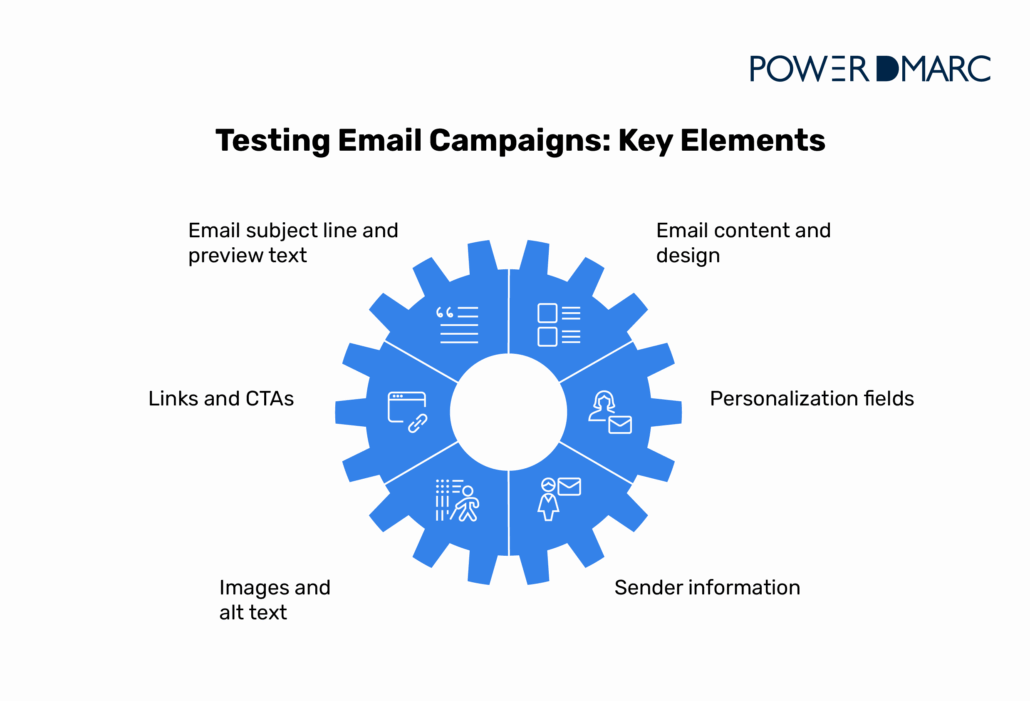

Systematic testing covers multiple dimensions of your email campaign. Here’s what you should verify every single time.
Email subject line and preview text
Your subject line is the moment people decide if your email is worth opening. Test for:
- Length optimization: Keep subject lines under 50 characters for mobile visibility.
- Spam trigger words: Avoid phrases like “Free money,” “Act now,” or excessive punctuation (!!!).
- Personalization accuracy: Verify merge tags display correctly, not as raw code.
- Preview text alignment: Ensure preview text complements your subject line and doesn’t repeat it.
Email content and design
Keeping your content consistent across platforms helps you avoid awkward display issues:
- Layout integrity: Check that columns, images, and text blocks align properly.
- Font rendering: Verify web fonts have fallbacks that work on all clients.
- Color accuracy: Ensure brand colors display consistently (some clients alter colors).
- Responsive design: Confirm mobile layouts adapt correctly without horizontal scrolling.
Links and call-to-action buttons
Every link and CTA must work perfectly:
- URL accuracy: Click every link to verify the correct destination pages.
- Tracking parameters: Confirm UTM codes and campaign tracking are properly appended.
- Button functionality: Test that CTAs render as clickable buttons, not broken code.
- Redirect chains: Check that links don’t go through multiple redirects (hurts deliverability).
Personalization fields
Dynamic content requires careful verification:
- Merge tag accuracy: Test with sample data to catch formatting errors.
- Fallback content: Verify what displays when personalization data is missing.
- Conditional logic: Confirm different content versions trigger correctly based on recipient data.
Images and accessibility
Visual elements need backup plans:
- Alt text completeness: Add descriptive alt text for every image (helps deliverability and accessibility).
- Image hosting: Ensure images load from reliable servers with proper permissions.
- Dark mode compatibility: Test how images and backgrounds appear in dark mode email clients.
Sender information
Sender details build trust and recognition:
- From name consistency: Use a recognizable, consistent sender name.
- Reply-to functionality: Verify reply addresses are monitored and functional.
- Brand alignment: Ensure sender name matches your brand or personal identity.
Testing for Deliverability
Deliverability testing requires verifying technical authentication and monitoring your sender reputation.
Email authentication protocols
Authentication protocols prove your emails are legitimate:
SPF (Sender Policy Framework) specifies which mail servers can send emails on your domain’s behalf. Test your SPF record by:
- Verifying DNS TXT records are published correctly.
- Ensuring all legitimate sending sources are included.
- Staying within the 10 DNS lookup limit (use SPF flattening if needed).
DKIM (DomainKeys Identified Mail) adds a digital signature to your emails. Confirm:
- DKIM signatures are being applied to outgoing messages.
- Public keys are properly published in DNS.
- Signatures validate correctly at recipient servers.
DMARC (Domain-based Message Authentication, Reporting & Conformance) ties SPF and DKIM together and tells receiving servers how to handle authentication failures. Test your DMARC setup with:
- Policy verification (start with p=none, progress to p=quarantine or p=reject).
- Aggregate report monitoring to catch authentication issues.
- Alignment checking (ensuring From domain matches SPF/DKIM domains).
PowerDMARC offers real-time checks for SPF, DKIM, and DMARC, helping you spot and fix authentication issues before they affect your deliverability.
Spam score testing
Before sending, check your content for spam triggers:
- Content analysis: Test email copy against known spam patterns.
- Link reputation: Verify URLs aren’t flagged or on blocklists.
- Image-to-text ratio: Balance images with sufficient text (too many images trigger filters).
- Spam trigger words: Scan for phrases that raise red flags with filters.
Inbox provider testing
Different email providers have unique filtering algorithms. Create test accounts across major providers and verify emails land in the primary inbox, not spam or promotions folders:
- Gmail: Tests for reputation and engagement signals.
- Outlook/Office 365: Sensitive to authentication and sender reputation.
- Yahoo: Requires strict DMARC compliance.
- Apple Mail: Focuses on user privacy and link safety.
Domain and IP reputation
Your sender reputation determines deliverability success:
- Reputation monitoring: Check your domain and IP reputation scores regularly.
- Warming protocols: For new IPs, gradually increase sending volume.
- Complaint rates: Monitor spam complaint rates (keep below 0.1%).
- Bounce management: Remove hard bounces immediately to protect reputation.
Cross-Device and Client Rendering Tests
Email clients all handle HTML in their own way, so testing across platforms is essential. An email that looks great in Gmail can look completely broken in Outlook.
Why rendering tests matter
Email clients use different rendering engines:
- Outlook 2007-2019: Uses Microsoft Word’s rendering engine (notorious for breaking modern CSS).
- Gmail: Strips certain CSS and has limited support for web fonts.
- Apple Mail: Generally CSS-friendly but handles dark mode uniquely.
- Mobile clients: Vary widely in screen size and feature support.
Without testing, you’re guessing how your email appears to different segments of your audience.
Desktop vs. mobile testing
Mobile optimization matters more than ever, since almost half of all emails are now opened on a phone:
- Responsive design verification: Confirm single-column layouts on small screens.
- Touch target sizing: Ensure buttons are large enough for finger taps (minimum 44×44 pixels).
- Font legibility: Verify text is readable without zooming (minimum 14px body text).
- Load time: Test that images and content load quickly on mobile networks.
Email client-specific issues
Different clients have quirks you must address:
Outlook challenges:
- Ignores margin and padding on some elements.
- Doesn’t support background images reliably.
- May require VML code for complex layouts.
Gmail specifics:
- Clips messages over 102KB (causing missing content).
- Removes CSS classes in the head and strips some inline styles.
- Caches images aggressively.
Apple Mail considerations:
- Automatically adjusts text sizing.
- Renders dark mode by inverting colors (can break design).
- Supports most modern CSS, but with occasional bugs.
Using email preview tools
Email testing platforms provide instant previews across dozens of clients:
- Screenshot testing: See how your email renders in 90+ email clients and devices.
- Code analysis: Identify problematic HTML or CSS before sending.
- Spam filter testing: Check deliverability across different inbox providers.
- Load time analysis: Measure how quickly your email loads.
These tools eliminate manual testing across multiple devices and accounts, saving hours while catching more issues.
A/B Testing Before Sending
A/B testing (split testing) lets you compare different versions of your email before sending it to everyone. Even small tweaks can lead to noticeably better results.
What to A/B test
Focus on elements that impact open and click rates:
Subject lines:
- Length variations (short vs. descriptive)
- Personalization (with name vs. without)
- Question format vs. statement
- Emoji usage (one emoji vs. none)
Call-to-action placement:
- Above the fold vs. after content
- Single CTA vs. multiple CTAs
- Button text variations (“Learn More” vs. “Get Started”)
Content variations:
- Different hero images or graphics
- Short copy vs. detailed explanations
- Video thumbnail vs. static image
How to conduct pre-send A/B tests
Start with a sample segment before full deployment:
- Split your test audience: Typically, 10-20% of your total list, divided equally between variations.
- Define success metrics: Open rate, click rate, or conversion rate.
- Set a meaningful sample size: Ensure statistical significance (usually 1,000+ recipients per variation).
- Allow sufficient time: Test for at least 4-6 hours before declaring a winner.
- Deploy the winner: Send the best-performing variation to your remaining audience.
Interpreting A/B test results
Statistical significance matters more than gut feeling:
- Minimum confidence level: Aim for 95% confidence before choosing a winner.
- Performance lift: Focus on meaningful improvements (5%+ lift is significant).
- Consistency: Validate winning variations in subsequent campaigns.
Documented testing reveals patterns over time. You might discover your audience responds better to questions in subject lines or prefers specific CTA language. Such insights can make your future campaigns stronger.
Tools to Test Email Campaigns
The right tools make testing easier and help you catch issues you might otherwise miss.
PowerDMARC
Primary use: Email authentication, domain protection, and deliverability visibility
PowerDMARC strengthens the technical foundation behind email deliverability by ensuring your authentication protocols are properly configured and consistently passing across all sending platforms.
The platform provides:
- Real-time DMARC monitoring: Instant alerts when authentication fails.
- Hosted SPF: Simplifies SPF management and helps prevent issues caused by exceeding DNS lookup limits.
- DKIM validation: Automatic signature verification across sending sources.
- Threat intelligence: Identifies impersonation attempts using your domain.
- Aggregate reporting: Detailed insights into email authentication across all your sending sources.
Email on Acid
Primary use: Cross-client rendering and spam testing
Email on Acid offers comprehensive previews across email clients and devices, helping you spot rendering issues before they reach your audience. The platform includes spam filter testing and detailed analytics on deliverability factors.
Litmus
Primary use: Design testing and collaboration
Litmus provides email preview tools, spam testing, and email analytics. Its collaborative features make it ideal for teams that need to review and approve campaigns before sending.
Mailtrap
Primary use: Safe testing environment
Mailtrap gives you a safe space to test your emails without the risk of sending anything to real people. It’s especially useful for developers who need to check transactional emails before they go live.
GlockApps
Primary use: Inbox placement testing
GlockApps specializes in deliverability testing, showing exactly where your emails land across different providers (inbox, spam, or promotions folders). It helps you spot the filtering issues you need to fix.
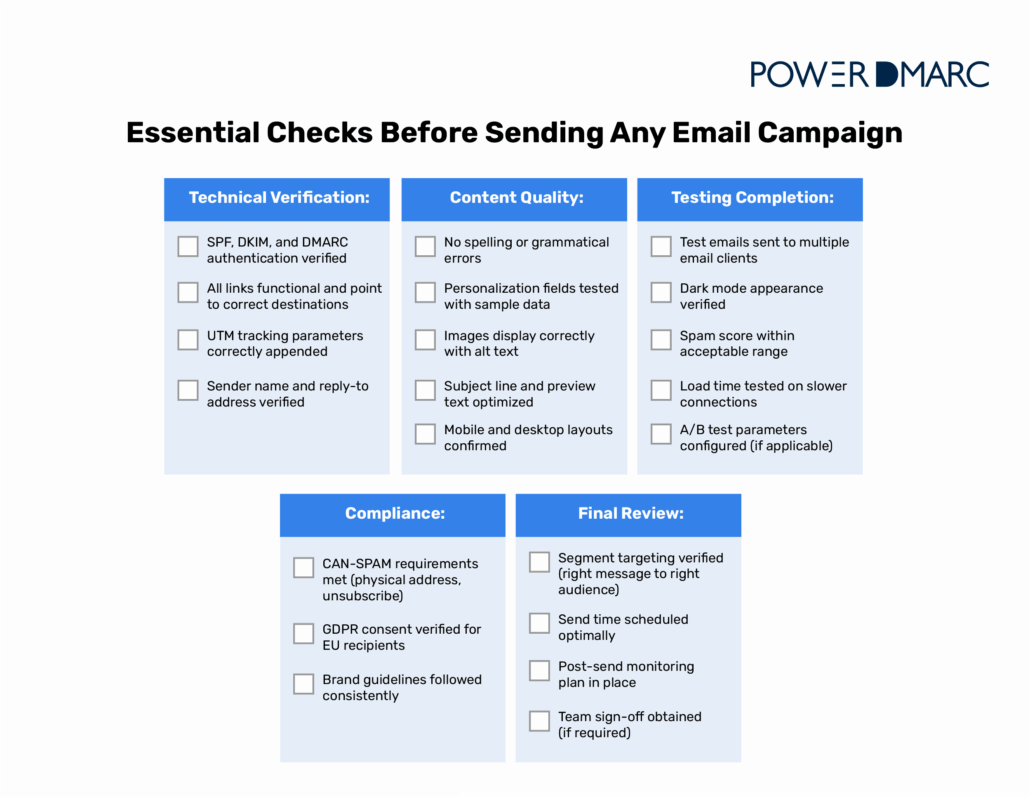
Pre-Send Checklist
Use this comprehensive checklist before every campaign send:

Common Mistakes to Avoid
Even experienced email marketers make these errors. Avoid them to protect your campaigns.
Sending to the wrong segment
The mistake: Accidentally targeting the wrong list segment with inappropriate content.
The fix: Implement a final verification step that shows exactly which recipients will receive your email. Many email platforms offer preview recipient counts, so use them. Double-check exclusion rules and filters before confirming send.
Ignoring dark mode design
The mistake: Designing only for light mode, causing illegible text or broken layouts in dark mode email clients.
The fix: Check how your emails look in dark mode on iOS Mail, Gmail, and Outlook. Choose colors that work in both light and dark settings, and don’t depend only on background colors to keep your text readable. Design with sufficient contrast that works in both modes.
Overlooking alt text and accessibility
The mistake: Skipping alt text for images or using generic phrases like “image.”
The fix: Write alt text that clearly explains what the image is there to do. Use semantic HTML so screen readers can follow the structure of your email. Accessibility improves deliverability because alt text provides context to spam filters.
Forgetting cross-client testing
The mistake: Testing only in one email client (usually whatever you personally use) and assuming it works everywhere.
The fix: Test in at least Gmail, Outlook, Apple Mail, and one mobile client before every send. Use an email preview tool that lets you see how your message looks across many different clients at once. If you send campaigns often, it also helps to keep a few test accounts with major providers so you can check things firsthand.
Not checking for spam triggers
The mistake: Using language or formatting that triggers spam filters without realizing it.
The fix: Run content through spam checker tools before sending. Avoid excessive use of sales language, all caps, or too many exclamation points. Balance images with text content. Ensure your domain authentication is properly configured, as technical issues trigger spam filters more than content.
Wrapping Up
Testing your emails before sending turns your campaigns from guesswork into something you can rely on. When you check deliverability, preview your emails on different devices, verify every link and CTA, and run thoughtful A/B tests, you avoid mistakes that hurt your brand and drain your budget.
The time you spend testing pays off right away. You’ll see higher open rates, stronger engagement, better conversions, and a healthier sender reputation that keeps your emails performing well over time. Start by checking your authentication first, since everything else depends on it.
Secure your email deliverability with PowerDMARC‘s comprehensive authentication testing. Our platform monitors SPF, DKIM, and DMARC in real-time, catching issues before they impact your campaigns.
Try our free domain health checker and ensure every email you send reaches its destination.
Frequently Asked Questions (FAQs)
How often should I test my email templates?
Test every new template thoroughly before first use, and retest quarterly or whenever you make significant design changes. Also, test before major campaigns or when email client updates occur.
Can I automate email testing before every campaign?
Yes. Most email platforms integrate with testing tools to automatically check spam scores, validate links, and verify authentication before scheduled sends. PowerDMARC continuously monitors authentication protocols, alerting you to issues immediately.
How do I know if my email went to spam?
Use inbox placement tools that send to seed lists and report where emails land across different providers. Monitor your campaign analytics for unusually low open rates, which often indicate spam filtering. Check your DMARC aggregate reports for authentication failures that trigger spam filters.


- What Is AI Phishing? A Guide to Emerging Cyber Threats - December 11, 2025
- Stop Spam Emails: Protect Your Sender Reputation - November 29, 2025
- ActiveCampaign DKIM, DMARC, and SPF Setup Guide - November 25, 2025