


Key Takeaways
- Email health is your domain’s ability to successfully send messages to the inboxes while avoiding the spam folder.
- Domain owners are interested in their email health because it’s closely linked to metrics like ROI, inbox placement, brand reputation, etc.
- You can check your email health by monitoring bounce rates, spam complaint rates, blacklists, and inbox placement.
- Some useful and actionable tips to boost email health include setting up DMARC, removing inactive subscribers, avoiding spam triggers, leveraging segmentation, etc.
- For long-term maintenance of good email health, conduct monthly audits, A/B testing of subject lines, and re-engagement campaigns for inactive subscribers.
Did you know that more than 17% of emails marketers send never reach consumers’ inboxes? Yours could be one of them, unless you take email health seriously. By prioritizing email health, you’re not just improving deliverability. You’re also boosting your brand reputation, reducing spam complaints, and increasing ROI. It’s a small step with a big ripple effect.
What is Email Health and Why Does It Matter?
Email health is the combination of factors like sender reputation, authentication, list quality, and engagement that determines whether your emails reach inboxes or go to spam. You can see your email health as a ‘credit score’ for your sending domain. It determines whether ISPs (Gmail, Outlook) trust your messages or not.
Let’s find out why it matters:
Inbox placement and revenues
When your email health is in good shape, you will enjoy higher inbox placement. The budget spent on email marketing campaigns will no longer go to waste. This, in turn, will increase revenues and reduce costs, leading to higher profits.
Spam and blacklists
A poor email health often leads messages to the spam folder. With poor email health, your domain and IP address might get blacklisted as well. In both cases, you will end up in a situation where your message doesn’t reach the intended recipient.
Subscriber trust
Good email health will help you build and maintain trust with your subscribers. They will feel safe opening your emails, without fearing malware or fraud.
How to Check Your Email Health
Understanding the overall health of your email domain helps you prevent deliverability issues, detect authentication failures, and maintain a strong security posture. These quick checks give you a clear picture of how your emails are performing.
Use email health check tools
The simplest way to assess your domain’s overall email health is by using an email health check tool. These tools take a close look at your DNS records, your authentication setup, and even your sender reputation, pulling all of it together to flag anything that might be hurting deliverability. Platforms like PowerDMARC go a step further with a full health check that makes it easy to see, at a glance, whether your domain is properly authenticated and meeting best-practice standards.
Monitor deliverability metrics
Keeping an eye on key deliverability metrics helps you understand whether your emails are consistently reaching inboxes. Tracking your bounce rate, spam complaint rate, and sender score can reveal early signs of authentication issues, reputation problems, or configuration errors that need attention.
Bounce rate (>2% = trouble)
If your bounce rate is above 2%, you are in trouble. You can fix this issue by verifying new signups with double opt-in. This will ensure only relevant users are in your list of subscribers, so no money is wasted on those who don’t care.
Spam complaint rate
The ideal spam complaint rate is below 0.1%. To bring spam complaints to this ideal percentage, add prominent unsubscribe links, and authenticate your emails.
Blacklists
There are many tools you can use to check if you’re on a blacklist or not. You can use PowerDMARC’s blacklist checker to monitor your domains, emails, IPv4 and IPv6 Addresses in over 200 real-time DNS Blacklists. If you find your domain or IP address listed on an IP address, you should immediately investigate and address it.
Complete an email authentication check
If any of your SPF, DKIM, and DMARC records are misconfigured, your emails might be flagged as suspicious. Use an SPF record checker to validate your SPF record and ensure it correctly lists all authorized sending sources. This helps improve trust and deliverability.
5 Key Factors Affecting Email Health
Email health builds on 5 main pillars.
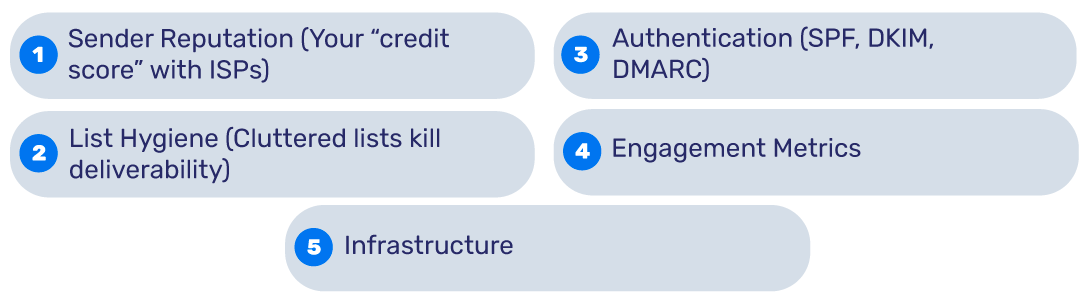

1. Sender reputation (Your “credit score” with ISPs)
Do you constantly experience high bounce rates, get many spam complaints, or have low engagement rates? This is an indicator of low sender reputation, hence poor email health. You can use online resources like Google Postmaster Tools to check yours.
2. List hygiene (Cluttered lists kill deliverability)
Poor email hygiene can destroy your email deliverability. The presence of inactive subscribers in your email lists implies you’re sending emails to uninterested or irrelevant recipients. This can lead to low engagement and decrease your email deliverability. To avoid this problem, you should monitor and cleanse inactive subs, hard bounces, and spam traps monthly.
3. Authentication (SPF, DKIM, DMARC)
No DMARC? You’re inviting spoofers. Not using email authentication or doing so inaccurately creates an open room for malicious actors to exploit your domain. This will endanger you and your recipients, potentially affecting your brand reputation and sensitive data. SPF, DKIM, and DMARC can help protect your email communications from cybercriminals.
4. Engagement metrics
ISPs regularly track opens and clicks. If they see the recipients don’t engage with your emails, they are likely to mark your emails as spam.
5. Infrastructure
You should have a dedicated IP address for sending emails if you have a high volume of emails. Additionally, you always need to leverage warm-up strategies for new IPs.
How to Maintain Healthy Email Performance Over Time
In addition to the above checklist, the following are some best practices to maintain your email health in the long term:


Conduct monthly audits
Try conducting monthly audits where you check different aspects of your email health. The checks should cover blacklists, authentication, engagement, and other areas that can impact your email security and deliverability. Such audits will help you secure a good reputation not just in the short term but also in the long term, helping you attract new customers and keep existing ones.
Run A/B tests on subject lines
Get the creative juices flowing and craft different subject lines that you can test against each other. Choose the one that yields higher open rates; this can contribute to higher engagement, better reputation, and boost deliverability.
Launch re-engagement campaigns
We said you should remove inactive users as soon as possible. However, before this phase, there is one more important step. You should try your best to win them back. Whether through free giveaways, segmentation, customized content, or anything else creative, try to win back their hearts. If you do everything right and they still don’t engage, it’s time to prune them and focus on those who care.
Conclusion
Good email health can ensure higher inbox placement, more profits, less spam, and enhanced credibility. It consists of 5 main pillars—authentication, list hygiene, sender reputation, engagement metrics, and overall infrastructure.
PowerDMARC can help you improve your email health through easy email authentication setup and management. Contact us today to boost inbox placement and improve email deliverability!
Frequently Asked Questions (FAQs)
Can poor email health cause my emails to go to spam?
Yes. Poor email health, such as failing SPF, DKIM, or DMARC checks, a low sender score, high spam complaints, or blocklist issues, can lead mailbox providers to classify your messages as unsafe. As a result, emails may land in the spam folder instead of the inbox.
How long does it take to recover from poor email health?
Recovery time varies, but most domains see improvement within a few weeks once issues are fixed. Restoring trust may take longer if the sender reputation is severely damaged. Consistent authentication, reduced spam complaints, and improved engagement help speed up recovery.



- Email Security Predictions for 2026: What Companies Need to Prepare For - December 3, 2025
- Email Health Check: What It Means and How to Run It - November 26, 2025
- Best Email Deliverability Tools: Improve Inbox Placement - November 18, 2025