¿Qué es un correo electrónico de phishing? Mantente alerta e identifica los correos electrónicos de phishing

por
Última actualización:
19 min de lectura

por
Última actualización:
Un correo electrónico de phishing es como un impostor camuflado en tu bandeja de entrada. Se hace pasar por una fuente fiable con el objetivo de engañarte y manipularte para que reveles información confidencial o realices acciones perjudiciales. El phishing por correo electrónico ha evolucionado a lo largo de los años, pasando de ser simples bromas —como las que sufrieron los primeros usuarios de AOL a mediados de los años 90 con generadores aleatorios de números de tarjetas de crédito— a convertirse en actividades sofisticadas y muy lucrativas para hackers de todo el mundo que utilizan tácticas avanzadas de suplantación de identidad. Se trata de un estafador digital que se aprovecha de las vulnerabilidades y la credulidad humanas.
Pueden tener consecuencias devastadoras, como el robo de identidad, pérdidas financieras o el acceso no autorizado a tus cuentas. Según el Informe de Verizon sobre Investigación de Fallas de Datos 2019, aproximadamente el 32% de las fallas de datos experimentadas ese año involucraron phishing por correo electrónico e ingeniería social. Mantente cauteloso y escéptico, ya que el único propósito del correo electrónico de phishing es engañarte y explotarte.
Puntos clave
Un correo electrónico de phishing es un mensaje fraudulento diseñado para engañar a los destinatarios y que estos revelen información confidencial, hagan clic en enlaces maliciosos, descarguen malware o aprueben acciones no autorizadas.
Estos correos electrónicos suelen suplantar la identidad de fuentes de confianza, como bancos, compañeros de trabajo, equipos de TI, empresas de mensajería o directivos. Los atacantes utilizan marcas conocidas, un lenguaje que transmite urgencia y un formato realista para que el mensaje parezca legítimo.
Los correos electrónicos de phishing actuales son cada vez más difíciles de detectar, ya que están personalizados, tienen en cuenta el contexto y están diseñados para imitar la comunicación empresarial real.
Las tácticas de los correos electrónicos de phishing no son ningún secreto. Están bien documentadas, se han estudiado a fondo y se imparte formación constante para combatirlas, pero siguen funcionando porque no se aprovechan de fallos en el software. Se aprovechan de la forma en que las personas procesan la información cuando están bajo presión.
Todos los correos electrónicos de phishing comienzan con una suplantación de identidad. El nombre del remitente parece correcto y el dominio pasa la prueba a simple vista (la mayoría de la gente nunca comprueba la dirección completa, y mucho menos revisa los encabezados; los atacantes basan campañas enteras en esa suposición). El formato, el tono y el logotipo están diseñados para resultar lo suficientemente familiares como para que no te detengas a cuestionarlos.
Los correos electrónicos de phishing crean una sensación de urgencia, utilizando el miedo como táctica. Puede tratarse de un pago fallido o de la suspensión del acceso a una cuenta importante. La presión está diseñada para que te saltes los pasos de verificación y actúes de inmediato.
A veces funciona incluso con profesionales de la seguridad con formación, con personas que han asistido a cursos de sensibilización sobre el phishing. La respuesta de ansiedad es más rápida que la de escepticismo, y los atacantes saben exactamente cómo provocarla.
El phishing elude por completo la infraestructura técnica al centrarse en algo que no se puede solucionar con parches: la forma en que las personas reaccionan ante la presión, la autoridad y la sensación de que se les acaba el tiempo.
Los atacantes utilizan tu nombre, el de tu empresa y, a veces, el nombre de tu jefe, obtenido de LinkedIn. Se hacen pasar por tu director general o por un proveedor con el que realmente trabajas. Te dan un plazo para actuar en la próxima hora o perderás el acceso; si no confirmas ahora, el pago fracasará. El FOMO es artificial, pero la ansiedad que provoca es real.
Los archivos adjuntos y las URL están diseñados para parecer idénticos a los auténticos. Si haces clic en ellos, te redirigen a una página de inicio de sesión falsa que imita el sitio legítimo con tal precisión que puede engañar a alguien que no preste mucha atención. Al introducir tus credenciales, estas son capturadas de inmediato, en tiempo real, antes de que te des cuenta de que algo ha salido mal.
A menudo buscan tus nombres de usuario, contraseñas, datos de tarjetas de crédito, números de la Seguridad Social o cualquier dato con valor de reventa o utilidad de acceso directo. Parte de esta información se utiliza de inmediato para apropiarse de cuentas o cometer fraudes financieros, mientras que el resto se vende. En cualquier caso, un solo correo electrónico de phishing que tenga éxito puede alimentar ataques que se prolonguen durante meses.
Una vez que los atacantes tienen tus credenciales, pasan a la acción. El acceso a la cuenta se produce en cuestión de horas, o a veces de minutos. Fraude financiero, reventa masiva de credenciales en mercados de la dark web y campañas posteriores de spear-phishing utilizando los datos personales que acaban de obtener de tu bandeja de entrada.
El spear-phishing de seguimiento es, básicamente, un ataque de seguimiento en el que los atacantes utilizan los datos de un correo electrónico de phishing que ha tenido éxito y los reutilizan en el siguiente ataque, aún más específico.
Los correos electrónicos de phishing se han perfeccionado tanto que llegan a engañar incluso a quienes saben perfectamente en qué fijarse. Lo que puedes hacer es tomarte tu tiempo y comprobar la autenticidad de un correo electrónico antes de abrirlo o de hacer clic en los enlaces.
Algunas de ellas son obvias, mientras que otras vale la pena conocerlas
Ejemplos: «Estimado cliente». «Estimado usuario». Cualquier empresa que tenga tu cuenta sabe cómo te llamas. Los saludos genéricos indican que este correo electrónico no se ha escrito pensando en ti, sino que se ha redactado para una lista genérica.
Los bancos nunca te piden la contraseña por correo electrónico. Los departamentos de informática tampoco te piden que «confirmes tus credenciales» a través de un enlace. Si una solicitud suele tramitarse mediante un proceso seguro y alguien te pide que te saltes ese proceso por correo electrónico, ahí está la clave.
Cualquiera puede poner el nombre que quiera en el campo «Nombre para mostrar». Lo que realmente importa es el dominio; compáralo con lo que cabría esperar de las comunicaciones oficiales de esa organización. Un solo carácter cambiado de sitio, un guión, un dominio de nivel superior diferente. Es fácil pasarlo por alto cuando se lee deprisa, que es precisamente cuando suelen llegar estos correos electrónicos.
Sobre todo de personas que conoces. Un archivo adjunto malicioso enviado desde una cuenta comprometida es más peligroso que uno de un desconocido, porque es menos probable que lo pongas en duda. Si no esperabas recibir un archivo, comprueba su origen antes de abrirlo. Las alertas en tiempo real de PowerDMARC avisan cuando remitentes no autorizados intentan utilizar tu dominio, detectando los intentos de suplantación de identidad antes de que lleguen a las bandejas de entrada.
Spoofing, spear phishing, whaling, pharming y BEC son algunos tipos comunes de correos electrónicos de phishing. Aunque su perfil de víctima o modus operandi puede diferir ligeramente, es probable que causen daños a organizaciones y particulares.
| Tipo de ataque | Vector de ataque | Objetivos habituales | Características distintivas |
|---|---|---|---|
| Falsificación del correo electrónico | Correo electrónico | Público en general | Dirección de remitente falsificada |
| Suplantación de identidad | Correo electrónico | Personas concretas | Contenido altamente personalizado |
| La caza de la ballena | Correo electrónico | Altos directivos | Suplantación de identidad de un directivo |
| Vishing | Teléfono | Público en general | Engaño mediante la voz |
| Smishing | SMS | Usuarios de dispositivos móviles | Entrega de mensajes de texto |
En septiembre de 2019, Toyota perdió 37 millones de dólares porque un atacante falsificó una dirección de correo electrónico. Bastó con un empleado y un correo electrónico convincente. El remitente parecía de fiar, la solicitud parecía plausible y nadie llamó para verificarla antes de que se realizara la transferencia.
En la suplantación de identidad por correo electrónico, se falsifica la dirección del remitente para que parezca que procede de un banco, un organismo público o, en ocasiones, un directivo de la propia empresa, es decir, de quienquiera que sea el destinatario más propenso a actuar sin plantearse preguntas. El correo electrónico no tiene por qué ser perfecto; solo tiene que resultar lo suficientemente convincente como para que una persona ocupada, un martes por la tarde, no se pare a comprobar el dominio completo del remitente.
La aplicación de DMARC lo impide a nivel de protocolo. Cuando un dominio tiene DMARC con p=reject, los correos electrónicos no autenticados que afirman proceder de ese dominio son rechazados antes de llegar a la bandeja de entrada. PowerDMARC se encarga de esa aplicación y te ofrece visibilidad de todo lo que se envía en nombre de tu dominio.
El phishing convencional tiene un gran alcance. El spear phishing es lo contrario: tiene un único objetivo, investigado de antemano, y un correo electrónico diseñado específicamente para él.
Los atacantes recogen tu nombre, tu cargo, el nombre de tu jefe y algún proyecto con el que se te asocie públicamente a través de LinkedIn, la página web de tu empresa o comunicados de prensa, es decir, cualquier información que puedan encontrar. A continuación, elaboran un mensaje que incluye suficientes referencias reales como para que parezca que proviene de tu propio entorno. No es un «Estimado cliente», sino tu nombre real, el nombre de tu empresa y, a veces, el nombre de un compañero en el que confiarías sin dudarlo.
Esa personalización es lo que hace que sea difícil formar a los usuarios para que se defiendan de los correos electrónicos de spear phishing. La formación genérica en materia de concienciación enseña a las personas a detectar ataques genéricos. El spear phishing no parece genérico, sino que se presenta como un correo electrónico normal enviado por alguien que te conoce, razón por la cual supera sistemáticamente a las campañas generales de phishing en cuanto a tasas de clics.
Nikkei Inc. perdió 29 millones de dólares cuando un empleado de su oficina estadounidense transfirió fondos siguiendo las instrucciones de alguien que se hacía pasar por un directivo. No hubo malware ni se vio comprometido el sistema. Solo un correo electrónico que parecía provenir de la persona adecuada, en el que se solicitaba algo que parecía estar dentro de los parámetros operativos normales.
El «whaling» es un tipo de spear phishing dirigido a ejecutivos o a empleados con autoridad financiera o acceso a datos confidenciales. La selección de objetivos es deliberada. Los atacantes dedican más tiempo a estos casos porque la recompensa lo justifica. Un correo electrónico bien elaborado que se haga pasar por un director financiero, un miembro del consejo de administración o un contacto de confianza de un proveedor puede autorizar transacciones que, de otro modo, requerirían múltiples niveles de aprobación.
El «Vendor Email Compromise» (VEC) sigue el mismo patrón, pero desde un enfoque diferente: los atacantes se hacen pasar por empleados de una empresa proveedora y aprovechan esa relación comercial ya existente para que las solicitudes de pago fraudulentas parezcan algo habitual.
Pharming es el tipo de ataque en el que, aunque hagas todo bien, acabas en una página falsa.
Los atacantes aprovechan vulnerabilidades del DNS o modifican la configuración del DNS mediante software malicioso, de modo que incluso una URL escrita correctamente redirige a un destino falsificado. La barra de direcciones del navegador puede parecer normal. No hay ningún enlace sospechoso sobre el que pasar el cursor, ni ningún indicio evidente en el correo electrónico, ya que en algunos casos ni siquiera hay correo electrónico. Simplemente accedes a un sitio web que has visitado decenas de veces y acabas en un lugar al que no pretendías ir.
El pharming es más difícil de detectar que un enlace falsificado, y aún más difícil de combatir mediante la formación
Una localidad de Colorado perdió más de un millón de dólares después de que un atacante enviara una solicitud fraudulenta de actualización de datos de pago para una empresa constructora local. Un empleado actualizó los datos de pago y los fondos fueron desviados. Para cuando alguien se dio cuenta, el dinero ya había desaparecido.
El BEC consiste en una cuenta de correo electrónico legítima que ha sido comprometida o en una suplantación de identidad lo suficientemente convincente como para autorizar transacciones, desviar pagos u obtener datos confidenciales. El Informe sobre Delitos en Internet de 2019 del FBI situó las pérdidas por BEC en más de 1.700 millones de dólares ese año, lo que supuso más de la mitad de todas las pérdidas por delitos cibernéticos denunciadas, y las cifras no han hecho más que aumentar desde entonces.
Lo que hace que el BEC sea eficaz es que la solicitud llega a través de un canal en el que la gente ya confía, como una dirección de correo electrónico conocida, una relación comercial ya existente o un nombre que reconocen. La aprobación se produce antes de que a nadie se le ocurra verificar la información a través de un canal independiente.
La aplicación de DMARC elimina el vector de suplantación directa: un atacante no puede enviar correos electrónicos que superen la autenticación como si procedieran de tu dominio sin tener acceso a tus claves de firma. La detecta los fallos de autenticación y los patrones de envío inusuales antes de que se conviertan en incidentes.
A diferencia de las soluciones tradicionales, PowerDMARC está diseñado específicamente tanto para empresas como para proveedores de servicios gestionados (MSP), y ofrece: informes avanzados, gestión automatizada de SPF y paneles de control multitenant. Descubre por qué nuestros clientes nos sitúan en el primer puesto en G2.
Descubre cómo ayudamos a Digital Infinity IT Group a detener los ataques de phishing
Lista exhaustiva de tipos de ataques de phishing
Aunque el correo electrónico suele ser el que más atención acapara, no es el único canal de ataque.
Estas plantillas siguen circulando porque siguen funcionando. Seguro que la mayoría de la gente ha visto alguna versión de todas ellas.
Ejemplos prácticos ampliados: Los siguientes ejemplos incluyen plantillas habituales de phishing y señalan señales de alerta específicas a las que hay que prestar atención en cada caso.
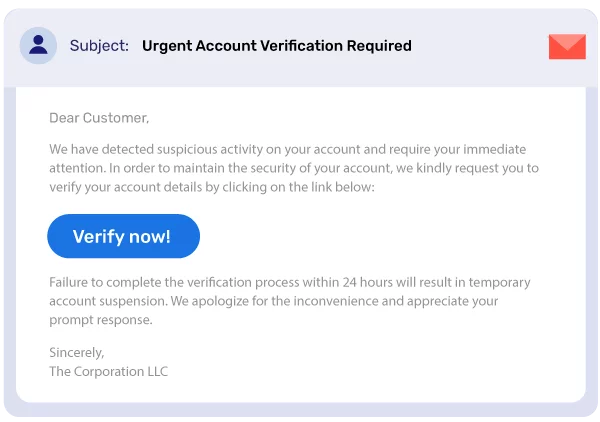
El asunto del correo indica que hay algún problema, como un intento de acceso no autorizado o un inicio de sesión sospechoso desde un dispositivo desconocido. «Tu cuenta quedará suspendida en 24 horas a menos que la verifiques de inmediato».
Haces clic antes de haber terminado de leer. Para cuando llegas a la página de inicio de sesión, ya no hay vuelta atrás. El enlace te lleva a una página que parece totalmente legítima. Introduces tus datos de acceso y el atacante consigue acceder a tu cuenta.
Presta atención a lo siguiente: que no haya datos específicos de la cuenta en el cuerpo del mensaje (las alertas auténticas suelen incluir tu nombre de usuario o los cuatro últimos dígitos de algún dato), que el dominio del remitente sea similar pero no coincida exactamente, y que la página de inicio de sesión te pida más datos de los que normalmente introducirías.
Algunas plantillas que se repiten constantemente en todos los sectores:
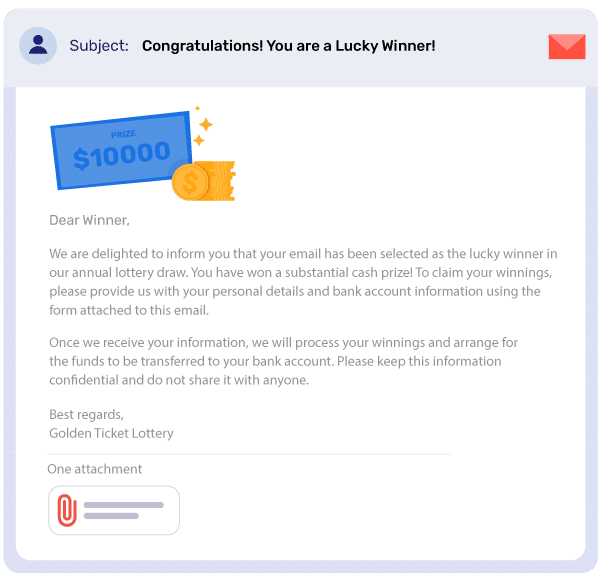
Estos correos electrónicos llegan a los buzones de correo electrónico anunciando un premio, a veces una cantidad de dinero en efectivo, una tarjeta regalo o «ganancias» poco claras, y solicitan datos personales para tramitar la reclamación. Nombre, dirección, fecha de nacimiento y, en ocasiones, datos bancarios para ingresar los fondos. El dominio del remitente no corresponde a ninguna organización real y la gramática suele ser incorrecta. A menudo se incluye un número de contacto en el extranjero o una dirección de correo electrónico genérica para el seguimiento.
Es una de las plantillas de phishing más antiguas que existen, pero sigue funcionando; no con la mayoría de la gente, pero sí con suficientes personas como para que no haya dejado de utilizarse. La estrategia se basa en el volumen: basta con enviarla a suficientes direcciones para que alguien responda.
Ten cuidado con: premios a los que nunca te has presentado, solicitud de datos personales por adelantado antes de que se «entreguen», presión para reclamarlos antes de una fecha límite, datos de contacto que no coinciden con ninguna organización verificable.
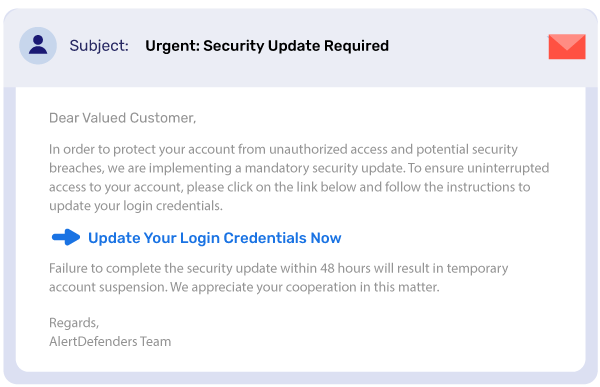
El correo electrónico parece proceder de un proveedor de software que realmente utilizas, con un asunto que hace referencia a un número CVE o a una vaga «vulnerabilidad crítica». Incluye un enlace de descarga y una fecha límite, junto con un mensaje que dice: «Aplica el parche ahora antes de que tu sistema quede expuesto».
La gente está acostumbrada a actualizar el software rápidamente. Y eso es precisamente lo que aprovecha este ataque. El enlace no lleva a un parche, sino a un archivo que instala malware y, dependiendo de su contenido, el atacante obtiene distintos niveles de acceso al equipo en el que se ejecute.
Presta atención a lo siguiente: no se menciona ninguna versión concreta del producto, la descarga se aloja en un sitio distinto al dominio real del proveedor y se utiliza un tono de urgencia que disuade de leer con atención antes de hacer clic.
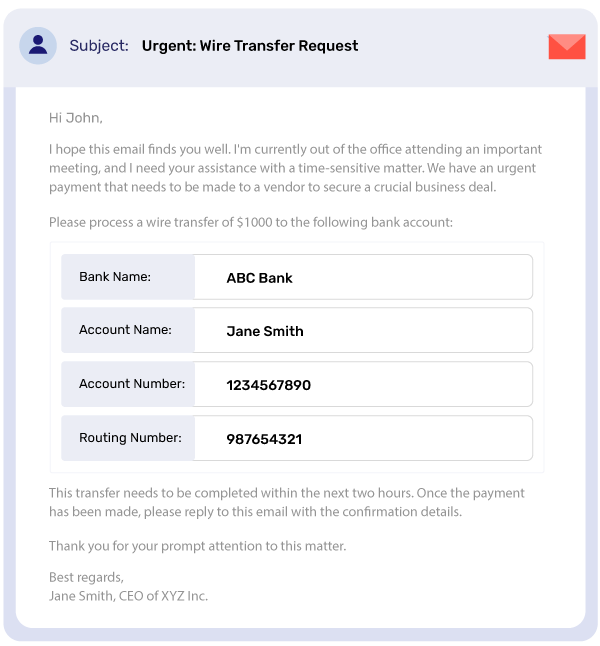
Los correos electrónicos breves suelen parecer que provienen de un alto directivo, como un director financiero o un director general, o a veces de un superior directo, con un mensaje del tipo: «Se necesita una transferencia bancaria urgente. Ahora mismo no puedo seguir los canales habituales. Ocúpate de ello y lo comentaremos más tarde».
La autoridad y la urgencia son artificiales. Ambas están pensadas para que actúes antes de verificar la información por otra vía, que es el único paso que permitiría detectar el engaño en todos los casos.
Presta atención a: dominios de remitente que sean similares pero no idénticos, solicitudes para eludir el proceso de aprobación habitual y cualquier instrucción financiera que vaya acompañada de una justificación por la que no debas confirmarla primero.
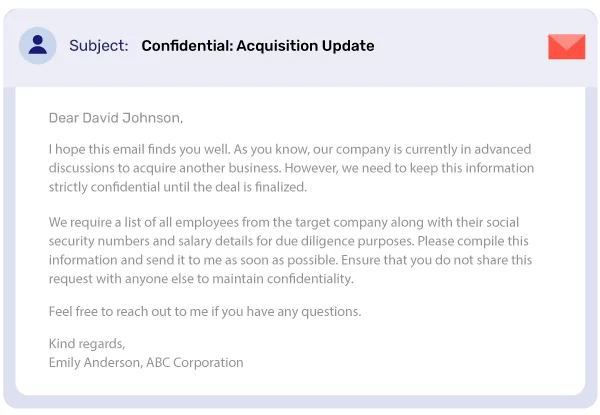
Correos electrónicos con mensajes del tipo: «Ha sido seleccionado para recibir información confidencial sobre una próxima adquisición. Haga clic aquí para acceder al documento».
Este ataque se centra en la curiosidad y en la sensación de formar parte de algo importante, como los detalles de una fusión, la inteligencia competitiva o información privilegiada. Los destinatarios suelen ser equipos financieros, asistentes ejecutivos y cualquier persona cuyo trabajo implique manejar información empresarial confidencial y que considere plausible ese correo electrónico.
El documento no existe. El enlace instala malware. Para cuando te des cuenta de que algo va mal, ya se está ejecutando.
Presta atención a lo siguiente: no hay ninguna relación previa ni contexto que explique por qué has recibido esto; es necesario descargar algo para poder ver el contenido; el remitente no se puede verificar a través de ningún otro canal.
Para los particulares, un ataque de phishing exitoso supone el robo de credenciales o el fraude de identidad. Para las empresas, los daños se extienden en varias direcciones a la vez, y el coste total de un ataque de phishing contra una organización casi siempre supera la pérdida económica inicial.
La suplantación de dominios de correo electrónico es el punto de entrada de la mayoría de los ataques de BEC. La mayoría de las organizaciones o bien no han implementado DMARC o bien se han quedado estancadas en p=none (modo de solo supervisión), lo que ofrece visibilidad pero no bloquea nada. PowerDMARC lleva a las organizaciones a la aplicación de DMARC en p=reject, donde los correos electrónicos suplantados se bloquean antes de su entrega, sin interrumpir los flujos de correo electrónico legítimos. Así es como funciona:
Para MSP y MSSP: la plataforma multitenant de PowerDMARC te permite gestionar y proteger de forma centralizada todos los dominios de tus clientes desde un único panel de control, con compatibilidad total con la marca blanca y certificaciones de cumplimiento de SOC 2 Tipo 2, ISO 27001 y el RGPD. Cuenta con la confianza de más de 2.000 organizaciones y organismos gubernamentales en más de 100 países.
En general, automatiza la parte más difícil: llegar a la fase de rechazo de forma segura, de modo que la protección esté activa antes de que la próxima factura falsificada o el próximo intento de suplantación de identidad del director general llegue a la bandeja de entrada.
Vea cómo funciona PowerDMARC
Reserva una demostración personalizada para ver cómo PowerDMARC lleva tus dominios a una aplicación completa de DMARC sin afectar al correo electrónico legítimo.
Durante años, los correos electrónicos mal redactados, las expresiones torpes, los errores evidentes y las frases que casi tenían sentido eran una señal inequívoca. A continuación te explicamos cómo los atacantes están utilizando las nuevas tecnologías para diseñar correos electrónicos de phishing cada vez más sofisticados:
Las viejas señales de alerta no han desaparecido: anomalías en la dirección del remitente, tono de urgencia, solicitudes inusuales. Simplemente se han sumado otras nuevas que apuntan en la dirección opuesta: pulidas, personalizadas y inquietantemente precisas.
La inteligencia sobre amenazas basada en IA de PowerDMARC analiza continuamente los patrones de ataque en todos los dominios, detectando anomalías en la autenticación e intentos de suplantación de identidad en tiempo real, antes de que las campañas generadas por IA lleguen a las bandejas de entrada.
El phishing se utiliza en demasiados canales, se adapta con demasiada rapidez y se aprovecha de los errores de juicio que cometemos bajo presión, algo que no se puede solucionar con un simple parche. A continuación te explicamos cómo protegerte de los correos electrónicos de phishing:
Si sospecha que ha recibido un correo electrónico de phishing, debe hacerlo:
Por último, utilice una plataforma que ofrezca la visibilidad, la automatización y el soporte especializado necesarios para proteger a su organización frente a las amenazas de phishing en constante evolución.
Póngase en contacto con nosotros hoy mismo para obtener una protección avanzada contra el phishing y otras amenazas similares por correo electrónico, y déjenos diseñar una estrategia para usted que le ofrezca resultados reales.
Los correos electrónicos de phishing más habituales incluyen solicitudes urgentes de verificación de cuentas, notificaciones falsas sobre loterías, estafas relacionadas con actualizaciones de seguridad, solicitudes de transferencias bancarias y ofertas de información confidencial. Estos correos suelen recurrir a la urgencia, el miedo o la codicia para manipular a los destinatarios y que revelen información confidencial o hagan clic en enlaces maliciosos.
Aunque un número de teléfono por sí solo no permite acceder directamente a tu cuenta bancaria, los estafadores pueden utilizarlo para llevar a cabo ataques de suplantación de SIM, ingeniería social o como parte de intentos de eludir la autenticación multifactorial. También pueden utilizar tu número de teléfono para recabar información personal adicional mediante llamadas de vishing (phishing por voz) con el fin de acabar accediendo a tus cuentas.
Las organizaciones pueden protegerse contra el BEC mediante protocolos de autenticación de correo electrónico (DMARC, SPF, DKIM), la formación de los empleados, procedimientos de verificación de las transacciones financieras y sistemas avanzados de detección de amenazas. PowerDMARC ofrece una protección integral contra el BEC mediante la supervisión en tiempo real y la respuesta automatizada ante amenazas.
Si has hecho clic en un enlace de phishing, desconéctate inmediatamente de Internet, ejecuta un análisis antivirus completo, cambia las contraseñas de todas tus cuentas importantes, vigila tus cuentas bancarias para detectar cualquier actividad sospechosa y denuncia el incidente a tu departamento de TI o a las autoridades competentes. Considera la posibilidad de activar medidas de seguridad adicionales, como la autenticación de dos factores.
Los ataques de phishing basados en la inteligencia artificial son más sofisticados, ya que se caracterizan por una gramática impecable, una hiperpersonalización basada en datos de las redes sociales y la capacidad de adaptarse en tiempo real. Pueden incluir elementos de audio o vídeo «deepfake» y están diseñados para eludir los filtros de seguridad tradicionales mediante técnicas de evasión basadas en el aprendizaje automático.








 ¿Qué son los ataques basados en el correo electrónico y cómo prevenirlos?