What Is DMARC? Definition, How It Works, and Why It Matters

by
Last Updated:
12 min read

by
Last Updated:
Key Takeaways
DMARC (Domain-based Message Authentication, Reporting, and Conformance) is an email authentication protocol that lets domain owners control what happens to emails that fail SPF and DKIM checks. It protects your domain from phishing, spoofing, and business email compromise by instructing receiving mail servers to monitor, quarantine, or reject unauthenticated email.
DMARC is now governed by RFC 9989 (May 2026), which replaced the original RFC 7489. It is important to note that existing records that were correctly configured before the RFC update still remain valid, so there is nothing to migrate.
DMARC stands for Domain-based Message Authentication, Reporting, and Conformance. Each part of the name maps to something the protocol actually does:
DMARC works by checking whether an incoming email passes SPF or DKIM, confirming that the result lines up with the domain shown in the From: field. It then applies the policy you have published in DNS. It builds on SPF and DKIM, and adds the two things they lack on their own.
When an email arrives claiming to be from your domain, the receiving server runs both checks, confirms whether either one aligns with your From: domain, and then applies whatever policy you have published in DNS. Finally, it sends you a report so you can see exactly what happened.
Here is the full sequence, from the moment an email is sent to the report that lands back in your inbox:
Alignment is the mechanism that connects an SPF or DKIM pass to the domain your recipient actually sees in the From: field. A message can pass SPF or DKIM for some domain while still displaying your domain in the From: header. Alignment closes that gap by requiring that the authenticated domain match the From: domain.
There are two alignment modes:
Without alignment, an attacker could pass SPF using a domain they control and still spoof your From: address, which is precisely the loophole DMARC was created to close.
Read more about the two alignment types, what to configure and when, in our DMARC alignment guide.
DMARC is not a replacement for SPF and DKIM; it depends on them. The three protocols each handle a different part of the authentication problem, and DMARC ties them together.
Read more about the individual protocols in our DMARC, SPF, and DKIM guide.
SPF (Sender Policy Framework) defines which IP addresses and servers are authorized to send email for your domain. The receiving server checks the envelope-from (Return-Path) address against your published SPF record. Its limitation: SPF does not protect the visible From: header that recipients actually read, so a message can pass SPF while still displaying a spoofed From: domain.
DKIM (DomainKeys Identified Mail) attaches a cryptographic signature to each message. Receivers verify that signature against a public key in your DNS, confirming the message was not tampered with in transit and identifying the signing domain. Its limitation: like SPF, DKIM can pass for a domain that differs from the one shown in the From: header, so it does not, by itself, stop From: spoofing.
SPF and DKIM authenticate individual mechanisms, but neither tells the receiver what to do when a check fails, and neither ties the result to the visible From: domain. DMARC adds the missing pieces: it ties SPF and DKIM together, requires alignment with the From: domain, publishes an enforcement policy, and turns on reporting. Without DMARC, spoofing can still succeed even when SPF and DKIM are both in place.
| Protocol | What it checks | Where it looks | What it protects | What it cannot do alone |
|---|---|---|---|---|
| SPF | Whether the sending IP is authorized | Envelope-from / Return-Path | Authorizes legitimate sending servers | Does not protect the visible From: header |
| DKIM | A cryptographic signature on the message | DKIM-Signature header + DNS public key | Message integrity and signing-domain identity | Can pass even when the From: domain is spoofed |
| DMARC | SPF/DKIM results + alignment with From: | DNS policy at _dmarc.yourdomain.com | Ties both together, sets policy, enables reporting | Has nothing to evaluate without SPF and DKIM |
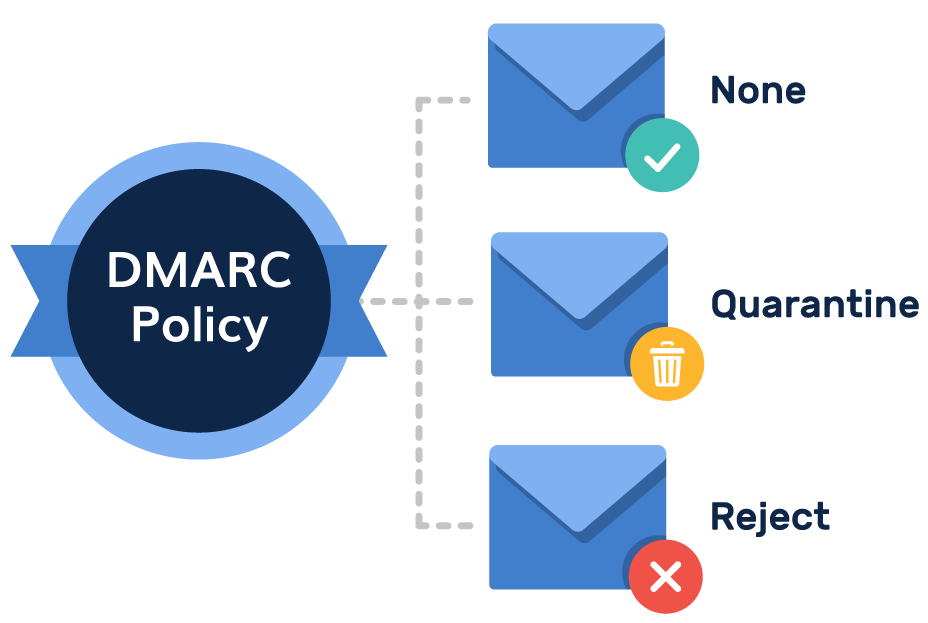
Your DMARC policy tells receiving servers what to do with mail that fails authentication and alignment. There are three DMARC policies, each a higher level of enforcement than the last.
No enforcement action is taken; failing mail is still delivered, and reports are sent so you can see who is sending on your behalf. This is the right first step for any new deployment.
Compliance note: p=none does not satisfy Gmail and Yahoo bulk-sender requirements or PCI DSS v4.0 anti-phishing requirements, which expect enforcement.
Mail that fails is routed to the spam or junk folder rather than the inbox. Legitimate, authenticated mail is unaffected. Compliance note: quarantine satisfies the enforcement expectations of Gmail, Yahoo, Microsoft, and PCI DSS v4.0.
Mail that fails is rejected outright and never reaches the inbox or the spam folder. This is the strongest level of protection. Compliance note: reject satisfies all current requirements. One caveat from RFC 9989: for domains whose users post to mailing lists, p=quarantine can be a safer permanent policy, because mailing lists often break authentication in ways that cause legitimate mail to be rejected.
DMARC is the only email authentication protocol that sends you visibility data. Those reports are the entire reason to publish DMARC at p=none before moving to enforcement: they show you every source sending mail as your domain, so you can confirm your legitimate senders all pass before you start blocking anything.
Aggregate reports are daily XML summaries sent by every receiving mail server that processed email from your domain. Each report lists the sending IP addresses, message volume, SPF pass/fail, DKIM pass/fail, the overall DMARC result, and the disposition applied. They matter because you cannot safely advance your policy without them: you need to confirm that every legitimate sender passes before moving to quarantine or reject. Reading raw XML by hand does not scale, so most teams use our DMARC Report Analyzer to turn reports into readable dashboards.
If you are new to reporting, view our step-by-step guide on how to read DMARC reports for a simplified walkthrough.
Failure reports (historically called forensic reports) are per-message notifications sent when an individual email fails DMARC. They are more granular than aggregate reports. Privacy note: Google, Microsoft, and Yahoo no longer send failure reports, so if your domain receives any, they come from smaller providers. Include the ruf= tag in your record only if you have a processor set up to handle them.
DMARC’s core job is to stop attackers from sending email that appears to come from your exact domain. That covers three of the most damaging email-based attack types.
In a spoofing attack, someone sends an email that appears to come from your exact domain, for example, [email protected]. DMARC at p=reject blocks these messages before they reach any inbox, because they cannot pass authentication and alignment for your domain.
Phishing emails impersonate your brand to trick customers or employees into handing over credentials or money. With DMARC at enforcement, attackers cannot use your domain as the sender, which removes the most convincing version of a phishing email: one that genuinely appears to come from you.
BEC attacks impersonate a CEO, CFO, or trusted vendor to request wire transfers or sensitive data. DMARC stops exact-domain BEC, where the attacker spoofs your real domain. Note that display-name spoofing, where the visible name reads “CEO Name” but the underlying domain is unrelated, is not stopped by DMARC, because the attacker is not using your domain at all.
Compliance has become the leading reason organizations implement DMARC. Over the past two years, the major mailbox providers and several regulators have turned DMARC from a best practice into a requirement. Crucially, p=none does not satisfy any of the mandates below, and enforcement (quarantine or reject) is what they expect.
Since February 2024, Gmail and Yahoo have required bulk senders, those sending 5,000 or more messages per day, to use SPF, DKIM, and a published DMARC record. Gmail ramped up to permanent rejection of non-compliant mail in November 2025. A p=none record meets the bare minimum for having a DMARC record published, but enforcement (quarantine or reject) is what provides real protection.
Microsoft began enforcing bulk-sender authentication requirements on May 5, 2025, rejecting high-volume mail that fails authentication outright at the SMTP level rather than routing it to junk. DMARC is part of Microsoft’s authentication requirements for senders of 5,000+ messages per day.
Requirement 5.4.1 of PCI DSS v4.0.1 requires automated anti-phishing mechanisms, including DMARC alongside SPF and DKIM, for organizations that handle payment card data. This became mandatory on March 31, 2025. A monitoring-only p=none record does not satisfy it; auditors expect an enforcement policy.
The US Cybersecurity and Infrastructure Security Agency’s Binding Operational Directive 18-01 (CISA BOD 18-01) requires all federal executive-branch domains to implement DMARC at p=reject. It was the first government mandate to require an enforcement-level policy rather than mere adoption.
To learn about global compliance requirements and recommendations, refer to our full DMARC compliance requirements guide.
PowerDMARC’s 2026 email phishing and DMARC statistics show a clear global pattern: phishing keeps climbing, DMARC adoption is growing but still far from universal, and most domains that do adopt it never reach the enforcement that actually blocks spoofing.
In May 2026, RFC 9989 replaced RFC 7489 as the DMARC standard, the first major update since the original specification in 2015. Since existing records remain valid, so no migration is required. However, domain owners using deprecated tags can consider updating their records to reflect the new refinements.
What changed is a small set of practical refinements to the tags you can publish in a record. Here are some of the key changes:
For a complete breakdown of the changes, you can refer to our DMARC RFC 9989 guide.
DMARC is highly effective against exact-domain spoofing, but it is not a complete anti-fraud solution, and it is worth being clear about what it does not cover:
For threats beyond what DMARC covers, you can use our Lookalike Domain Checker to start your investigation into detect lookalike domains, typosquatting and homoglyph attacks.
You do not need to configure anything complex to begin. The following steps will get you moving:
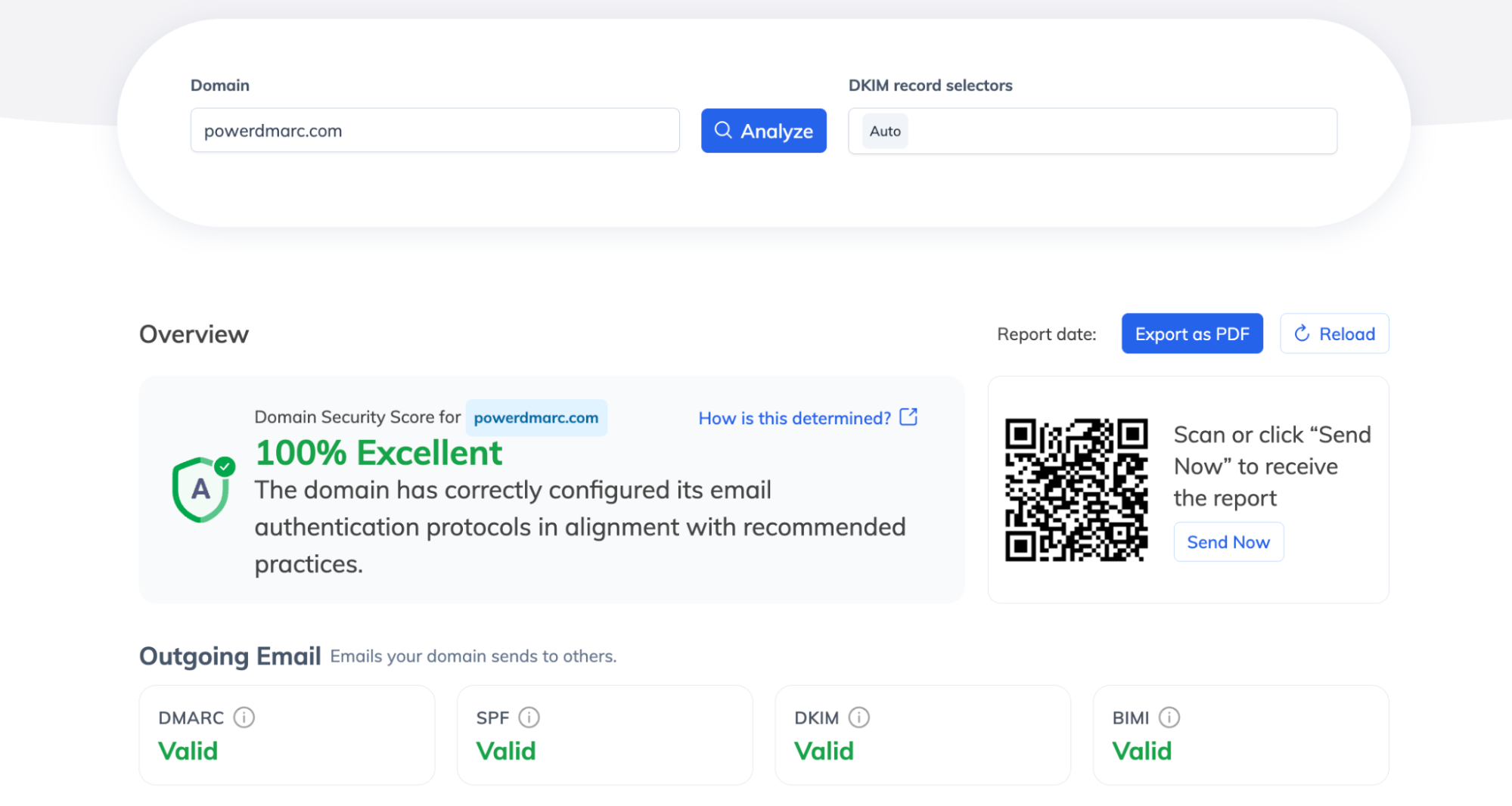
1. Check your SPF, DKIM and DMARC records: As explained earlier, DMARC needs either SPF or DKIM configured to function (preferably both). So before getting started you need to verify if these records exist. Run your domain through our Domain Analyzer to to confirm in one go whether you have an existing SPF, DKIM, and DMARC records and your current record policy.
2. Generate a record if you don’t have one: Use our DMARC Generator tool to create a valid syntax, and publish the record in your DNS to activate the protocol. For starters, always keep your policy at “none”, then slowly move to enforcement once you are confident with your deliverability.
3. Add record to your DNS: Open your DNS management console and publish the DMARC record under _dmarc.yourdomain.com as a TXT record.
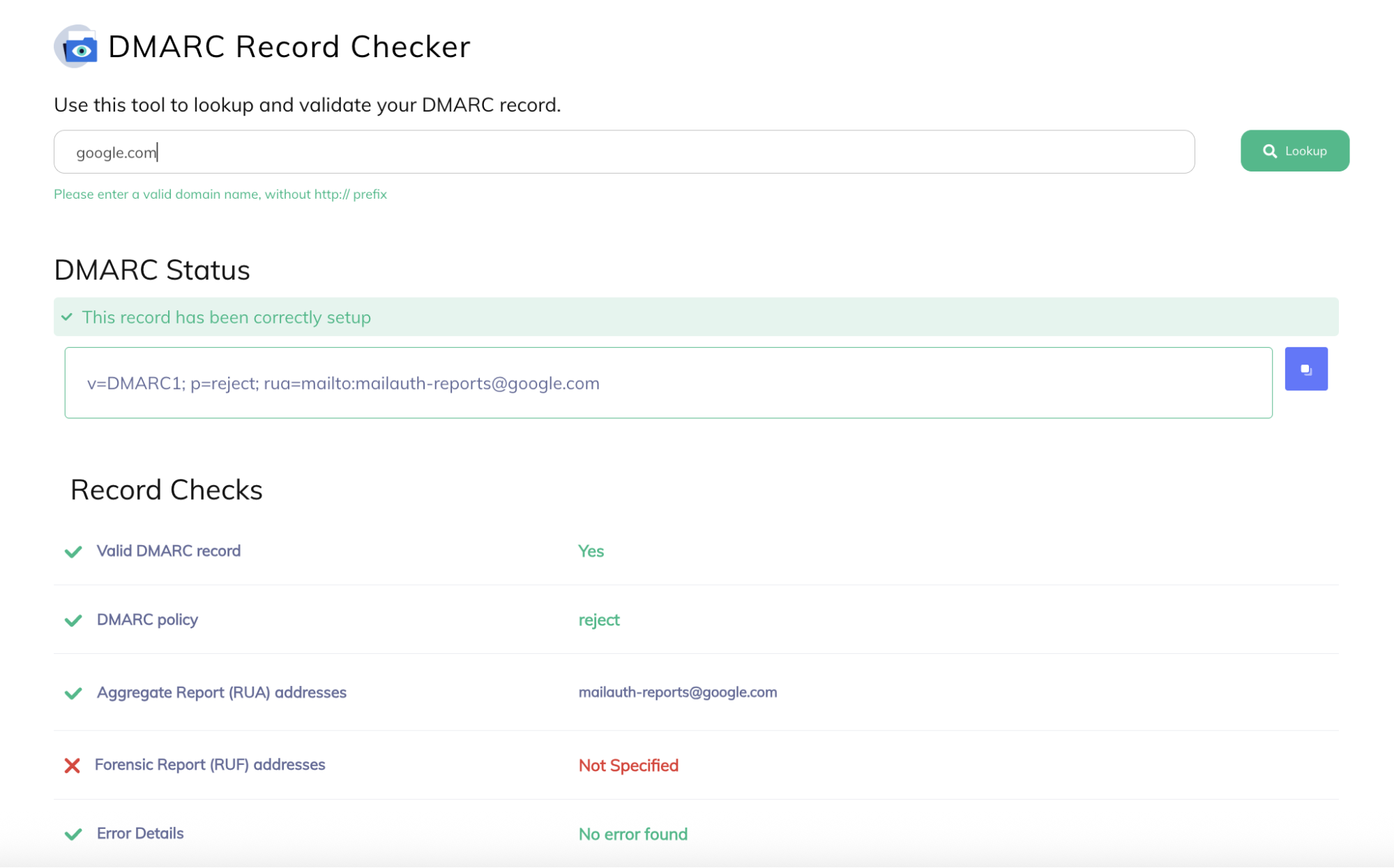
4. Verify with DMARC checker: Finally, after 24 hours, run your domain through our DMARC checker tool to check if your published record is valid and error-free.
For a complete walkthrough on how to set up DMARC, refer to the linked blog for a detailed step-by-step tutorial.
DMARC has moved from a security recommendation to a baseline expectation. It is what tells the world that mail carrying your domain is genuinely yours, and it is increasingly required by the mailbox providers and regulators your business already answers to. The protocol itself is not complicated: publish a record, read your reports, and tighten your policy as your legitimate senders line up behind it. The real work is making the move from monitoring to enforcement.
PowerDMARC a full-stack DMARC management platform that handles the monitoring and enforcement journey for you, turning raw reports into readable insight and helping you reach p=reject without blocking legitimate mail.
A DMARC record is a DNS TXT record published at _dmarc.yourdomain.com. It contains your DMARC policy and the email addresses where reports should be sent. Creating and publishing a DMARC record is the first step in implementing DMARC for your domain.
Yes, for bulk senders. Gmail and Yahoo have required DMARC since February 2024 for domains sending 5,000 or more emails per day, and Microsoft began enforcement in May 2025. PCI DSS v4.0 has required DMARC for payment card data processors since March 2025. Even for non-bulk senders, DMARC is strongly recommended to protect your domain from spoofing.
SPF verifies which IP addresses can send email for a domain. DKIM verifies message integrity using a cryptographic signature. DMARC ties both together, aligns them with the visible From: domain, adds an enforcement policy, and enables reporting. All three are needed for complete email authentication.
DMARC prevents exact-domain email spoofing, where an attacker sends email that appears to come from your domain. This covers phishing emails, brand impersonation, and business email compromise. It does not prevent lookalike domain attacks or display-name spoofing, where a different domain is used.
Without DMARC, receiving servers have no policy instruction for email from your domain that fails SPF and DKIM, so your domain can be freely spoofed in phishing attacks. Since 2024, the absence of DMARC also affects deliverability for bulk senders, because Gmail and Yahoo may reject or downgrade your legitimate email.
No. DMARC stops phishing that spoofs your exact domain, but it cannot stop lookalike domains, display-name abuse, or attacks from compromised legitimate accounts. DMARC should be one layer in a broader email security strategy rather than the only one.








 Top 10 Valimail Alternatives and Competitors in 2026