Migliori pratiche per la consegna delle e-mail aziendali: come PowerDMARC garantisce che le tue e-mail arrivino nella posta in arrivo

di
Ultimo aggiornamento:
13 13 minuti di lettura


di
Ultimo aggiornamento:
In breve: la deliverability delle e-mail è fondamentale per il successo aziendale. Una deliverability efficace richiede un'autenticazione adeguata (SPF, DKIM, DMARC), una buona reputazione del mittente e liste di indirizzi e-mail pulite. PowerDMARC aiuta le aziende e gli MSP a raggiungere tassi di deliverability superiori al 95% grazie alla gestione automatizzata dell'autenticazione e al monitoraggio centralizzato.
Se vi è mai capitato di inviare una campagna e-mail per poi scoprire che una buona parte del vostro pubblico non l'ha mai vista, vi siete già resi conto dell'importanza della deliverability delle e-mail. Tuttavia, nella maggior parte dei casi, le persone non sono sicure di quali siano le cause di questi problemi o di come risolverli.
Per le organizzazioni che operano in settori regolamentati, quali quello finanziario, sanitario o pubblico, la deliverability delle e-mail non riguarda solo la garanzia del ritorno sull'investimento (ROI) delle attività di marketing. Si tratta di un requisito fondamentale in materia di conformità e gestione dei rischi. Le aziende che gestiscono più domini, così come gli MSP (Managed Service Provider) e gli MSSP (Managed Security Service Provider) che assistono numerosi clienti, devono affrontare sfide specifiche per garantire l'arrivo delle e-mail nella casella di posta in arrivo e il rispetto delle normative. Questa guida illustra le migliori pratiche, adattate alle esigenze dei team che operano in ambito di conformità e dei fornitori di servizi.
Noi di PowerDMARC abbiamo come missione quella di ridefinire la sicurezza dei domini e della posta elettronica, rendendo le comunicazioni digitali più sicure per le organizzazioni e le amministrazioni pubbliche di tutto il mondo.
La deliverability delle e-mail misura il numero di e-mail inviate che vengono accettate dai provider di servizi Internet. Il tasso di recapito delle e-mail tasso è il numero di e-mail inviate con successo come percentuale di tutte le e-mail inviate.
La deliverability delle e-mail copre l'intero percorso del messaggio, dal server alla casella di posta del destinatario.
Spesso si usano i termini “consegna” e “conseguibilità” come se avessero lo stesso significato, ma non è così.
Per “consegna” si intende semplicemente che l’e-mail è arrivata al server di posta del destinatario. Non è stata respinta, non è stata bloccata: tecnicamente è passata. Ma questo non significa che sia arrivata nella posta in arrivo. Potrebbe comunque trovarsi nella cartella dello spam o nella scheda “Promozioni”, dove la maggior parte delle persone non va mai a guardare.
D'altra parte, la deliverability riguarda il luogo in cui l'e-mail arriva effettivamente dopo essere stata accettata dal server. È ciò che decide se il messaggio viene visualizzato nella casella di posta o se viene seppellito da qualche altra parte.
Molto dipende da questo: la reputazione del vostro mittente, l'autenticità del vostro dominio (SPF, DKIM, DMARC), il modo in cui le persone interagiscono con le vostre e-mail e persino le parole che usate nell'oggetto.
Vedetela in questo modo: la consegna porta l'e-mail alla porta; la deliverability la porta all'interno della stanza.
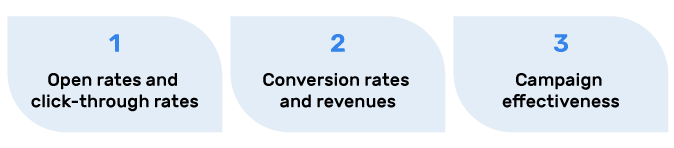
La deliverability delle e-mail è di fondamentale importanza per il vostro ROI. Un alto tasso di deliverability delle e-mail significa che i vostri messaggi saranno probabilmente visti e utilizzati dai destinatari. Alcune importanti metriche influenzate dalla deliverability delle e-mail sono:
Una scarsa deliverability può avere un forte impatto sui tassi di apertura, sul coinvolgimento e sulla reputazione del marchio. Quando le e-mail non raggiungono le caselle di posta, possono verificarsi:

Ci sono diversi fattori che possono influenzare la deliverability delle vostre e-mail:
Di seguito sono riportati alcuni problemi comuni di deliverability delle e-mail che i mittenti devono affrontare nelle loro campagne di email marketing.
I filtri antispam utilizzano algoritmi complessi per analizzare il contenuto delle e-mail, le informazioni sul mittente e il coinvolgimento dei destinatari. Per non attivare questi filtri, dovreste:
I bounce si verificano quando le e-mail non possono essere consegnate. Esistono due tipi di bounce:
È possibile ridurre la frequenza di rimbalzo adottando le seguenti misure:
L'inserimento in una blocklist può danneggiare la reputazione del mittente e la deliverability. Le blocklist sono database di indirizzi IP o domini che sono stati segnalati per l'invio di spam o per pratiche di posta elettronica sospette. Potete cercare di evitare le blocklist se:
La reputazione del mittente è un punteggio assegnato dagli ISP in base alle vostre pratiche di invio. Per avere una buona reputazione, dovreste:
L'autenticazione delle e-mail è fondamentale per garantire la consegna dei messaggi e proteggere il marchio, soprattutto per le organizzazioni che operano in settori regolamentati. La piattaforma unificata di PowerDMARC semplifica l'implementazione e il monitoraggio di tutti i protocolli chiave (SPF, DKIM, DMARC) su più domini, con avvisi in tempo reale e report sulla conformità.
È necessario implementare e monitorare tutti i principali protocolli di autenticazione (SPF, DKIM, DMARC) per garantire la conformità e l'arrivo dei messaggi nella posta in arrivo. Con PowerDMARC, la nostra piattaforma automatizza questo processo per te.
Una volta che il server di posta del destinatario riceve l'e-mail, esegue un processo di verifica. Il server verifica la legittimità del mittente confrontando l'indirizzo IP dell'e-mail in arrivo con il record SPF (Sender Policy Framework) collegato al dominio di invio. In base a questo processo di verifica, l'e-mail viene contrassegnata come SPF pass o fail per evitare diverse forme di utilizzo non autorizzato.
Una solida base tecnica è fondamentale per garantire una consegna ottimale delle e-mail. Effettuare regolarmente dei test di consegna delle e-mail aiuta a individuare eventuali problemi di recapito nella posta in arrivo, difficoltà con i filtri antispam ed errori di autenticazione prima che questi possano compromettere le prestazioni delle campagne. L'infrastruttura e-mail influisce direttamente sul modo in cui gli ISP percepiscono e gestiscono i messaggi.
Un corretto allineamento dei domini garantisce che il dominio del mittente, il dominio del percorso di ritorno e il dominio di firma DKIM funzionino in modo armonioso, assicurando il massimo successo nell'autenticazione.
Per i responsabili IT nei settori finanziario, sanitario o pubblico: La piattaforma aziendale di PowerDMARC offre il controllo centralizzato e le tracce di audit necessari per la conformità normativa, semplificando al contempo la complessa gestione dell'autenticazione multi-dominio.
Ecco le migliori pratiche per aiutarvi a a incrementare la deliverability delle vostre e-mail:
I protocolli di autenticazione delle e-mail, come DMARC, SPF e DKIM, lavorano insieme per verificare la vostra identità di mittenti e proteggervi dallo spoofing delle e-mail. Se si implementano correttamente e con attenzione questi protocolli, si noterà un miglioramento non solo nella consegna delle e-mail, ma anche nella sicurezza generale e nella protezione dagli attacchi di phishing.
La creazione etica di liste di contatti e il marketing basato sul consenso sono fondamentali per garantire a lungo termine l'efficacia delle consegne e il rispetto delle norme di legge.
Come già detto, dovreste cercare di rimuovere gli iscritti inattivi che non si sono impegnati con le vostre e-mail per 6-12 mesi. Questa azione va eseguita di tanto in tanto per garantire che la lista sia sempre aggiornata.
Non utilizzate mai liste di email acquistate, perché potrebbero contenere indirizzi non validi o non impegnati e non apportare alcun valore ai vostri sforzi di email marketing (anzi, potrebbero danneggiarli). Costruite invece le vostre liste con strategie di marketing efficaci (ad esempio, regalando un e-book a chi si iscrive, offrendo una sessione dimostrativa gratuita, ecc.) Utilizzate il doppio opt-in per i nuovi iscritti, in modo da evitare che si aggiungano persone irrilevanti o non interessate.
Una volta ottenuta la lista, cercate di segmentarla in base all'impegno e alle preferenze per inviare contenuti più mirati e pertinenti.
Quando si lanciano nuovi domini o indirizzi IP, è fondamentale aumentare gradualmente il volume per costruirsi una reputazione positiva come mittente.
Fornite contenuti preziosi, informativi e verificati nelle vostre e-mail e cercate di rendere le informazioni il più possibile personalizzate. Per questo motivo, la comprensione del pubblico di riferimento, delle sue preferenze, del suo comportamento e dei suoi dati demografici è fondamentale per migliorare i contenuti e aumentare il coinvolgimento.
Evitate i contenuti che pesano sulle vendite o il tono altamente promozionale, perché possono allontanare le persone e farvi apparire come troppo desiderosi di vendere i vostri prodotti e servizi.
Effettuare test regolari aiuta a individuare e risolvere i problemi di consegna prima che incidano sulle tue campagne.
Non sovraccaricate i vostri abbonati con un numero eccessivo di e-mail. Potete testare diversi orari di invio per massimizzare il coinvolgimento in base alle abitudini del vostro pubblico.
Se i vostri modelli di invio sono coerenti, potete stabilire una certa prevedibilità con i destinatari e gli ISP e ottenere un maggiore coinvolgimento.
Utilizzate modelli di design reattivi che possano adattarsi a schermi e dispositivi di diverse dimensioni.
Inoltre, mantenete le righe dell'oggetto concise (30-40 caratteri) per una visualizzazione ottimale da mobile. Per la lettura da mobile, cercate di utilizzare un layout a colonna singola, poiché rende l'esperienza di lettura più facile e piacevole sui dispositivi mobili.
Non utilizzate il testo tutto maiuscolo e le parole che scatenano lo spam sia nell'oggetto che nel corpo dell'e-mail e astenetevi da una punteggiatura eccessiva. Puntate a un rapporto testo/immagine equilibrato, con almeno il 60% di testo. Un'altra buona pratica è quella di utilizzare l'alt-text per le immagini per fornire un contesto nel caso in cui alcune o tutte le immagini siano bloccate.
Utilizza strumenti digitali e DMARC Analyzer di PowerDMARC per monitorare lo stato della tua reputazione e della deliverability. La nostra piattaforma ti avvisa dei problemi prima che questi influenzino il posizionamento nella casella di posta.
Una corretta gestione delle richieste di cancellazione tutela la reputazione del mittente e garantisce il rispetto delle leggi antispam.
Scegliete un ESP con funzioni di deliverability e supporto efficaci. Sfruttate gli strumenti di analisi e di reporting del vostro ESP e le funzioni integrate di gestione delle liste, segmentazione e automazione.
Il monitoraggio costante è fondamentale per garantire una deliverability ottimale. Ecco alcuni metodi e strumenti pratici per monitorare le prestazioni delle tue email:
I vantaggi di PowerDMARC: La nostra piattaforma offre un monitoraggio in tempo reale su tutte queste aree con avvisi automatici e informazioni utili, aiutandoti a mantenere una deliverability ottimale senza bisogno di supervisione manuale.
Comprendere e monitorare gli indicatori giusti ti aiuta a individuare tempestivamente eventuali problemi e a ottimizzare la tua campagna email per ottenere risultati migliori.
| Metrico | Definizione | Parametro di riferimento per la salute | Azione richiesta |
|---|---|---|---|
| Tasso di consegna | Percentuale di e-mail accettate dagli ISP | >95% | |
| Frequenza di rimbalzo | Percentuale di email non recapitate | >5% richiede una pulizia dell'elenco | |
| Tasso di reclamo per spam | Percentuale di destinatari che contrassegnano il messaggio come spam | >0,3% danneggia la reputazione | |
| Tasso di apertura | Percentuale di email consegnate che sono state aperte | 20-25% | |
| Tasso di clic | Percentuale di email recapitate su cui è stato cliccato | 2-5% |
PowerDMARC offre soluzioni di autenticazione delle e-mail e gestione della deliverability di livello aziendale che vanno ben oltre il semplice monitoraggio. Ecco cosa ci contraddistingue:
Risultati concreti: I nostri clienti risolvono i problemi di autenticazione 3 volte più velocemente utilizzando la dashboard centralizzata di PowerDMARC e raggiungono in media tassi di consegna superiori al 95%.
Inizia la prova gratuita di 15 giorni Leggi le storie di successo dei nostri clienti
Utilizza questa lista di controllo completa per assicurarti che il tuo programma di deliverability delle e-mail soddisfi gli standard aziendali:
Ora che hai compreso i fondamenti della deliverability delle e-mail, ecco cosa dovresti fare:
Inizia oggi stesso il tuo percorso con PowerDMARC – 15 giorni di prova gratuita
Ricordate che una buona deliverability delle e-mail non riguarda la consegna di una singola e-mail nella casella di posta del destinatario o il conseguimento di un buon ROI a breve termine dalla vostra campagna di marketing. Si tratta della relazione a lungo termine tra voi e i vostri abbonati, del vostro dominio e della vostra reputazione aziendale e del ROI a lungo termine delle vostre campagne di email marketing.
La comprensione dell'importanza della deliverability delle e-mail per il successo aziendale a lungo termine dovrebbe motivarvi a monitorare e testare costantemente i contenuti delle vostre e-mail, le pratiche di invio e la salute generale delle e-mail. Inoltre, dovreste cercare di essere il più flessibili possibile e di adattarvi sempre ai cambiamenti delle tendenze, degli standard e delle normative per una presenza online rilevante e attraente.
Alcuni fattori chiave decidono se le vostre e-mail finiscono nella posta in arrivo o vengono contrassegnate come spazzatura. La reputazione del vostro mittente è importante; se avete avuto molti bounce, reclami per spam o invii incoerenti, i provider della posta in arrivo iniziano a perdere fiducia. Anche la qualità della vostra lista è importante. L'invio a liste obsolete o acquistate può danneggiare rapidamente la vostra credibilità. Poi ci sono i contenuti e il coinvolgimento. Se le persone non aprono, non cliccano e non interagiscono, le piattaforme segnalano che le vostre e-mail potrebbero non essere di valore.
Per ottenere risultati ottimali, la vostra lista di e-mail deve essere pulita periodicamente, ogni tre-sei mesi. Le vostre campagne e-mail otterranno una migliore deliverability e manterranno la conformità alla legge sulle e-mail quando eliminerete gli indirizzi inattivi o che producono bounce o quelli non validi.
Il punteggio di reputazione del mittente varia da 0 a 100 punti. Un punteggio di reputazione del mittente superiore a 80 indica una deliverability eccellente con un rischio minimo di spam. I problemi di recapito si verificano quando il punteggio di reputazione del mittente scende al di sotto di 70, in quanto indica un'elevata frequenza di rimbalzo e reclami per spam.
La regola del 60/40 consiste nel mantenere un rapporto equilibrato tra testo e immagini nelle e-mail, con almeno il 60% di testo e non più del 40% di immagini. Ciò aiuta a evitare che i filtri antispam segnalino le e-mail con un elevato contenuto di immagini come potenzialmente sospette.
Le 5 C del galateo delle e-mail sono: chiarezza (oggetti concisi), concisione (contenuti brevi), cortesia (tono professionale), correttezza (grammatica e ortografia corrette) e completezza (inclusione di tutte le informazioni necessarie). Seguire questi principi migliora il coinvolgimento e la deliverability.
La regola del 30/30/50 suggerisce di dedicare il 30% dell'e-mail al problema, il 30% alla soluzione e il 50% all'invito all'azione. Questa struttura aiuta a mantenere vivo l'interesse del destinatario stimolando al contempo le azioni desiderate, migliorando così sia i dati relativi al coinvolgimento che quelli relativi alla deliverability.
La regola delle e-mail 3-2-1-0 è un metodo per migliorare la produttività: controllare la posta elettronica solo 3 volte al giorno, dedicare non più di 2 minuti a ogni e-mail, cercare di rispondere con una sola frase quando possibile e mantenere la casella di posta in arrivo vuota. Questo aiuta a mantenere una comunicazione ordinata e può fornire ai mittenti indicazioni sulle migliori pratiche in termini di frequenza e chiarezza.








 Come controllare la deliverability delle e-mail: Strumenti e suggerimenti