What Is BIMI? Email Trust and Brand Identity

by
Last Updated: 10 min read

by
Last Updated: Email inboxes were once a place where people could quickly recognize who a message was really coming from. Today, that trust is much harder to maintain. Brand impersonation, look-alike domains, and phishing emails often appear convincing at first glance, leaving recipients unsure which messages are genuine and which are designed to deceive.
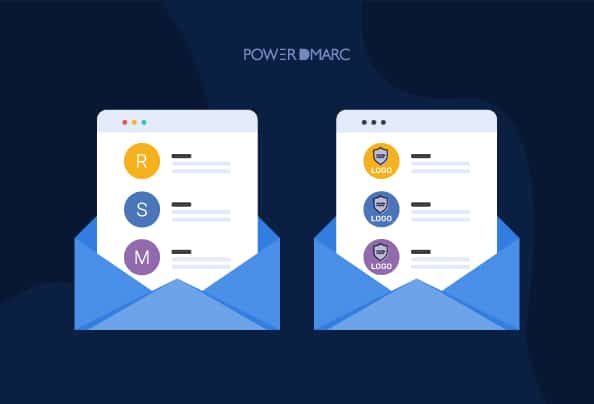
BIMI is an email standard that allows verified brand logos to appear next to authenticated emails in supported inboxes. By showing a trusted visual identifier, BIMI helps recipients quickly recognize legitimate messages and builds confidence in the sender.
In this article, we explain what BIMI is, why it matters, how it works, and what you need to set it up correctly, including logo requirements and the role of DMARC.
BIMI stands for Brand Indicators for Message Identification. It is an email standard that allows organizations to display a verified brand logo alongside their emails in supported inboxes. BIMI works in combination with existing email authentication protocols to confirm that a message comes from a legitimate source before a logo is shown.
As both an email authentication and brand visibility standard, BIMI connects technical verification with visual trust. When a domain meets the required authentication criteria, mailbox providers can display the sender’s official logo next to emails, making it easier for recipients to recognize authentic messages.
BIMI logos appear directly in email inboxes, typically next to the sender’s name or profile image. This visibility helps emails stand out while giving recipients a quick, visual signal that the message has been properly authenticated.
BIMI matters because it directly addresses trust, visibility, and engagement in crowded email inboxes. Instead of abstract benefits, its impact shows up in measurable ways.
By combining authentication with visual identity, BIMI turns email security into something recipients can actually see, resulting in better engagement, stronger brand recognition, and reduced risk from phishing and spoofing.
Think of BIMI like a verified storefront sign on a busy street. When people see a familiar, trusted logo on the door, they feel more confident walking in. In the same way, BIMI adds a verified brand logo to your emails, giving recipients an immediate visual signal that the message comes from a legitimate source.
BIMI works by allowing domain owners to attach their official logo to authenticated emails, which is then displayed directly in supported inboxes. The BIMI specification ensures that this logo is verified, controlled by the brand, and shown consistently across email clients that support the standard. Instead of relying on randomly pulled images or generic icons, recipients see the same trusted logo every time they receive a legitimate email from your domain.
By appearing prominently in the inbox, the BIMI logo draws attention, reinforces brand recognition, and helps distinguish authentic messages from look-alike or impersonated emails. While BIMI strengthens email security behind the scenes through enforced authentication, it also delivers a visible benefit that marketers value: stronger first impressions, clearer brand identity, and increased confidence among recipients.
To display your brand logo using BIMI, several technical and formatting requirements must be met.
Meeting these requirements ensures your logo can be verified and trusted by mailbox providers that support BIMI.
A Verified Mark Certificate (VMC) is a digital certificate that proves trademark ownership of a brand’s logo so it can be displayed in supported email inboxes through BIMI. Obtaining a VMC typically involves trademark verification and certificate issuance through an approved authority, with costs commonly ranging from several hundred to a few thousand dollars per year, depending on provider and validation requirements. The process usually takes a few weeks to a couple of months, influenced by trademark status and verification speed.
VMCs strengthen inbox trust by ensuring only verified logos appear next to authenticated emails, helping recipients distinguish legitimate messages from impersonation attempts. They also reinforce consistent brand recognition and are increasingly important as mailbox providers expand BIMI support, most notably where full logo display requires a VMC. To obtain one, organizations must have a registered trademark for the logo and work with a trusted certificate authority (such as DigiCert), often with assistance from platforms like PowerDMARC to streamline validation and deployment.
To implement BIMI, you first need to enforce your existing DMARC policy by setting it to either reject or quarantine. Achieving full DMARC compliance is crucial, as it ensures SPF and/or DKIM authentication for all mail using your From domain. This step not only enhances your email security but also builds your reputation as a conscientious sender.
Users can prepare their BIMI-compliant logo either manually using Adobe Illustrator, or automatically using a BIMI SVG converter tool.
You can prepare a BIMI-compliant SVG logo manually using Adobe Illustrator, as long as the file meets BIMI formatting requirements. Start by opening your logo and ensuring it is fully vector-based, with no bitmaps, linked files, or editable text. Any text should be converted to outlines, and all elements should be ungrouped.
Next, place the logo on a square (1:1) canvas using RGB color mode and export it as an uncompressed SVG. During export, select SVG Tiny 1.2 as the profile and keep decimal precision low to reduce file size. Basic code cleanup may be required to meet BIMI specifications.
For step-by-step instructions, export settings, and SVG code cleanup details, refer to our detailed guide on creating a BIMI-compliant SVG logo.
Sign up with PowerDMARC for free.

Go to Analysis tools > PowerToolbox

Select Generator Tools > BIMI SVG Converter. Add your image URL/domain name and click Convert.

The tool generates for converted image that you can directly download and use.

Once you have a BIMI-compliant SVG logo, the next step is creating your BIMI DNS record. This record is published as a TXT record in your DNS and tells mailbox providers where to find your verified logo and, if required, your certificate.
You can generate this record using our BIMI Record Generator.
The BIMI record(s) reside in the “_bimi” space of your DNS, with the default BIMI record being “default._bimi”. The text part holds the identifier of the record version (v=BIMI1), URL to the logo (l=), and URL to the logo certificate (VMC) if available (a=).
Format of the BIMI DNS Entry
The BIMI DNS entry is formatted as a text (TXT) record within the “_bimi” space of your domain’s DNS. This record includes the version identifier, the logo URL, and optionally, the URL for the VMC. The syntax typically starts with the version, followed by the logo URL, and finally, the certificate URL if it’s available.
Real-world Example of a BIMI Record
A complete BIMI record would look like the following:
default._bimi IN TXT “v=BIMI1;l=https://url.to/your.file.svg;a=https://url.to/certificate.pem”
Consider including multiple logos for different use cases if needed, but the “default” selector works for all mail. By following these steps, you’ll successfully implement BIMI, enhancing your email’s brand visibility and trustworthiness.
Once your BIMI record is published and your authentication requirements are met, it’s important to verify that everything is working as expected. BIMI verification tools help confirm that your DNS record is correctly formatted, your logo is accessible, and your domain meets the necessary authentication conditions.
When to use this tool:
Use a BIMI verification or lookup tool after publishing or updating your BIMI record, after enforcing your DMARC policy, or if your logo is not appearing in supported inboxes. It’s also useful during troubleshooting, vendor changes, or routine checks to ensure your BIMI setup remains valid and visible.
To verify your BIMI implementation, enter your domain into a BIMI lookup tool and review the results. The tool will highlight record errors, missing requirements, or validation issues, allowing you to correct problems before they affect logo display.
When a company implements BIMI, its logo will prominently appear alongside emails in both web and mobile interfaces. This logo’s visibility is consistent across various devices, enhancing brand recognition and trust.
On desktop

For desktop email clients, BIMI ensures that the company logo is displayed beside the sender’s information within the inbox. This allows recipients to easily identify emails from trusted sources at a glance.
On mobile

Mobile email apps also support BIMI, presenting the logo next to the sender’s name. Importantly, mobile interfaces often offer views in both light and dark modes, ensuring that logos appear clearly and distinctively no matter the user’s display preference.
To ensure that your BIMI record is functioning properly:
BIMI is gaining traction among email providers, though it’s not universally live just yet. Here’s a concise update on who’s currently on board:
View more email providers that support BIMI.
BIMI requires DMARC enforcement because mailbox providers only display brand logos when they can confidently confirm the sender’s identity. An enforced DMARC policy (quarantine or reject) ensures that unauthenticated emails are blocked before reaching inboxes, reducing the risk of brand impersonation. Without DMARC enforcement, there is no reliable way to guarantee that a logo is tied to a legitimate sender.
DMARC itself relies on SPF and DKIM to evaluate whether an email is legitimate. SPF verifies that the sending server is authorized, while DKIM confirms that the message content has not been altered. DMARC then checks whether at least one of these mechanisms aligns with the domain shown in the visible “From” address and applies the policy defined by the domain owner.
At a conceptual level, BIMI sits on top of this authentication framework. SPF and DKIM establish technical legitimacy, DMARC enforces trust decisions, and BIMI adds a visual signal once that trust is confirmed. Alignment across these protocols ensures that only authenticated, policy-compliant emails can display a brand logo, tying visual identity directly to verified email security.
Creating a BIMI-compliant SVG logo might take a few extra steps, but the payoff is well worth it. With your logo proudly displayed next to your emails, you boost brand visibility, enhance recipient trust, and reduce the chances of phishing and spoofing.
But the process doesn’t have to be quite so complicated. Get started with PowerDMARC’s hosted BIMI services today to enjoy hassle-free BIMI implementation and logo display. We do the heavy lifting, so you don’t have to! Contact us today.
While BIMI does not directly prevent phishing, it enforces DMARC, enabling domain owners to take action against phishing emails from unauthorized sources.
There are a couple of alternative methods that can display logos without complete adherence to BIMI standards.
Although these methods can mimic the appeal of a BIMI-authenticated logo, they do not provide the added layer of security that BIMI offers.
By displaying a brand’s logo in email inboxes, BIMI helps messages stand out, which can lead to higher open rates and increased engagement from recipients.
BIMI creates a unique synergy between marketing and security by simultaneously enhancing brand visibility and bolstering email security, aligning the goals of both departments.


 Emails From [email protected]: Is It Legit or a Scam?