The IT Admin’s Checklist for Responding to a Business Email Compromise Incident

by
Last Updated:
6 min read

by
Last Updated:
Key Takeaways
Business email compromise (BEC) is not simply an email filtering problem. Once an attacker gains access to a legitimate mailbox, a BEC attack can unfold from inside your own organization. Attackers can use existing conversations, contacts, payment information, calendars, files, and internal processes to make fraudulent activity look routine.
That changes the job for IT administrators. An effective business email compromise response has to cover the compromised identity, the mailbox, related endpoints, email infrastructure, financial processes, and the evidence needed to understand what happened. The first objective is containment. The second is determining how far the attacker got.
A central IT operations layer makes the response easier to coordinate. IT management software can help administrators track affected devices, users, software, configuration changes, and remediation work from a common operational view. It does not replace email security controls, but it provides useful context when an incident extends beyond a single mailbox.
Open an incident record as soon as BEC is suspected and assign one owner for the technical response. From there, build a timeline covering the first suspicious message, suspected account access, password or MFA changes, mailbox rule changes, outbound messages, and any financial activity.
Avoid making changes that destroy useful evidence before the initial investigation is documented. At the same time, concerns about preserving evidence should never leave an attacker with active access. The response has to balance both.
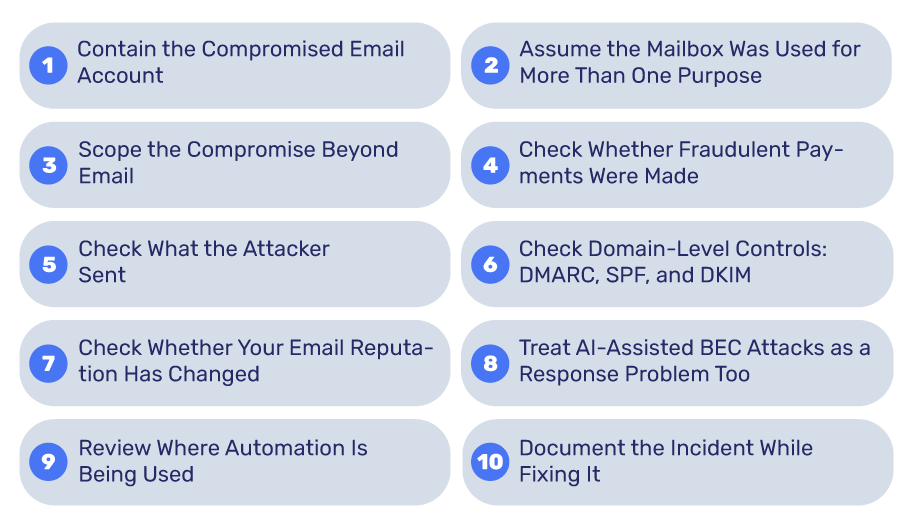
The first technical priority is to stop the attacker from continuing to operate the account. Your immediate checklist should include:
Mailbox rules deserve particular attention. An attacker may create rules that automatically forward selected messages, move security alerts out of sight, or delete communications that could expose the intrusion.
A compromised mailbox should not be treated as an isolated credential problem.
Attackers may search historical messages for invoices, supplier details, executive names, payment information, contract details, customer data, or authentication links. They may also monitor conversations before sending a fraudulent request, so the message fits naturally into an existing business relationship.
Review the mailbox for signs of reconnaissance as well as obvious fraud. Look for unusual sign-ins, new forwarding rules, deleted conversations, suspicious sent messages, and changes to account settings.
Build a timeline where possible. When did the suspicious login occur? When was the first fraudulent message sent? Did mailbox settings change before or after that event? These details help distinguish the initial access from later activity.
One of the most important distinctions in BEC response is between mailbox compromise and identity compromise.
If the attacker obtained valid credentials, other systems may also have been exposed. Check whether the account provides access to cloud storage, collaboration platforms, remote administration systems, finance applications, CRM platforms, password managers, or internal documentation.
Investigate the affected employee’s device too. A phishing page may have captured credentials without compromising the endpoint, while malware or an infostealer points to a broader problem.
This is where endpoint and IT administration data becomes valuable. The question is not only “Was this mailbox compromised?” but “What else could this identity reach?”
BEC frequently has a financial objective, so finance and IT should work together rather than treating the incident as a purely technical problem.
Compare recent payment requests against normal supplier records. Pay particular attention to:
The safest verification method is a separate, trusted communication channel. Confirm a new bank account number using established contact details, never by replying to the email that requested the change.
After containment, determine whether the compromised account was used to contact customers, suppliers, employees, or executives.
Review sent-mail records and message traces where available. Identify messages containing payment instructions, password reset links, malicious attachments, requests for confidential information, or changes to established processes.
Warn recipients quickly, particularly if they could act on an attacker-controlled instruction. A message sent from a genuine company mailbox appears far more credible than a conventional phishing email, especially when it continues an existing conversation.
Do not assume that deleting the fraudulent message from the sender’s mailbox ends the incident. Recipients may already have opened it, forwarded it, or acted on it.
DMARC, SPF, and DKIM are important BEC controls, but IT administrators need to understand what each can and cannot accomplish.
DMARC provides a policy framework for handling messages that fail authentication, with options to monitor, quarantine, or reject them. Your DMARC policy is therefore an important part of protecting your domain from spoofing.
However, it does not automatically stop an attacker who is sending from a genuinely compromised mailbox. If the criminal logs into a legitimate account and sends a message through the authorized mail service, the message can still authenticate normally.
After an incident, review your SPF, DKIM, and DMARC configuration and confirm that all legitimate sending services are correctly represented. The objective is to reduce domain impersonation while separately addressing account takeover.
A compromised account can create a second problem if attackers use it to send large volumes of malicious or unwanted email.
Review blocklists, bounce rates, spam complaints, and other sender reputation indicators. Monitoring helps establish whether the incident affected your ability to deliver legitimate mail. A dedicated email reputation service can provide additional visibility into domain and IP reputation during that process.
This matters because regaining control of a mailbox does not necessarily reverse every consequence of the attack. Other mail systems may already have reacted to the traffic generated during the compromise.
The basic objective of BEC has not changed, but the quality of impersonation has.
A recent Forbes analysis describes how attackers are combining harvested organizational information with AI-generated communications, voice cloning, and deepfake technology to make fraudulent requests more convincing. The article also reports substantial growth in reported BEC losses in the US between 2021 and 2025. AI-enhanced scams are making some traditional warning signs less dependable.
Poor grammar or an obviously generic message can no longer be treated as the main indicators of fraud. Authentication controls, transaction rules, and independent verification become more important when the message itself looks convincing.
The same organizations facing more sophisticated BEC attacks are also introducing more automation into IT operations.
Recent UK enterprise coverage points to growing use of AI in IT management, including automated handling of routine service and infrastructure tasks. AI in IT also raises the question of how much control organizations should retain as automated systems take on more responsibility.
That matters during incident response. Automated systems can identify suspicious activity, collect logs, disable accounts, or trigger workflows quickly, but their permissions need to be tightly controlled.
Security research on AI-driven workflows similarly highlights the risks that arise when autonomous systems receive privileged access to enterprise infrastructure. The incident response environment is no exception.
Audit which automated systems had standing access to the compromised identity, and confirm their permissions were scoped narrowly enough to limit the blast radius.
This step is often overlooked. Record what happened while the evidence is still available.
Capture the initial indicator, affected accounts, suspicious IP addresses, mailbox rule changes, authentication events, fraudulent messages, payment attempts, containment actions, credentials reset, systems reviewed, and notifications made. This creates a technical record for future investigations and helps identify where controls failed.
The final review should answer several practical questions:
BEC response is strongest when treated as an identity, infrastructure, financial, and communications incident at the same time. Contain the account, revoke persistence, scope the access, protect financial processes, review domain controls, preserve evidence, and verify important instructions through a channel that the compromised mailbox does not control.
What is the first step in a business email compromise response?
Contain the compromised account. Restrict it, revoke active sessions and refresh tokens, then reset the password and remove any unfamiliar MFA methods, OAuth grants, and inbox rules.
Does DMARC stop BEC attacks?
DMARC stops attackers from spoofing your domain, but it cannot stop messages sent from a genuinely compromised mailbox, because those messages pass authentication. Account takeover needs identity-level controls as well.
Is a password reset enough after an email account compromise?
No. Attackers can keep access through active sessions, refresh tokens, OAuth app consent, added MFA methods, and forwarding rules. Revoke all of these alongside the password reset.