What is TLS Reporting? How SMTP TLS Reports Detect Email Delivery Failures

by
Last Updated: 7 min read

by
Last Updated: Key Takeaways
Most SMTP TLS failures happen without anyone noticing. A certificate expires, a server drops STARTTLS support, or an attacker forces a downgrade, and the email either goes out unencrypted or never arrives, with no alert to explain why. TLS reporting exists to close that gap.
Defined in RFC 8460, SMTP TLS Reporting (TLS-RPT) gives domain owners a standardized way to find out when TLS encryption fails between mail servers, and why. This article walks through how SMTP TLS works, why it can fail, what a real TLS-RPT report looks like field by field, and the specific failure types you’ll run into once you start reading them.
To understand why TLS reporting matters, it helps to know why SMTP needed it in the first place.
SMTP dates back to 1982. At the time, email was a small, trusted network, and the protocol was designed without an encryption layer. Messages moved between servers in plain text by default.
That gap stayed open for decades. Encryption was bolted on later, as an option rather than a requirement, which is where the next problem starts.
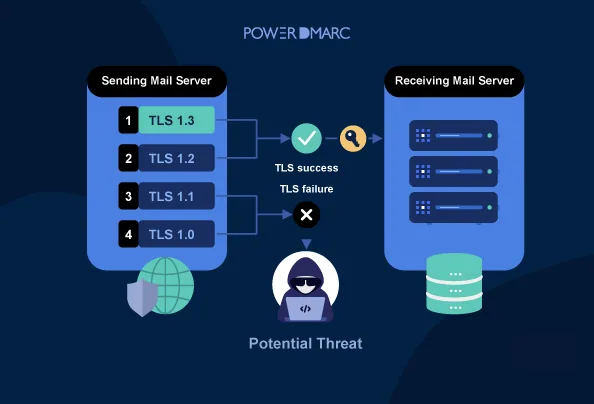
STARTTLS lets a sending server ask a receiving server to upgrade a plain-text connection to an encrypted one. If both sides support it, the message travels encrypted. If either side doesn’t, or if something interferes with the handshake, the connection quietly falls back to plain text and the email still goes through.
That fallback is the core problem TLS-RPT was built to expose. Nothing in standard SMTP tells you when a message was sent unencrypted, whether that happened because of a misconfiguration or because someone actively stripped the STARTTLS command in transit.
TLS-RPT is a reporting standard, defined in RFC 8460, that lets domain owners receive regular, structured reports on TLS connection failures for emails sent to their domain. It doesn’t stop failures from happening. It tells you when they happened, how often, and why, so you can fix the underlying problem.
For the full breakdown of RFC 8460’s report fields and how to publish a TLS-RPT DNS record, see our detailed guide on TLS-RPT.
TLS-RPT and MTA-STS work as a pair. MTA-STS is the enforcement mechanism: it tells sending servers that mail to your domain must go over an encrypted, authenticated connection, or not go at all. TLS-RPT is the visibility mechanism: it reports back on what happened whenever that encrypted connection couldn’t be established. One sets the rule, the other tells you when the rule gets triggered.
For detailed setup steps on how to configure MTA-STS for your domain, you can see our MTA-STS implementation guide.
TLS-RPT reports arrive as JSON, which is not exactly human-readable. Below is a shortened, realistic example based on the RFC 8460 format, with a successful session summary and a failed one, followed by a plain-English breakdown of each field.
JSON
{
  "organization-name": "Google Inc.",
  "date-range": {
    "start-datetime": "2026-07-01T00:00:00Z",
    "end-datetime": "2026-07-01T23:59:59Z"
  },
  "contact-info": "[email protected]",
  "report-id": "[email protected]",
  "policies": [
    {
      "policy": {
        "policy-type": "sts",
        "policy-string": [
          "version: STSv1",
          "mode: enforce",
          "mx: mail.yourdomain.com",
          "max_age: 604800"
        ],
        "policy-domain": "yourdomain.com"
      },
      "summary": {
        "total-successful-session-count": 4821,
        "total-failure-session-count": 3
      },
      "failure-details": [
        {
          "result-type": "certificate-expired",
          "sending-mta-ip": "209.85.220.41",
          "receiving-mx-hostname": "mail.yourdomain.com",
          "receiving-mx-helo": "mail.yourdomain.com",
          "receiving-ip": "203.0.113.45",
          "failed-session-count": 2,
          "additional-information": "https://support.google.com/mail/answer/tls-rpt-cert-expired"
        },
        {
          "result-type": "starttls-not-supported",
          "sending-mta-ip": "209.85.220.41",
          "receiving-mx-hostname": "mail2.yourdomain.com",
          "receiving-ip": "203.0.113.46",
          "failed-session-count": 1
        }
      }
    }
  ]
} TLS-RPT reports use a fixed set of result-type values. Here are the ones that show up most often, what each one means, and what to do about it.
The receiving server’s TLS certificate had passed its expiration date. Renew the certificate before it lapses, and set a reminder well ahead of the next expiry.
The certificate presented doesn’t match the hostname the sending server expected. This usually points to a misconfigured certificate or a DNS record pointing to the wrong host.
The receiving server didn’t respond to the STARTTLS command at all. Check that TLS is properly enabled on that mail server, and confirm the server software actually supports it.
The sending server couldn’t retrieve your MTA-STS policy file over HTTPS. Verify the policy file is reachable, correctly formatted, and served with a valid certificate.
The connection attempted to negotiate a TLS version that the sending server considers outdated or insecure. Update your mail server’s TLS configuration to drop legacy protocol versions. For certificate-related validation issues specifically, see our guide on DANE.
SMTP TLS reporting is beneficial for a wide variety of reasons. Below are some of them:

TLS-RPT surfaces cases where a connection was forced into an unencrypted channel, which is exactly the pattern behind a MITM downgrade attack. Without reporting, that kind of interception can go on indefinitely without anyone knowing.
Without TLS-RPT, there’s no reliable way to know why emails to your domain failed, or whether they were delivered without encryption. The reports show exactly where and why a TLS connection broke down, instead of leaving you to guess.
Reading through server logs to trace a delivery problem takes time. TLS-RPT reports point directly to the failing server, the failure type, and how often it happened, which cuts troubleshooting from days to minutes.
TLS-RPT reports arrive as raw JSON files, and reading them by hand across multiple sending sources gets old fast. PowerDMARC converts these reports into readable dashboards automatically, aggregated by result type and by sending source, so you can see what’s failing and where without opening a single JSON file.
We help domain owners:
Start a free trial or book a demo to see it on your own domain’s data.
1. What is TLS reporting used for?
TLS reports are used to detect and diagnose failures in encrypted email delivery, including expired certificates, misconfigured servers, and downgrade attacks, by generating regular reports on what went wrong and why.
2. Is SMTP TLS reporting the same as TLS-RPT?
Yes. “SMTP TLS reporting” and “TLS-RPT” refer to the same RFC 8460 standard. TLS-RPT is the shorthand name for the protocol.
3. How do I set up TLS reporting for my domain?
To set it up for your domain, simply publish a TLS-RPT DNS record specifying where reports should be sent. You can generate one with our TLS-RPT record generator and confirm it’s live with our TLS-RPT checker.
4. What happens if I don’t enable TLS-RPT?
If you don’t enable TLS-RPT, mail servers will still attempt TLS encryption on their own, but you won’t get any visibility into failures. Downgrade attacks, expired certificates, and misconfigured servers can go unnoticed indefinitely.
5. Does TLS-RPT work without MTA-STS?
Yes, TLS-RPT can report on TLS failures independently. But it’s most useful paired with MTA-STS, since MTA-STS enforces encrypted delivery and TLS-RPT reports on what happened when that enforcement kicked in.
6. How often are SMTP TLS reports sent?
Most senders generate and deliver reports roughly once every 24 hours, though the exact interval can vary by provider.


 How to Set Up DMARC for Google Workspace (Gmail)