What Happens When AI Chatbots Leak Internal Business Data?

by
Last Updated:
6 min read

by
Last Updated:
Key Takeaways
An AI chatbot data leak rarely stays contained to the original conversation. You may need to replace passwords, notify customers under privacy law, write off confidential documents, or deal with phishing and payment fraud built from the leaked context.
Employees pasting confidential text into a public chatbot is only one entry point. Connected AI assistants can search your inbox, cloud storage, CRM and internal messages. Give one of these assistants excessive permissions, or let it follow malicious instructions hidden inside a document, and a single interaction can turn into a wider data breach.
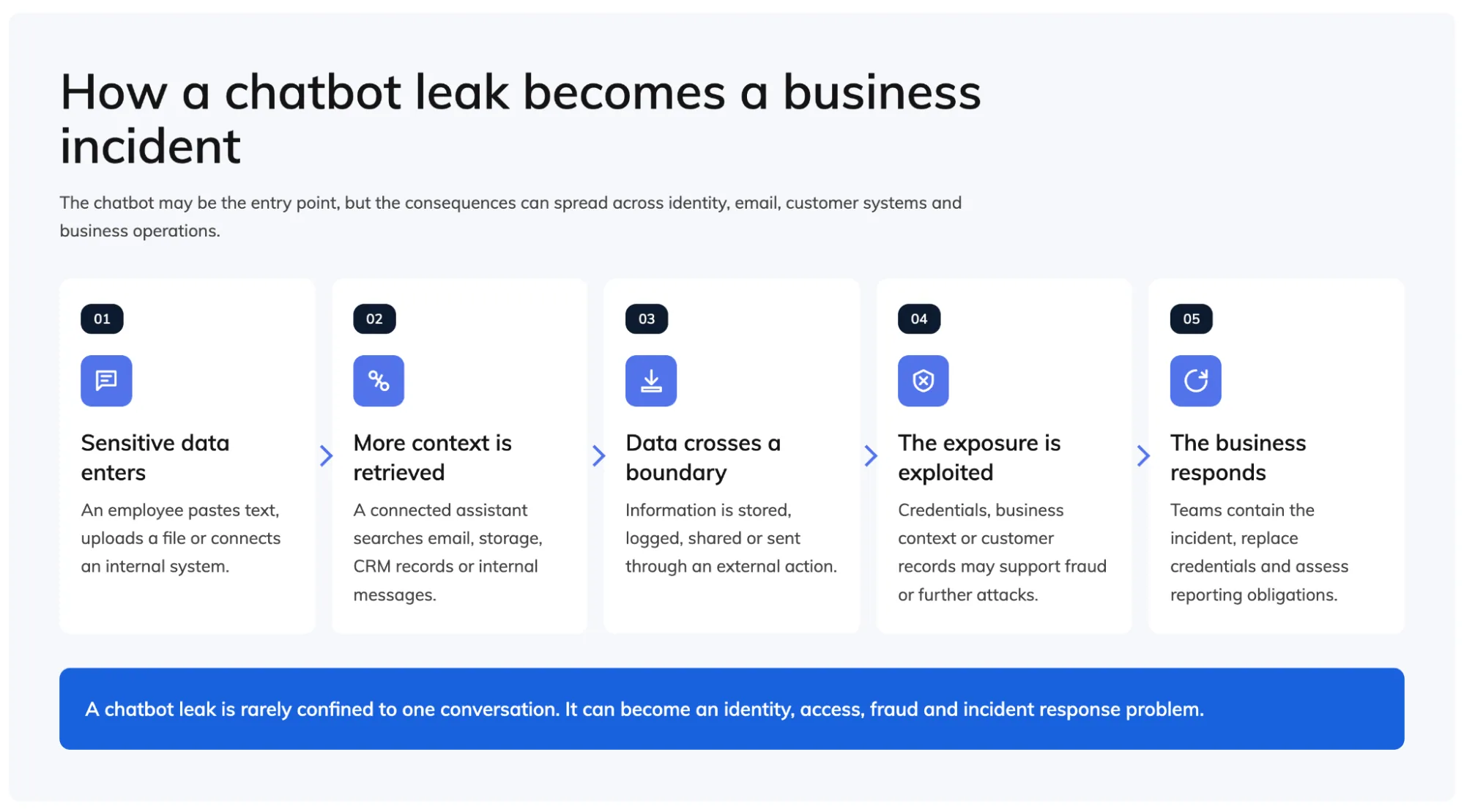
A chatbot data leak starts through one of three routes:
An employee might upload source code for debugging, paste customer information into a writing assistant, or submit meeting notes for summarising. Most are just trying to work faster.
A public or unapproved AI tool sits outside your normal business environment. Once an employee submits information, you may lose control over how it’s logged, retained or handled.
This is one part of the wider cybersecurity risks of generative AI, which include phishing, impersonation, fraud and intellectual property theft.
A basic chatbot may only see the current conversation. A connected assistant can search email, shared drives, calendars, internal chat, customer records, and code repositories.
That creates a permission problem. The assistant may not need to break into a restricted folder. It can make broad, outdated, or poorly configured permissions easier to use.
Say an employee asks for a summary of discussions about an upcoming restructure. The assistant could locate draft HR documents and management emails the employee had access to on paper, but would never have found by hand.
An attacker can hide instructions inside an email, webpage, document, or support ticket. If it reads that content, the assistant may mistake the attacker’s words for an authorised command.
This is indirect prompt injection. An attacker can use a poisoned document to push the assistant into searching for confidential files, revealing account details, or contacting an external service. The employee may only have asked it to summarise an ordinary-looking file.
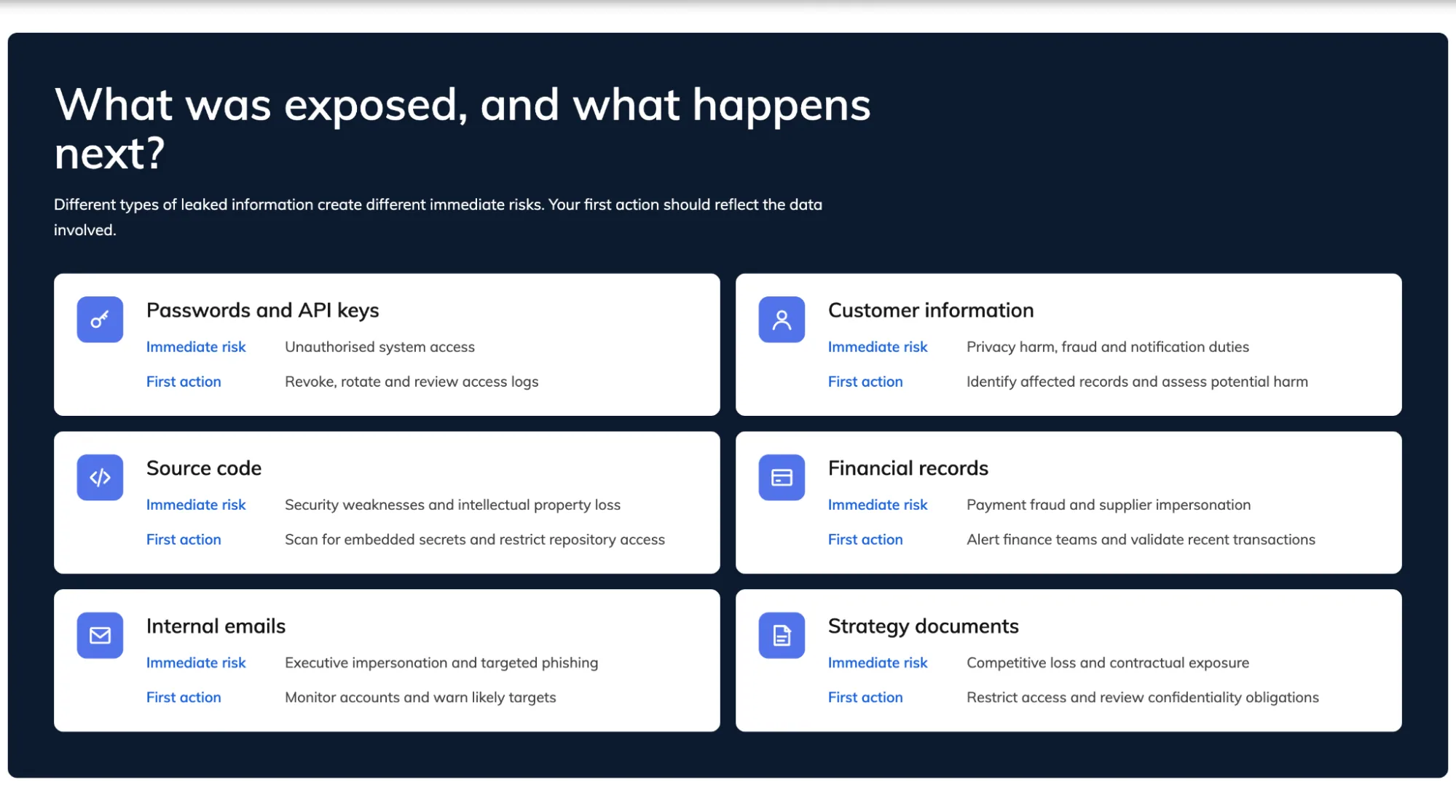
The outcome depends on what was exposed, which systems the chatbot could access and whether the information left the approved environment.
If leaked material contains passwords, API keys, authentication tokens or database credentials, assume they may have been copied.
Deleting the conversation is not enough. Revoke and replace the credentials, check whether they were used and remove them from affected files and repositories.
Internal documents can show who approves payments, how executives write, and which suppliers you use. They can also reveal what invoices look like and when decision-makers are travelling.
An attacker can use that context to create convincing business email compromise, supplier impersonation or executive fraud.
DMARC won’t stop an employee from uploading a confidential document, but it can stop attackers from spoofing your domain to weaponise that leaked context in fraudulent email.
Source code, product plans, pricing models and tender information can lose their commercial value the moment the wrong person has them.
A leak can create contractual problems if customer information or partner-owned material went through an unapproved tool. Depending on the data and jurisdiction, you may need to review privacy laws, confidentiality clauses and data processing agreements. Check your cyber insurance terms and reporting duties too.
“The biggest mistake is treating AI data leakage as a prompt problem. Once a chatbot can search email, files and CRM records, it becomes an identity, access and incident response problem.”
Brad Russell, Founder of Digital Hitmen
You may need legal advice, digital forensics and credential replacement. Customer communications, system monitoring and temporary AI restrictions can follow.
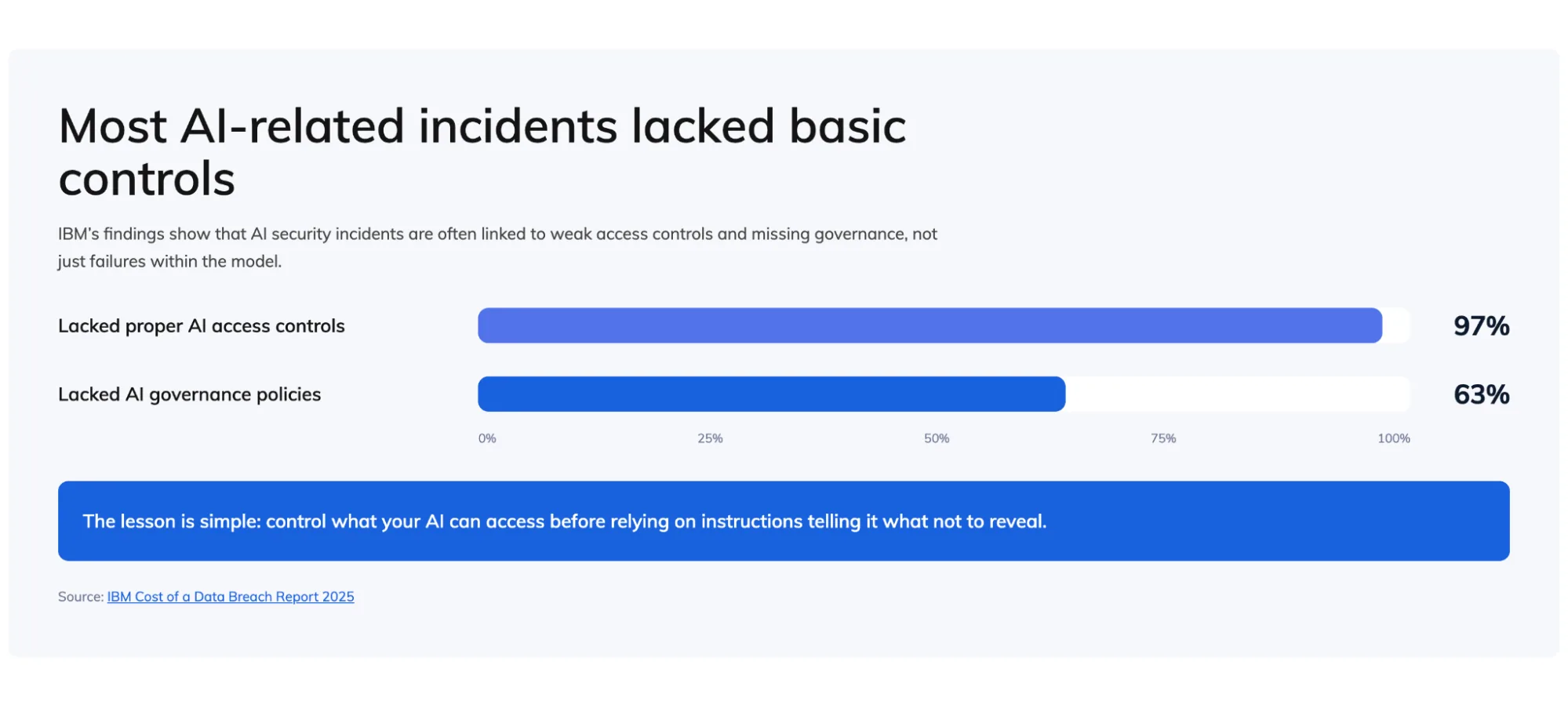
IBM’s 2026 Cost of a Data Breach Report puts the global average cost of a data breach at USD 4.99 million, a record high, with AI-driven attacks up 56% year on year. Among organisations that reported an AI-related security incident, 92% lacked proper AI access controls, and only 40% of organisations use access controls on AI models and data at all. These numbers point to AI security failures as access and governance failures more than model failures.
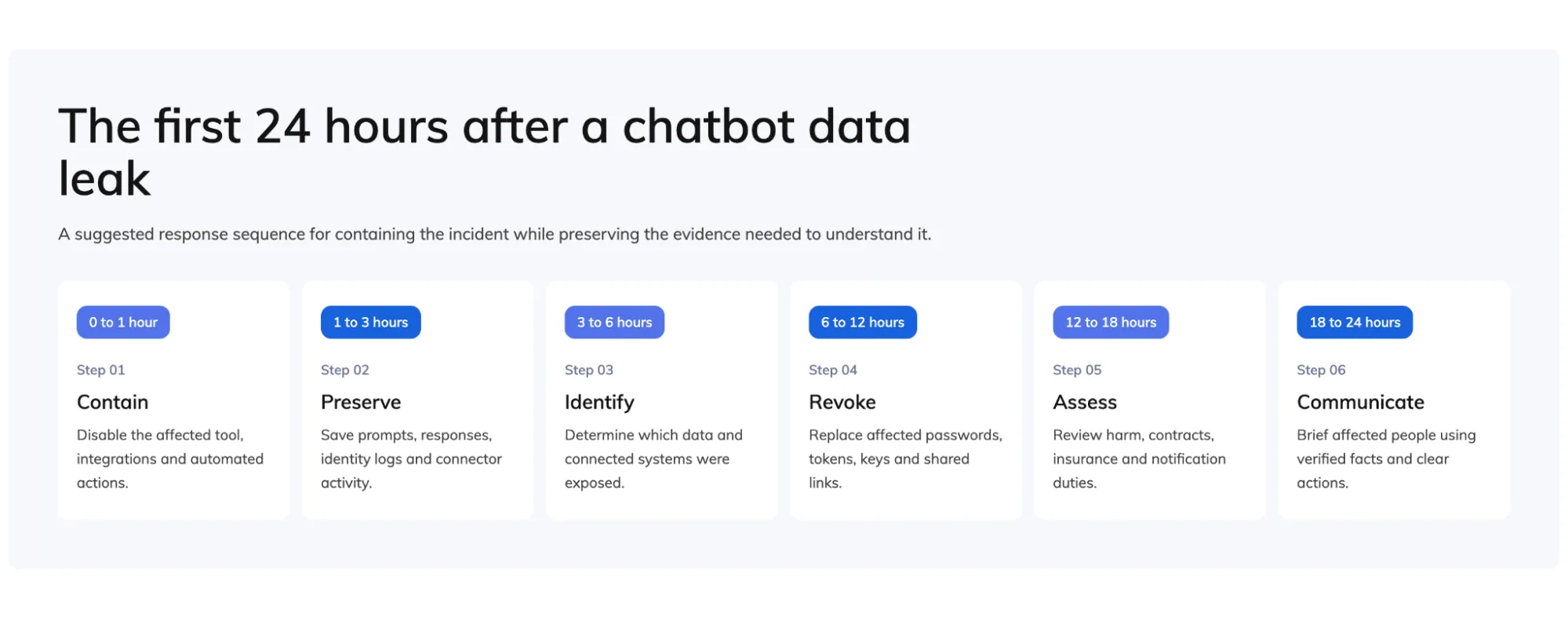
Your priority is to contain the incident without destroying the evidence needed to understand it.
Disable or restrict the account, and cut its access to connected email, storage, CRM, browser and messaging systems. Pause automated external actions, but do not wipe the account before preserving relevant logs.
Collect:
You need to establish what the assistant saw, retrieved and did.
Determine:
Do not assume the visible response shows the full extent of the incident.
Replace affected passwords, keys, tokens and shared links now. Review sign-in and access records for suspicious activity after the suspected exposure.
Review your legal, regulatory, contractual and insurance obligations. Obtain legal advice when the incident includes personal information, privileged material, major customer data or sensitive intellectual property.
Tell affected people what’s confirmed, what you’re still investigating, and what they should do next. Avoid claiming no one accessed the data until the evidence backs that up.
You need several layers of control. Employee training helps, but it cannot carry the entire defence.
A blanket ban can push employees towards personal accounts and shadow AI. Give staff an approved business tool with central administration and audit logging. Add retention controls, managed connectors and single sign-on on top. Building that environment in-house typically runs $15,000–$35,000 for a governed RAG deployment, according to Merehead’s cost breakdown.
Specify What Staff Must Not Enter into Public or Unapproved Tools, Including:
“Do not share sensitive data” is too vague to guide behaviour.
Data loss prevention controls can inspect prompts, uploads and copied text for credentials, personal information and payment data. They can also flag source code and confidential labels. Depending on the risk, the control can warn, redact, block or require approval.
Every connected assistant should have access only to the systems and records required for its task.
In Microsoft environments, security teams can block high-risk AI agents in Microsoft Entra using Conditional Access. PowerDMARC notes that this applies to agent identities, while agents using a person’s delegated permissions require separate user-focused controls.
Require human approval before an assistant sends external email, exports data or shares documents. The same goes for changing permissions, creating payment requests, contacting an unfamiliar domain or executing code.
AI leakage and email fraud can reinforce each other. Use SPF, DKIM and DMARC enforcement alongside multi-factor authentication and email filtering. Add independent verification for payment or account changes on top.
Email authentication won’t prevent every chatbot leak, but it makes your domain harder to impersonate once an attacker has useful internal context to work with.
Don’t treat a chatbot data leak as an isolated employee mistake, or a conversation you can delete and forget.
An AI assistant with access to email, business files and customer systems raises the stakes. A leak can expose credentials, support fraud, trigger contractual obligations, or require a formal incident response.
You don’t need to avoid AI. Treat every connected assistant as a privileged system user. Limit what each assistant can read and send, log what it does, and make sure you can switch it off fast if something goes wrong.

 Microsoft Quarantine: How to Find and Release Quarantined Emails in Outlook