What Is a Man-in-the-Middle (MITM) Attack? How It Works, Types & Prevention

by
Last Updated: 9 min read

by
Last Updated: Key Takeaways
Man-in-the-middle attacks are one of the oldest tricks in network security, and they’re still effective today because they don’t target encryption directly. They target the path data travels, whether that’s a local network, a DNS lookup, or the routing tables that move traffic across the internet. Once an attacker gets into that path, they can sit quietly between two parties who have no reason to suspect anything is wrong, since both sides keep receiving what looks like a normal response.
This guide breaks down how these attacks actually work, the different forms they take, how to spot one before real damage is done, and the specific defenses that address each layer, including the email-focused angle that most explainers on this topic skip entirely.
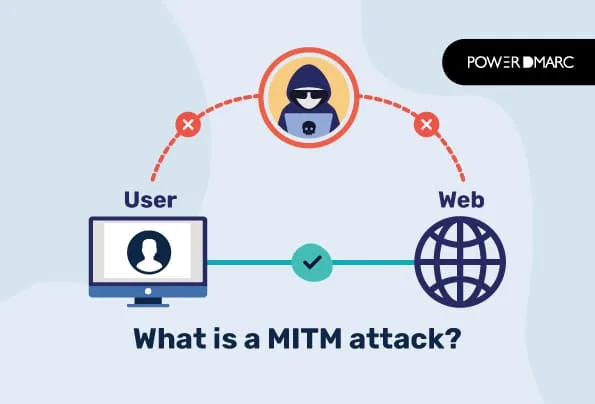
A man-in-the-middle (MITM) attack happens when an attacker positions themselves between two communicating parties and intercepts, reads, or alters the data passing between them. It can be a person and a website, two mail servers, or a device and a Wi-Fi router. Neither party realizes anything is wrong, because the attacker relays traffic in both directions and can make the connection look completely normal.
The classic analogy is a postal worker who opens your letters, reads them, reseals them, and drops them back in the mail. You get your letter. The sender thinks it arrived untouched. But someone read it along the way, and if they wanted to, they could have changed a few words before sending it on.
MITM attacks matter because they don’t rely on breaking encryption through brute force. They rely on getting into the path traffic travels, whether that’s a local network, a DNS lookup, or a routing table, and exploiting the fact that many systems trust that path by default.
Most MITM attacks follow a similar sequence, regardless of which technique the attacker uses to get into position:
The attacker essentially becomes an invisible relay. As long as both sides keep receiving what looks like a normal response, the attack can continue for as long as the attacker maintains that position.
MITM isn’t a single technique. It’s a category of attacks that share the same goal (getting between two communicating parties) but use different methods to get there.
ARP spoofing is the most common MITM technique on local networks, like an office LAN or an unsecured public network. The Address Resolution Protocol (ARP) maps IP addresses to the physical (MAC) addresses of devices on a local network, and it has no built-in verification. An attacker sends forged ARP messages that associate their own MAC address with the IP address of a legitimate device, such as the network’s router. Once devices on the network update their ARP tables with this false mapping, traffic meant for the router gets sent to the attacker instead.
DNS spoofing (also called DNS cache poisoning) involves feeding a device or resolver a forged DNS response, one that maps a legitimate domain name to an IP address the attacker controls. If it works, victims trying to reach a real website or mail server get silently redirected to an attacker-controlled server instead, often used for credential theft or phishing. This is also where DNS security becomes relevant to email specifically, since a poisoned MX record lookup can redirect where a sending server thinks a recipient’s mail server lives.
HTTPS is supposed to prevent MITM attacks by encrypting the connection between a browser and a website. SSL stripping works around this by intercepting the initial connection request and quietly downgrading it from HTTPS to plain HTTP before the browser establishes an encrypted session, so the victim’s traffic travels in plaintext while the address bar may still look deceptively normal on unpatched or older browsers. Modern browsers and HSTS (HTTP Strict Transport Security) have made this harder to pull off than it was a decade ago, but it remains a documented technique against systems that don’t enforce HTTPS consistently.
An evil twin attack involves setting up a rogue Wi-Fi access point that mimics a legitimate one, often using the same or a very similar network name. Victims who connect to it, sometimes automatically because their device remembers a network with that name, send all their traffic through the attacker’s equipment. This is one of the most common MITM vectors in public spaces like airports, cafes, and hotels, precisely because it requires no access to the victim’s device or the real network.
Border Gateway Protocol (BGP) is what internet service providers use to announce which IP address ranges they’re responsible for routing. BGP has no built-in authentication, so a network operator, whether through misconfiguration or malicious intent, can falsely announce that it owns IP ranges belonging to someone else. Other networks that accept the false announcement start routing traffic for those addresses through the attacker’s network instead. This is a routing-level attack rather than a local one, and it can affect large volumes of traffic at once.
In April 2018, attackers exploited exactly this to hijack IP prefixes belonging to Amazon’s Route 53 DNS service, rerouting lookups for the cryptocurrency wallet site MyEtherWallet to a malicious server and stealing roughly $150,000 in Ethereum from users who were redirected to a phishing page.
Email has its own version of this problem. When one mail server delivers a message to another, it typically upgrades the connection to an encrypted one using a command called STARTTLS.
The catch is that STARTTLS is opportunistic by default: if the connection can’t be upgraded, most mail servers will still send the message in plaintext rather than fail the delivery. An attacker sitting on the network path between two mail servers can intercept the STARTTLS negotiation and strip it out, so the sending server never sees the offer of encryption and falls back to sending the message unencrypted. This is called a STARTTLS downgrade attack, and it’s specifically named as a threat that MTA-STS (RFC 8461) was designed to close. A sender that enforces an MTA-STS policy will refuse delivery rather than fall back to plaintext when TLS can’t be verified.
Lenovo Superfish (2015)
Lenovo shipped a batch of consumer laptops with pre-installed adware called Superfish that intercepted users’ browsing to inject targeted ads, including on HTTPS sites. To do this, it installed its own self-signed root certificate on every affected machine, and that certificate shared the same private key across all installations.
Once researchers extracted the key, anyone could impersonate any HTTPS website to any affected Lenovo laptop without triggering a browser warning, turning a piece of adware into a ready-made MITM tool for public Wi-Fi attackers. CISA published an advisory confirming the vulnerability and instructing users to remove both the software and the certificate.
The 2018 MyEtherWallet BGP hijack
As described above, attackers used a BGP hijack against Amazon’s Route 53 DNS infrastructure to redirect traffic for a cryptocurrency wallet site to a server they controlled, stealing user funds in the process.
Cloudflare, whose own DNS resolver was affected by the leaked routes, documented the incident in detail shortly after it happened. It’s one of the clearest illustrations of how a routing-level MITM attack can affect users who did nothing wrong on their own devices.
Public Wi-Fi credential theft
This one is more mundane but far more common day-to-day. An attacker sets up an open or evil-twin Wi-Fi network in a public space, waits for people to connect, and then either eavesdrops directly on unencrypted traffic or uses techniques like ARP spoofing and SSL stripping to capture login credentials submitted over the connection.
CISA lists this as a specific risk of connecting to public hotspots and recommends avoiding sensitive logins or transactions on them without a VPN.
MITM attacks are designed to be invisible, but they usually leave a few traces if you know where to look:
No single control stops every type of MITM attack, since the techniques operate at different layers, from the local network up to internet routing. A layered approach covers more ground:
Most guides to MITM attacks focus on browsing traffic and stop there. Email has its own exposure to this same category of attack, and it’s one that’s often overlooked. Because STARTTLS is opportunistic, an attacker who can intercept the connection between two mail servers can strip the encryption offer and force the message through in plaintext, all without either mail server necessarily flagging it as an error.
MTA-STS closes this gap. By publishing an MTA-STS policy in enforce mode, a domain tells every sending mail server that it always supports TLS and lists exactly which servers are authorized to receive its mail. If a sending server can’t establish TLS to a server that matches the policy, it refuses to deliver rather than silently falling back to plaintext. Because the policy itself is fetched over HTTPS rather than negotiated during the SMTP handshake, an attacker can’t tamper with it the same way they can strip a STARTTLS offer.
DANE adds another layer on top of this. Rather than relying on the traditional certificate authority system, DANE publishes a TLSA record in DNS that specifies exactly which certificate a mail server should present. Because DANE depends on DNSSEC, the TLSA record itself is protected against the kind of DNS spoofing described earlier in this article, giving sending servers a cryptographic way to confirm they’re really talking to the intended recipient’s mail server.
Together, MTA-STS and DANE address the two things opportunistic STARTTLS was never built to guarantee: that encryption will actually be used, and that the server on the other end is the right one. PowerDMARC hosts both, so domains can enforce encrypted, verified mail delivery without manually managing DNS records or web-hosted policy files.

Note: Transport encryption only protects the connection. It doesn’t stop someone from spoofing your domain in the “From” field of an email that never touches your mail servers at all. That’s what DMARC is for, and the two protections work best together rather than as substitutes for one another.
What is the purpose of a MITM attack?
The goal is almost always to intercept, read, or alter communication that both parties believe is private. Depending on the attacker’s motive, that can mean stealing login credentials, redirecting financial transactions, injecting malicious content into a legitimate connection, or simply surveilling traffic without either party’s knowledge.
Can HTTPS prevent MITM attacks?
HTTPS makes MITM attacks significantly harder by encrypting traffic between a browser and a website, but it isn’t a complete guarantee on its own. Techniques like SSL stripping, forged or compromised certificates, and evil twin Wi-Fi networks that intercept traffic before HTTPS is established can still create openings. Pairing HTTPS with HSTS and certificate pinning closes most of those gaps.
What is the most common type of MITM attack?
On local networks, ARP spoofing is the most common technique because it requires no special access beyond being on the same network. In public spaces, evil twin Wi-Fi attacks are more common because they don’t even require compromising an existing network.
How does MTA-STS prevent email MITM attacks?
MTA-STS stops STARTTLS downgrade attacks by letting a domain declare, over HTTPS rather than through the SMTP handshake itself, that it always requires TLS for incoming mail. Sending servers that support MTA-STS will refuse to deliver mail in plaintext to a domain with an enforced policy, closing the opportunistic gap that STARTTLS leaves open on its own.
Is a MITM attack the same as eavesdropping?
They’re related but not identical. Eavesdropping typically means passively listening to traffic without altering it. A MITM attack goes further: the attacker actively positions themselves in the communication path and can read, modify, inject, or block traffic in either direction, not just observe it.


 DMARC Tester – DMARC Testing Methods Explained