What Is Email Security? Threats, Protocols and Best Practices

by
Last Updated:
12 min read


by
Last Updated:
Key Takeaways
Email security is the set of technologies, policies, and practices that protect email accounts, messages, and domains from unauthorized access, phishing, spoofing, malware, and data loss. This guide breaks down the most critical threats facing modern organizations, the technical protocols required to secure mail flow, and an actionable best-practice checklist to protect both your inbox and your brand reputation.
Email security encompasses the tools, cryptographic standards, and administrative procedures designed to protect electronic mail communication from compromise. Crucially, comprehensive email security operates across two distinct fronts:
Most legacy security frameworks focus exclusively on inbound perimeter filtering. However, leaving the domain unprotected exposes your organization to direct domain spoofing and deliverability penalties from major mailbox providers. Email security establishes enhanced control over inbound inspection and outbound domain legitimacy.
Email remains the primary communication protocol for modern commerce, handling contracts, invoices, financial credentials, and operational correspondence. Because Simple Mail Transfer Protocol (SMTP) was originally engineered without built-in identity verification, email has also become the single most targeted attack vector in cybersecurity.
According to the Federal Bureau of Investigation (FBI) Internet Crime Complaint Center (IC3), Business Email Compromise (BEC) alone accounted for $3.05 billion in reported losses in 2025, second only to investment fraud. When attackers compromise an email account or impersonate an executive, they bypass perimeter firewalls by exploiting human trust.
Beyond direct financial theft, inadequate email security introduces severe compounding risks:
Attackers deploy diverse social engineering and technical exploitation methods across the email ecosystem. Mitigating these risks requires understanding how each threat operates.
Phishing uses deceptive emails designed to look like legitimate notifications from banks, software vendors, or internal departments to lure recipients into disclosing credentials or sensitive information. Spear phishing elevates this tactic by researching specific individuals, tailoring messages with personal or job-specific details to dramatically increase the likelihood of deception.
Between August 3 and August 5, 2026, Microsoft detected a large-scale invoice-fraud campaign that sent more than one million phishing emails, primarily targeting accounts payable teams to trick them into authorizing fraudulent payments of nearly $50,000.
Business Email Compromise is a sophisticated form of fraud where attackers impersonate corporate executives, trusted vendors, or legal advisors. Rather than relying on malicious links or attachments, BEC attacks typically use conversational social engineering to request urgent wire transfers, payroll changes, or vendor payment rerouting. Because these messages often contain no malicious payloads, standard antivirus engines struggle to detect them.
In a direct email spoofing attack, an unauthorized sender inserts a legitimate company’s domain directly into the visible From: header of an email. Recipients see an exact match for the legitimate company address. Domain impersonation damages company reputations by using this forgery to deceive recipients into paying fake invoices or sharing sensitive records.
Threat actors embed malicious scripts into everyday business documents such as PDFs, macro-enabled spreadsheets, or compressed archives. Once an employee opens the attachment, the payload executes, establishing a backdoor, harvesting stored credentials, or encrypting enterprise storage systems for ransom.
Account takeover occurs when an unauthorized user gains full access to a legitimate corporate mailbox, typically through credential stuffing, session hijacking, or successful credential-harvesting phishing campaigns. Once inside, attackers review internal threads, monitor ongoing transactions, and launch hyper-credible attacks from the legitimate sender’s mailbox against internal colleagues and external partners.
When organizations successfully block direct spoofing using strict authentication policies, attackers frequently pivot to lookalike domain phishing attacks (also known as cousin domains or typo-squatting). Attackers register domains that look almost identical to the target organization (for example, replacing an “m” with “rn” or adding a subtle hyphen) to deceive inattentive recipients.
Note: While some legacy frameworks categorize email security into digital, physical, and administrative controls, modern technical architectures organize defenses around these six operational layers to establish defense-in-depth across the entire mail flow.
Email security relies on independent, cooperative checkpoints applied at each phase of an email’s lifecycle. A secure message moves through three primary stages:
Internet email operates on open architectural standards established by the Internet Engineering Task Force (IETF). Understanding these protocols is critical to configuring a dependable domain defense.
| Protocol | Primary Function | Key Technical Limitation | Where It Is Configured |
|---|---|---|---|
| SPF (RFC 7208) | Authorizes specific server IPs to send mail for a domain | Checks the envelope sender and can also check the HELO identity; does not protect visible From header or survive forwarding | DNS TXT Record |
| DKIM (RFC 6376) | Cryptographically verifies message integrity and sender attribution | Does not validate visible From address or instruct receiver actions on failure | DNS TXT Record & Outbound Server |
| DMARC (RFC 9989) | Aligns visible From with SPF/DKIM; can request receivers to reject fakes | Does not inspect message content or prevent lookalike domain registrations | DNS TXT Record |
| BIMI | Displays authenticated brand logos in supporting mailboxes | Relies entirely on underlying DMARC enforcement; does not authenticate mail alone | DNS TXT Record, HTTPS SVG, VMC |
| TLS (RFC 8446) | Encrypts server-to-server mail transit over SMTP | Operates hop-by-hop; opportunistic STARTTLS is vulnerable to downgrade attacks | Mail Server (MTA) Transport Layer |
| MTA-STS & TLS-RPT (RFC 8461/8460) | Enforces mandatory TLS for inbound mail and reports delivery failures | Requires dedicated HTTPS policy server and DNS records; protects transit only | DNS TXT & HTTPS Web Server |
| S/MIME (RFC 8551) | Provides end-to-end payload encryption and non-repudiation | Requires client-side certificate management; cannot be inspected by cloud SEGs | Email Client (MUA) & User Keys |
| IMAPS & POP3S (RFC 8314) | Secures client-to-server mailbox retrieval and credential sync | Only protects the local access leg; does not protect external server transit | Mailbox Server & Client Ports |
SPF (defined in RFC 7208) allows a domain owner to publish, in DNS, the servers and IP ranges permitted to send email on their behalf, using mechanisms such as ip4, ip6, a, mx, include and exists.
Critical Technical Nuance: SPF evaluates the envelope sender address (the RFC 5321 MAIL FROM identity or Return-Path), not the visible From: address displayed to the user in their email client (RFC 5322 From:). Consequently, SPF alone cannot stop an attacker from forging your brand in the visible header. Furthermore, SPF frequently fails when emails are forwarded automatically by third-party mail relays, as the forwarder’s IP address will not match your SPF record.
DKIM (defined in RFC 6376) adds a cryptographic digital signature to outbound emails. The sender calculates a cryptographic hash of designated header fields and the message body, signs the hash using an organizational private key, and inserts the result as a DKIM-Signature header. The receiving server queries the public key published in the sender’s DNS (at selector._domainkey.domain.com) to verify the signature.
DKIM guarantees that signed portions of the message were not altered during transit. However, DKIM alone does not verify whether the domain listed in the d= tag of the signature matches the visible header From: address.
DMARC (defined in RFC 9989) ties SPF and DKIM together by introducing Identifier Alignment. DMARC requires the domain in the visible From: header to match the domain validated by SPF (the MAIL FROM domain) or by DKIM (the d= signature domain). Under relaxed alignment, the default, an organizational-domain match is enough (mail.example.com aligns with example.com); strict alignment requires an exact match.
Note: Under RFC 9989, an email passes DMARC if at least one underlying mechanism (SPF or DKIM) passes authentication AND achieves identifier alignment with the visible RFC 5322 From: domain. SPF and DKIM don’t both need to pass. If an email breaks SPF due to forwarding, but retains an intact, aligned DKIM signature, DMARC evaluates to PASS.
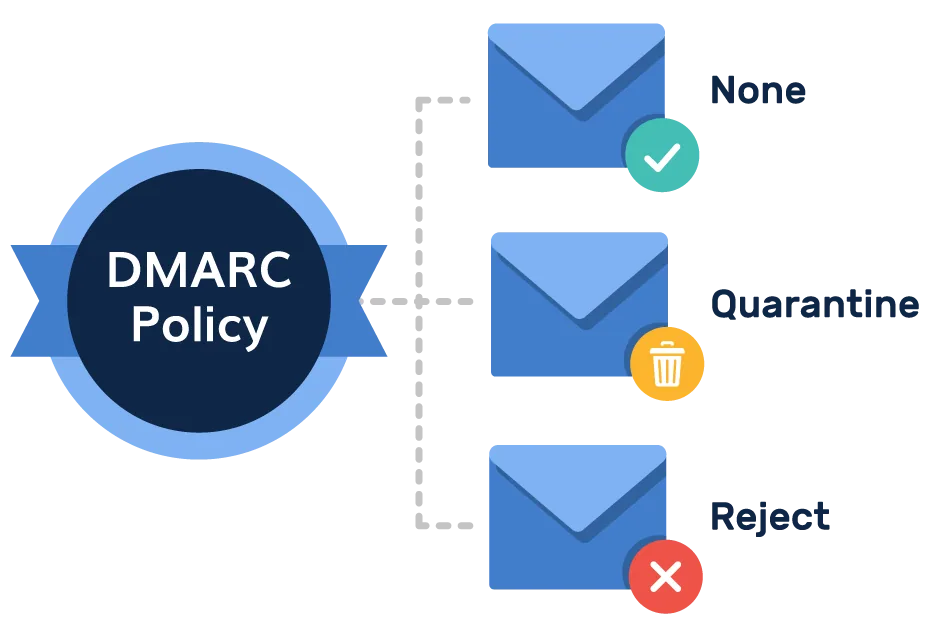
Domain owners publish their policy via a DNS TXT record (_dmarc.domain.com), defining the domain owner’s handling preference for failed messages (note that the decision of whether or not to honor the preference lies with the receiver):
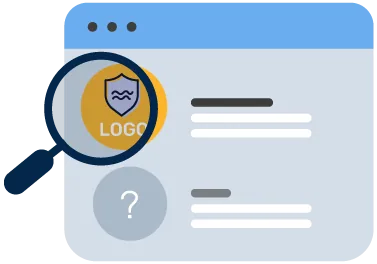
BIMI builds on DMARC enforcement to increase brand visibility. Once a domain enforces DMARC at p=quarantine or p=reject on both the Organizational Domain and the From domain (subdomain policy cannot be none), the domain owner publishes a DNS TXT record to enable the protocol that holds an l= URI pointing to the SVG logo.
Supporting mailbox providers (including Gmail, Yahoo, and Apple Mail) can display this official logo beside authenticated messages in the inbox.
Gmail requires a Verified Mark Certificate (VMC) or Common Mark Certificate (CMC) from a recognized certification authority to display the logo; only a VMC, which validates trademark ownership, adds the blue verification checkmark.
However, it is important to note that even after meeting all requirements, the display of logos and verified checkmarks is never guaranteed.
In SMTP communication, TLS encrypts data in motion between connecting mail servers using the STARTTLS command (RFC 3207).
Critical Technical Nuance: Unlike web browsing (HTTPS), which operates end-to-end between your browser and the web server, standard SMTP TLS operates hop-by-hop. If an email passes through intermediate security gateways or relays, the message is decrypted at each hop. Furthermore, default STARTTLS is opportunistic: if an active attacker intercepts the connection and strips the STARTTLS directive (a downgrade attack), mail servers quietly fall back to cleartext transmission.
Related read: Difference between SSL and TLS
SMTP Mail Transfer Agent Strict Transport Security (MTA-STS, RFC 8461) closes the opportunistic TLS vulnerability. By publishing an MTA-STS policy via DNS and an HTTPS endpoint, a domain owner explicitly instructs external sending servers that all connections to their mail exchangers must use TLS with valid, unexpired certificates. If secure TLS negotiation fails, the sending server refuses to deliver the message in cleartext.
SMTP TLS reporting (TLS-RPT, RFC 8460) complements MTA-STS. Sending mail servers generate automated JSON aggregate reports back to the domain owner, detailing any transport-layer failures, expired certificates, or potential man-in-the-middle tampering.
Defined in RFC 8551, S/MIME provides true end-to-end encryption (E2EE) and cryptographic non-repudiation. S/MIME encrypts and signs the actual email body and attachments at the email client level using individual public key infrastructure (PKI) certificates. The content remains encrypted while resting on intermediate relays and mail servers, and can only be decrypted by the recipient possessing the matching private key.
While SMTP handles outbound delivery and server-to-server routing, IMAP and POP3 handle local retrieval between user devices and mailbox servers. Defined under modern deployment standards (such as RFC 8314), IMAPS (port 993) and POP3S (port 995) establish dedicated TLS tunnels before initiating authentication, protecting user passwords and cached mailboxes from local network sniffing.
Implementing resilient email defense requires combining strict protocol enforcement with rigorous administrative and endpoint controls. Use this prioritized checklist to review your configuration:
Note of caution: As per RFC 9989, domains whose users post to mailing lists should not publish p=reject. Any domain moving to reject should first run p=none for at least a month, then p=quarantine for an equal period. Domains at p=reject must not rely only on SPF and must sign with DKIM.
Evaluating your current security posture requires looking beyond your local client settings to verify how mail servers globally perceive your domain.
Check SPF, DKIM, DMARC, BIMI, and MTA-STS for any domain, then let PowerDMARC monitor every sending source and guide you to DMARC enforcement with hosted records.
Configuring email authentication manually across dynamic enterprise environments poses significant operational challenges. A single syntax error in an SPF record or an unaligned third-party CRM can disrupt critical transactional emails or drop deliverability overnight.
Engaging professional email security services provides automated control and specialized expertise:
Email remains an indispensable operational protocol, but its reliance on open transport channels demands a proactive, layered defense. Relying solely on inbound spam filters leaves your external brand reputation entirely unprotected. Real security requires aligning domain authentication protocols (SPF, DKIM, DMARC) with modern transport encryption, robust account controls, and continuous monitoring.
PowerDMARC simplifies this complexity by providing an integrated, cloud-native domain security platform. Through hosted DMARC, automated SPF management, hosted MTA-STS, and real-time threat intelligence, organizations gain full visibility and control over their email identity.
You can verify your email security by checking that your provider enforces TLS encryption in transit, mandates multi-factor authentication for mailbox logins, and maintains active SPF, DKIM, and DMARC records in DNS. Using automated domain analyzers will confirm whether your domain actively blocks unauthorized impersonators.
Common email security threats include credential phishing, business email compromise, malware attachments, account takeover, direct domain spoofing, and lookalike domains. These attacks exploit human trust and weak domain authentication to intercept communications, compromise networks, and divert corporate funds.
The most effective email security uses a multi-layered defense. Combine outbound domain authentication (DMARC at p=reject, SPF, and DKIM) with server-side transport encryption (MTA-STS and TLS), multi-factor authentication (MFA) using hardware security keys, and a reputable secure email gateway for inbound message filtering.
Protect your email account by requiring multi-factor authentication (preferably using authenticator apps or FIDO2 hardware tokens rather than SMS), using a unique passphrase of at least 15 characters stored in a password manager, and never clicking unverified links or downloading unexpected attachments.
Warning signs of a compromised mailbox include unexpected password reset notices, unknown entries in your sent or trash folders, new automated forwarding rules you did not create, notifications of logins from unfamiliar IP addresses or devices, and contacts reporting suspicious messages originating from your address.
Within cybersecurity, email security is the specialized discipline focused on protecting email communication channels, message contents, and domain reputations from threat actors. It integrates identity management, transport encryption, content filtering, and DNS protocol enforcement to ensure data confidentiality, integrity, and sender authenticity.

 Holiday Phishing Scams 2026: How Attackers Spoof Brands Around Black Friday...