What is Email Authentication? Protocols, Setup, and Why It Matters

by
Last Updated:
12 min read

by
Last Updated:
Key Takeaways
Every day, billions of email messages travel across the internet through mail servers and third party services. Without a way to verify who actually sent them, anyone can forge sender addresses and impersonate your domain.
Email authentication solves this problem. When properly configured, it protects your brand from impersonation, ensures your legitimate emails reach the customer’s inbox instead of the spam folder, and gives you visibility into how your domain is being used.
With Google, Yahoo, Microsoft, and Apple now enforcing strict authentication requirements for bulk senders, setting up proper authentication is no longer optional. This guide explains what email authentication is, how each protocol works, why it matters for your email deliverability and sender reputation, and how to get it right.
Email authentication is a process used to verify the source and legitimacy of an email message. It is a group of standards designed to identify and prevent the delivery of email messages from forged senders.
These standards help email service providers fight spam and phishing attempts, ultimately protecting email recipients from fraudulent messages.
At its core, email authentication helps providers verify the origin of a message to determine if it comes from a trustworthy source or has been forged. It does this through a combination of email authentication protocols, specifically SPF, DKIM, and DMARC, that are published as TXT records in the Domain Name System (DNS).
When a receiving mail server checks an incoming message, it references these DNS records to confirm the sender’s domain ownership and decide whether to deliver the email to the inbox, route it to spam, or reject it outright.
You might be wondering whether email authentication is really worth the effort. The short answer is ‘yes’; skipping it creates real risks for your business.
Email authentication protects brand reputation by preventing scammers from using your domain to send fraudulent messages.
When attackers spoof your domain, recipients associate the phishing attempt with your brand, even though you had nothing to do with it. Authenticating emails is essential for protecting your brand’s reputation and ensuring customer trust remains intact.
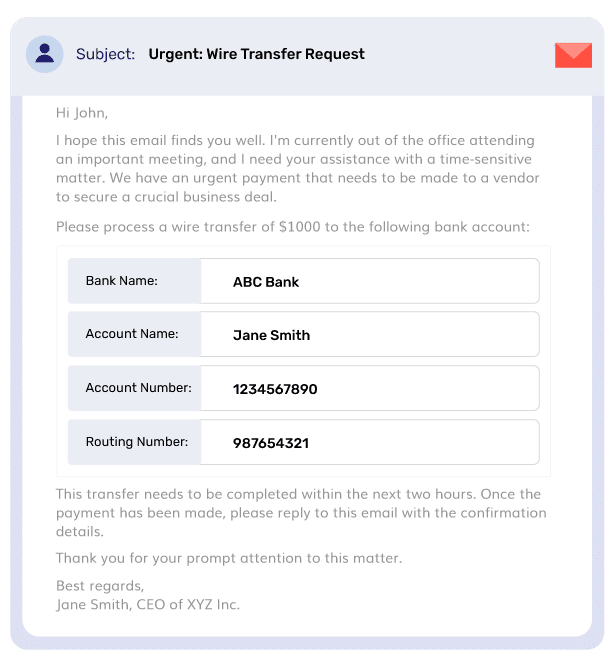
Email authentication prevents phishing and spoofing by making it significantly harder for scammers to impersonate trusted brands or individuals.
SPF, DKIM, and DMARC work together to verify the sender’s identity before the message reaches the recipient.
Without these checks, attackers can freely forge sender addresses and launch business email compromise campaigns.
Authenticated emails are less likely to be flagged as spam by providers like Gmail or Outlook, ensuring legitimate messages reach the inbox. Proper email authentication improves email deliverability and sender reputation by assuring ISPs that the sender is legitimate.
Many email service providers and mailbox providers now require DKIM and DMARC to be set up for successful email delivery, and meeting these standards leads to higher inbox placement rates.
Organizations that do not adopt email authentication may face compliance issues with major email providers, which increasingly require these protocols for bulk senders.
Google, Yahoo, Microsoft, and Apple all mandate SPF, DKIM, and DMARC for domains sending over 5,000 emails per day. Google began strict enforcement in November 2025, rejecting non-compliant emails.
Not authenticating can directly impact whether your emails get delivered at all.
Email authentication, particularly DMARC, gives domain owners reporting on how their domain is being used to send mail. These reports reveal unauthorized senders, authentication failures, and spoofing attempts, giving you the data you need to take action.
Without authentication, you have no visibility into email performance and security across your sending infrastructure.
Your first 15 days are on us
Here's why 10,000+ customers trust PowerDMARC's platform
Email authentication serves as a strategic advantage in the competitive digital marketplace. Organizations that authenticate properly build stronger trust with recipients, experience fewer delivery issues, and protect their sending infrastructure from abuse.
In an environment where inbox providers increasingly reward properly authenticated senders, getting this right puts you ahead of competitors who have not.
Suggested read: What is AI Phishing? A Guide To Emerging Cyber Threats
Now that you understand why email authentication matters, let’s look at the specific protocols that make it work. Each one handles a different part of the verification process.
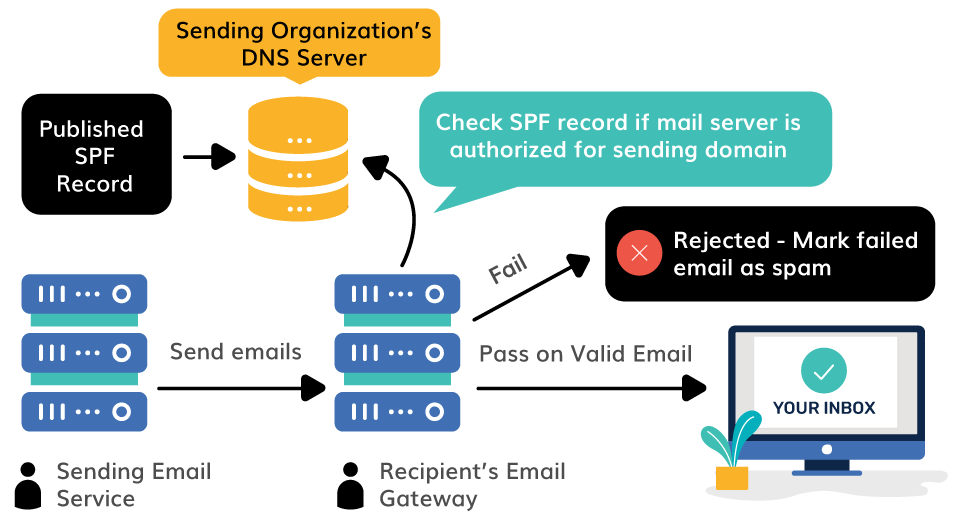
Sender Policy Framework is the first layer of defense in any email authentication system. SPF prevents email spoofing by specifying the authorized IP addresses that can send emails from a domain.
It validates sources for senders in the MAIL FROM domain only and does not consider the domain in the From address. This distinction matters because SPF focuses on the message envelope (the Return-Path), not the address the recipient sees in their inbox. If the sending IP matches the SPF record, the email passes. If not, it fails the check.
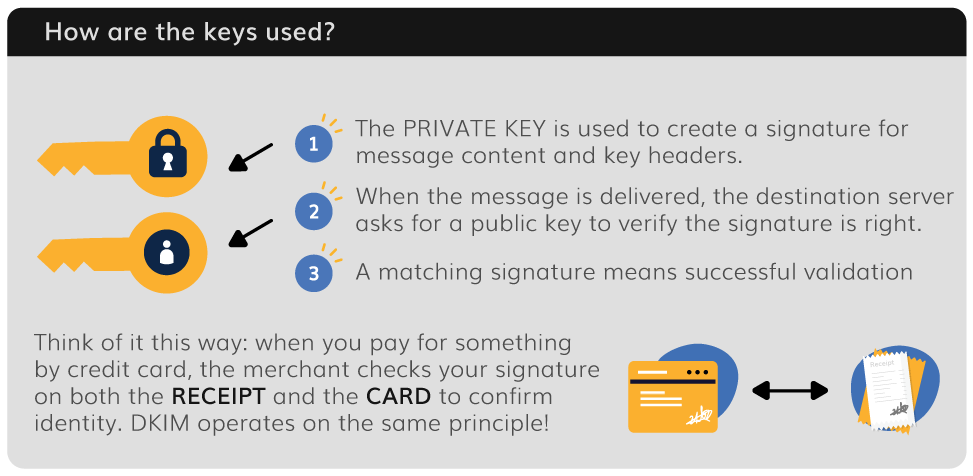
While SPF verifies the sending server, DKIM verifies that the email content has not been tampered with during transit.
It adds a digital signature to emails using cryptographic keys. The sender’s server signs the email with a private key, generating a unique DKIM signature that gets attached to the message headers. Additionally, the receiving server then retrieves the corresponding public key published in the sender’s DNS records and uses it to verify the signature.
If the DKIM signature matches the public key and the content has not been modified, DKIM authentication passes. This confirms the message was genuinely sent from the claimed domain and was not altered between the sender’s server and the recipient.
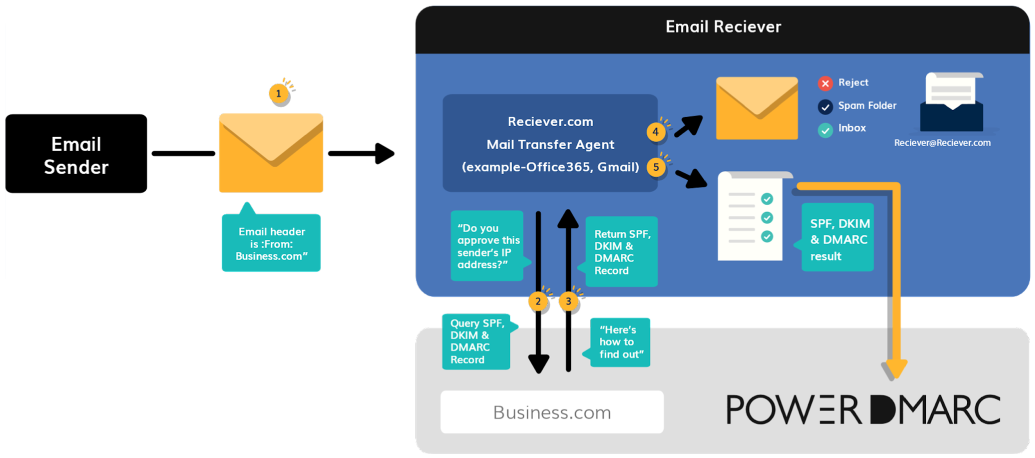
DMARC is the protocol that brings everything together. It checks whether the incoming email passes SPF or DKIM checks and whether the domain used in those checks aligns with the domain in the From address. This alignment requirement is what makes DMARC so effective at catching spoofed messages that might slip past SPF or DKIM alone.
It specifies the action the destination email system should take on messages that fail DMARC checks.
The core trio of SPF, DKIM, and DMARC covers most email authentication needs. But there are other authentication methods that extend protection for specific scenarios.
If you forward emails through mailing lists, ticketing systems, or other third party services, you may have noticed that forwarded messages sometimes fail SPF or DKIM checks. ARC solves this problem.
ARC preserves original authentication results for forwarded emails, helping to address SPF and DKIM failures due to intermediate servers. When an email passes through a trusted intermediary, ARC records the authentication results at each hop and creates a cryptographically signed chain.
The final receiving server can then verify this chain to confirm the email was originally authenticated, even if the forwarding process broke the original SPF or DKIM signature.
MTA-STS enhances security by requiring encrypted SMTP connections between mail servers. It prevents attackers from intercepting or downgrading email traffic to plain text through man-in-the-middle attacks.
When MTA-STS is configured, it tells sending servers that they must use TLS encryption when delivering mail to your domain, and that they should refuse to deliver if a secure connection cannot be established.
BIMI (Brand Indicators for Message Identification) displays a verified brand logo in the recipient’s inbox next to authenticated messages, providing visual proof of legitimacy.
For BIMI to work, your domain must have a DMARC policy of at least p=quarantine. BIMI adds a layer of brand recognition that helps recipients instantly identify your emails as genuine, which can improve open rates and reinforce trust in the recipient’s email client.
Suggested read: How to Create and Publish a BIMI Record
If you are searching for how to authenticate email, the process comes down to configuring three DNS records that receiving mail servers use to validate every message your domain sends.
Each email authentication method targets a different layer of verification, from authorized IP addresses and digital signatures to policy enforcement. Here is a walkthrough of the full setup, from your first TXT record to a fully enforced authentication system.
Before you publish any DNS records, map out every source that sends email messages on behalf of your domain.
This includes your primary email servers, marketing automation platforms, CRM systems, helpdesk tools, billing software, and any other third party services like Google Apps or transactional email providers.
Many authentication failures stem from overlooked sending sources, so this audit is essential for a clean deployment.
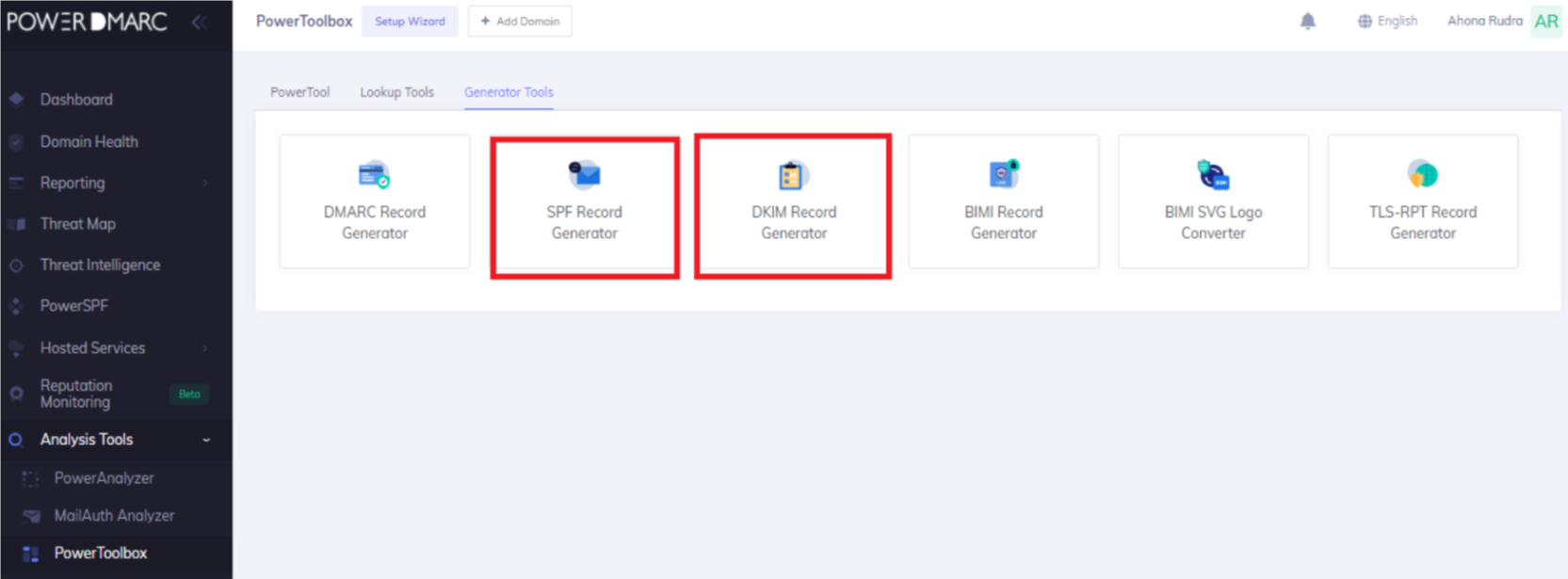
Create a single TXT record in your domain’s DNS that lists every authorized IP address and sending service. The SPF record tells receiving mail server checks which sources are permitted to send mail from your sender’s domain.
Keep in mind that each include counts toward the SPF 10 DNS lookup limit. If your SPF record exceeds this limit, the entire SPF authentication check will fail for all messages.
PowerDMARC’s SPF flattening tool can help you stay within bounds.
Generate a DKIM key pair through your email service provider or mail server.
The private key stays on your sending server and signs every outgoing message. The public key gets published as a TXT record in your domain’s DNS so that receiving servers can verify the DKIM signature.
Once configured, each outgoing email carries a cryptographic DKIM signature in the email header. The receiving mail server retrieves the public key from the sender’s DNS, verifies the signature, and confirms the message has not been altered in transit.
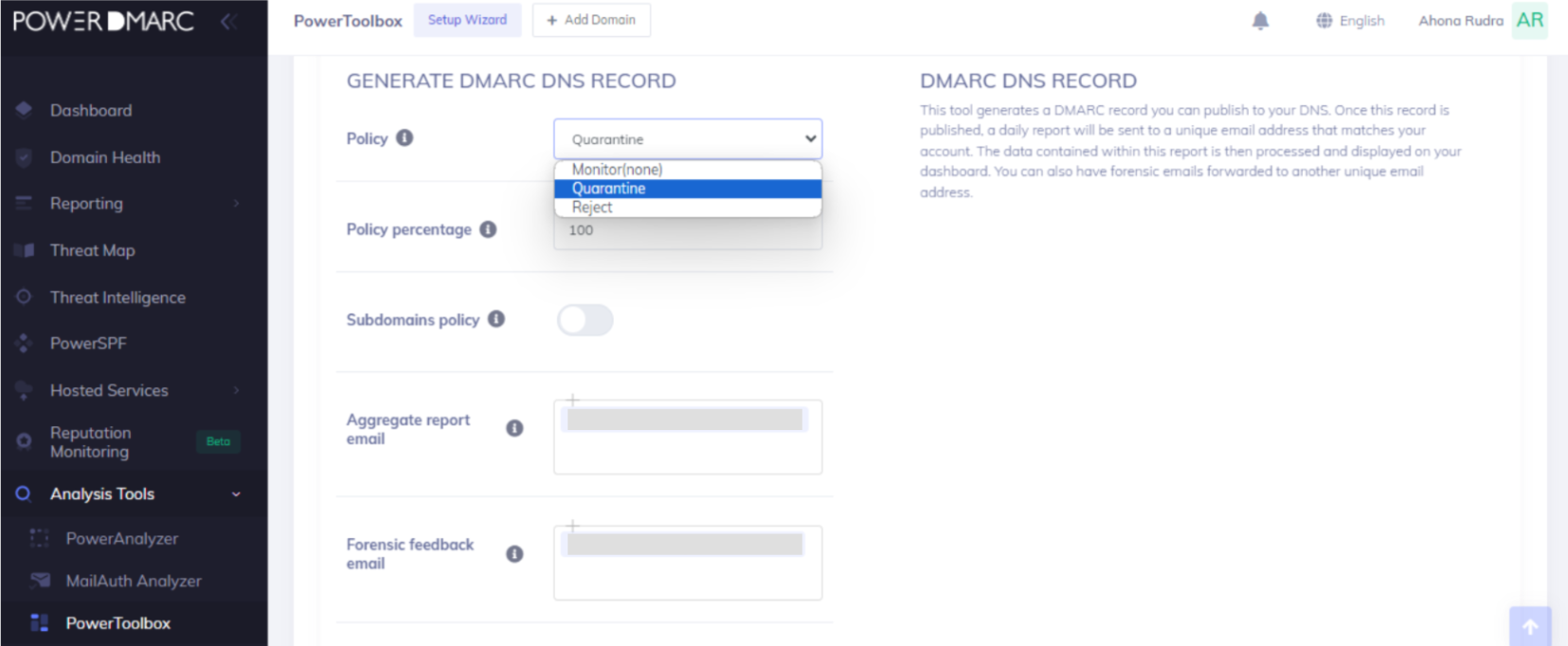
Publish a DMARC TXT record in your DNS that specifies how receiving servers should handle authentication failures. Start with a monitoring-only policy so you can observe your authentication results before taking enforcement action.
Send test emails from every sending source you identified in Step 1 and inspect the message headers.
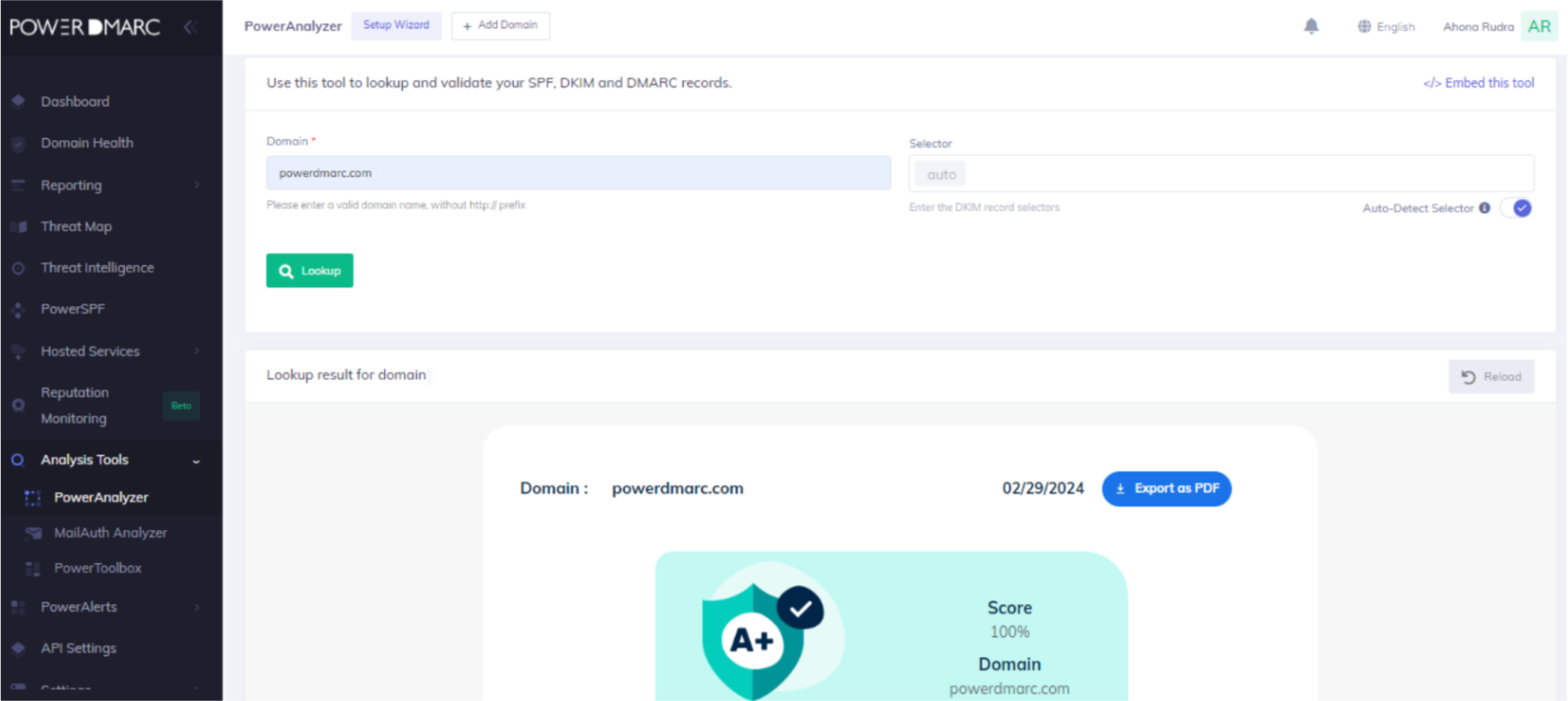
The Authentication-Results header will show whether each message passed SPF, DKIM, and DMARC. Using an email service provider can simplify this process, as many ESPs offer built-in authentication diagnostics.
PowerDMARC provides instant domain analysis with its free SPF, DKIM, and DMARC lookup tools, so you can validate your setup in seconds.
Use our Domain Analyzer to validate https://powerdmarc.com/domain-analyzer/
There are several ways to check if your email is authenticated.
Checking whether you have email authentication already set up can be crucial for your domain health. This can give you major insights into how protected your emails are against cyberattacks. It also confirms the validity of your existing email authentication setups.
1. To check if your emails are authenticated manually, you need to send a test mail from your domain to an account you have access to.
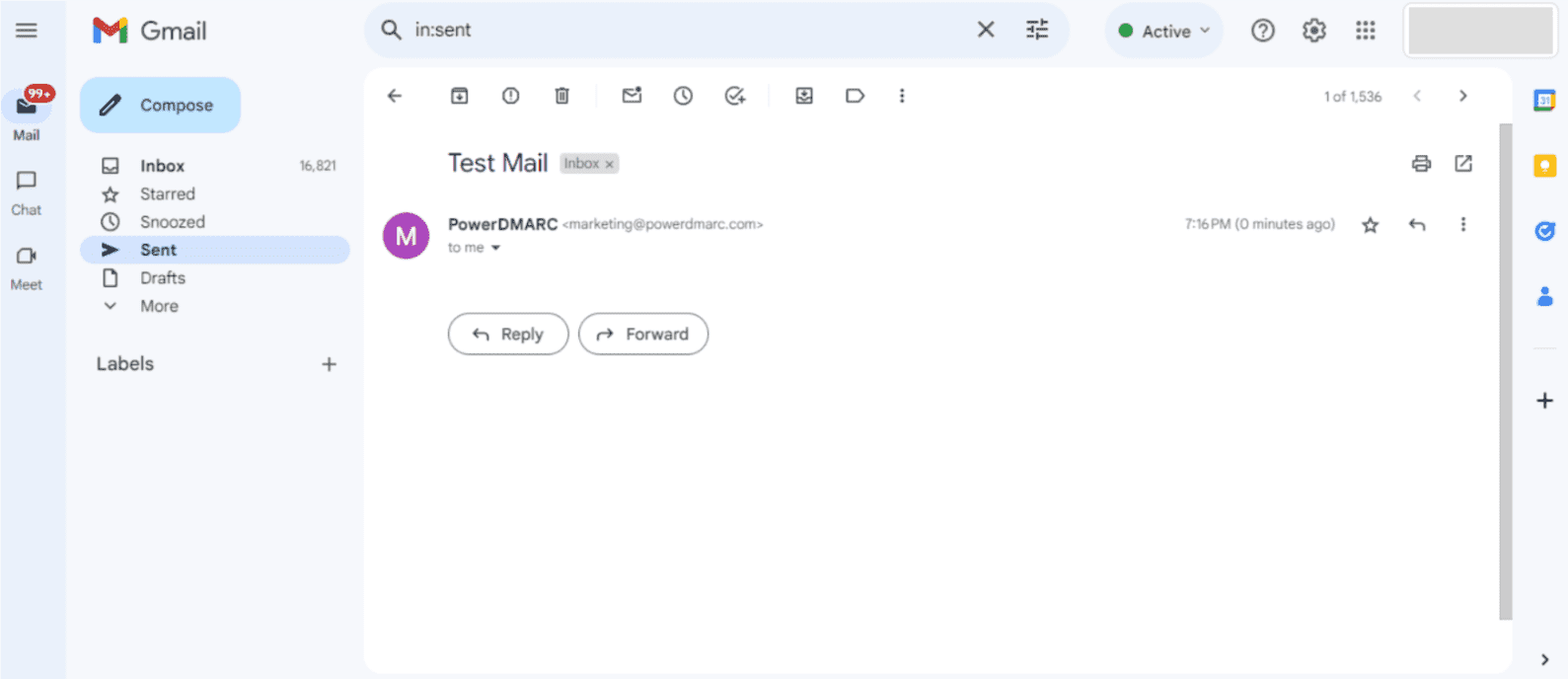
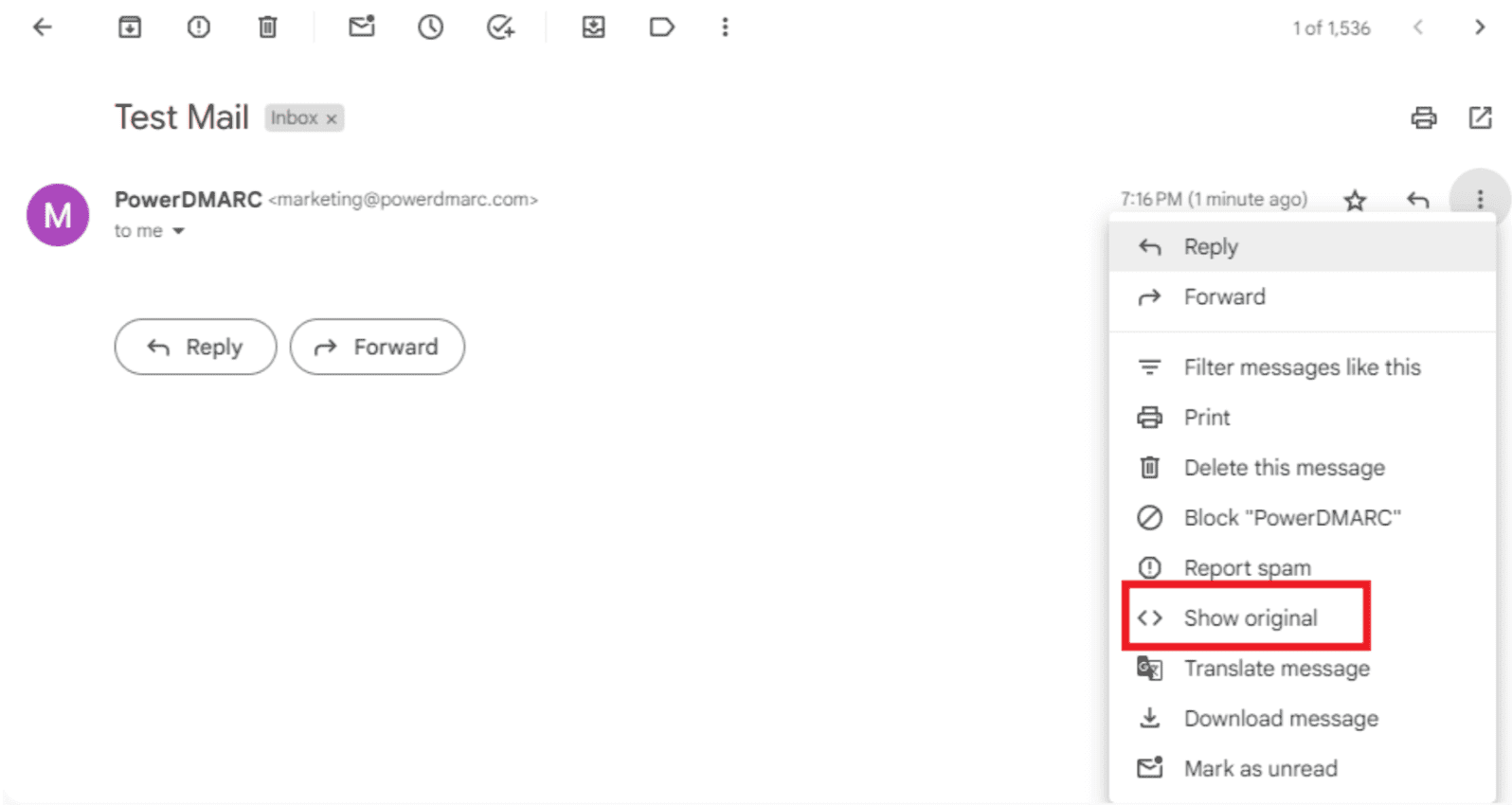
2. Click on the 3 dots in the top right corner, and select “Show original”.
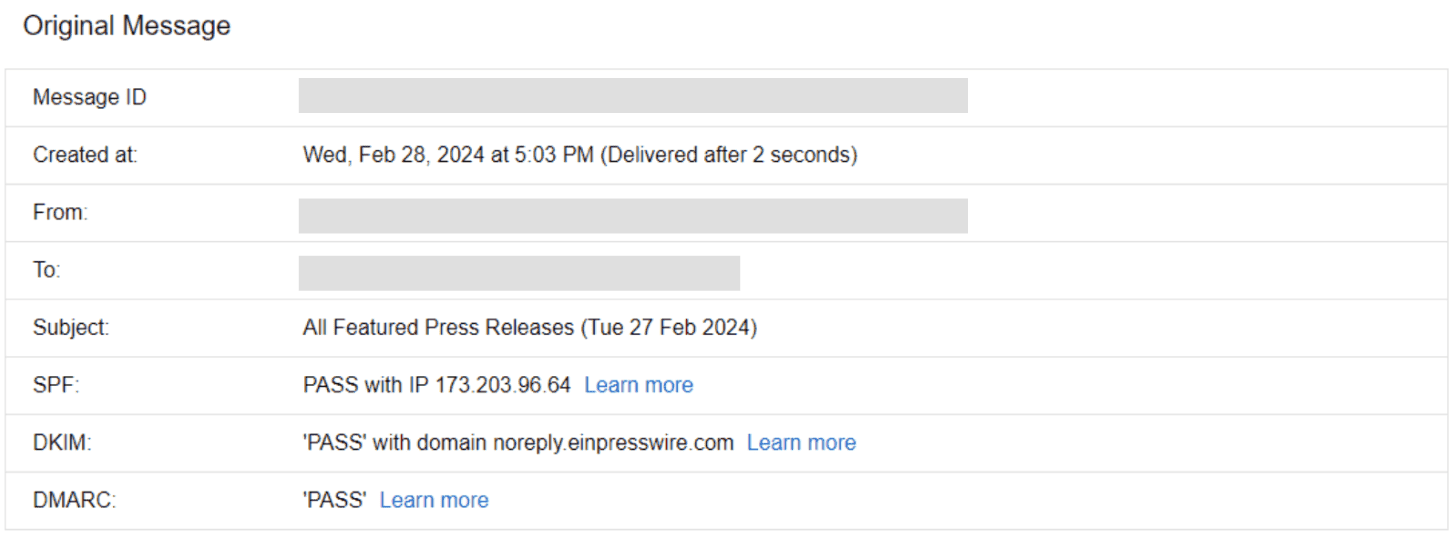
3. In a new tab the original message headers will appear. You can check the message summary for SPF, DKIM and DMARC.
4. Scroll down to view detailed headers and search for “dkim=”, “spf=” and “dmarc=” fields.
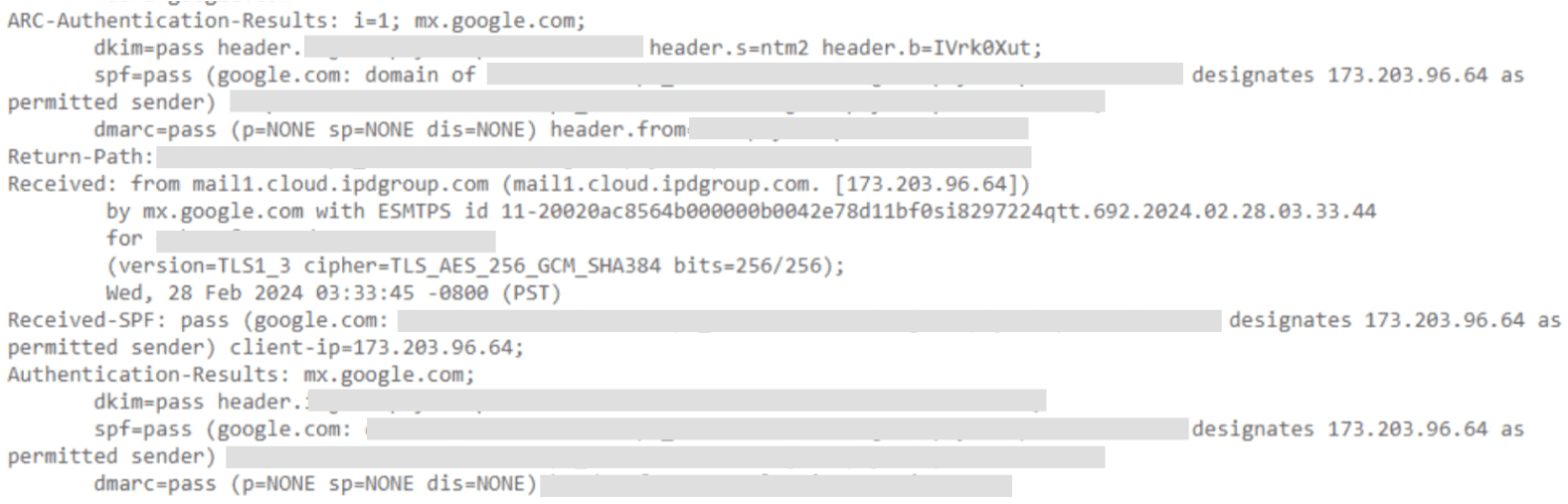
This confirms that your emails are authenticated.
There is a much easier way to check and test if your emails are authenticated. This requires just a few seconds of your time and a single click. Here’s how:
1. Sign up with PowerDMARC for free and go to the PowerAnalyzer.
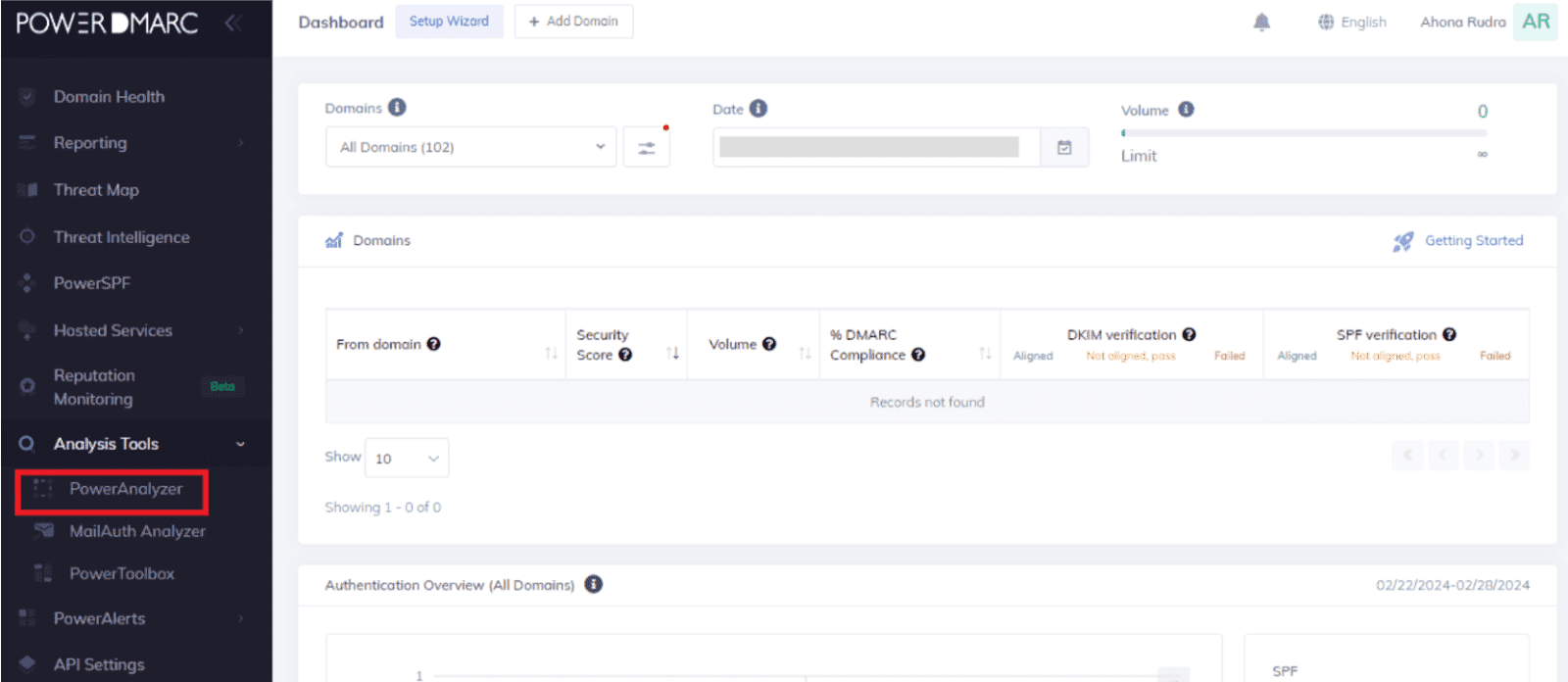
2. Enter your domain name and click on “Lookup”.
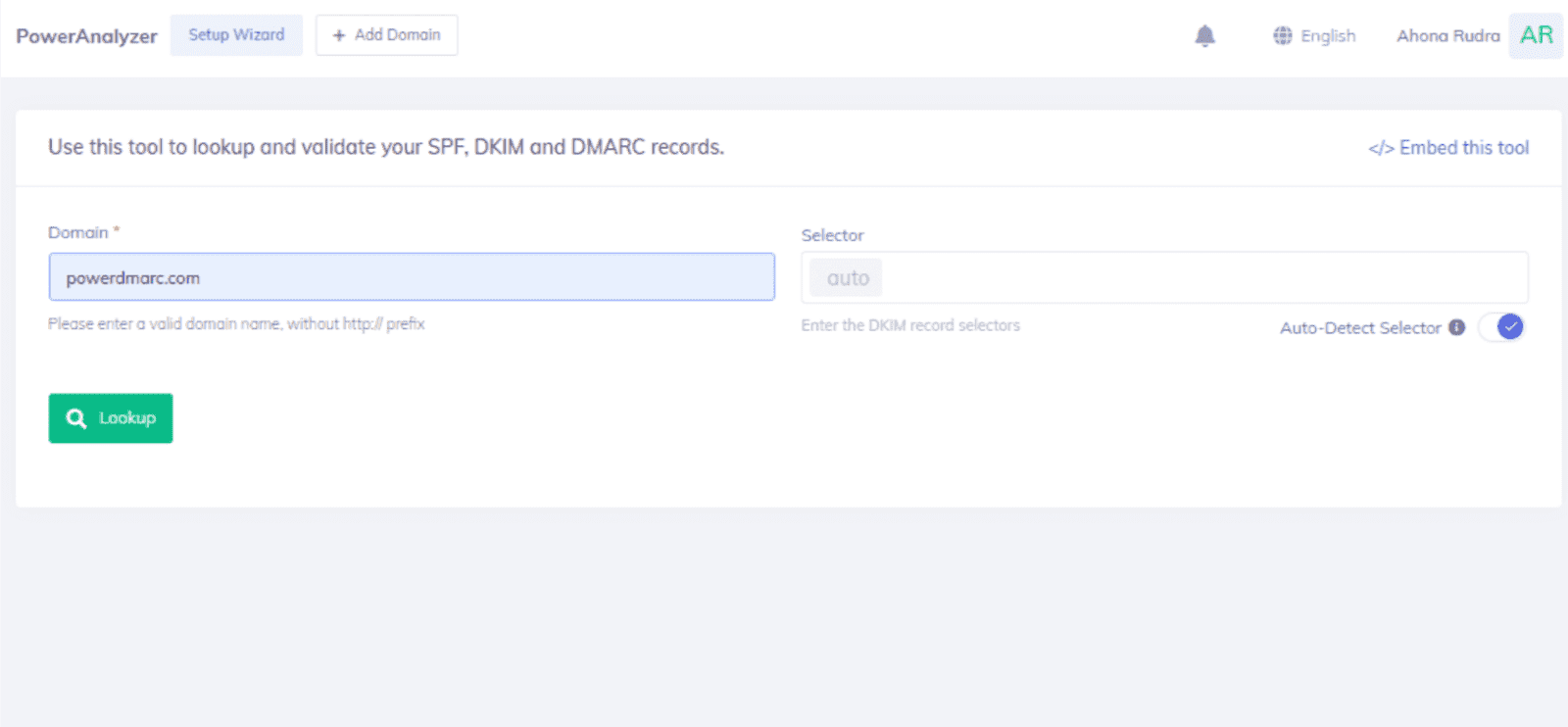
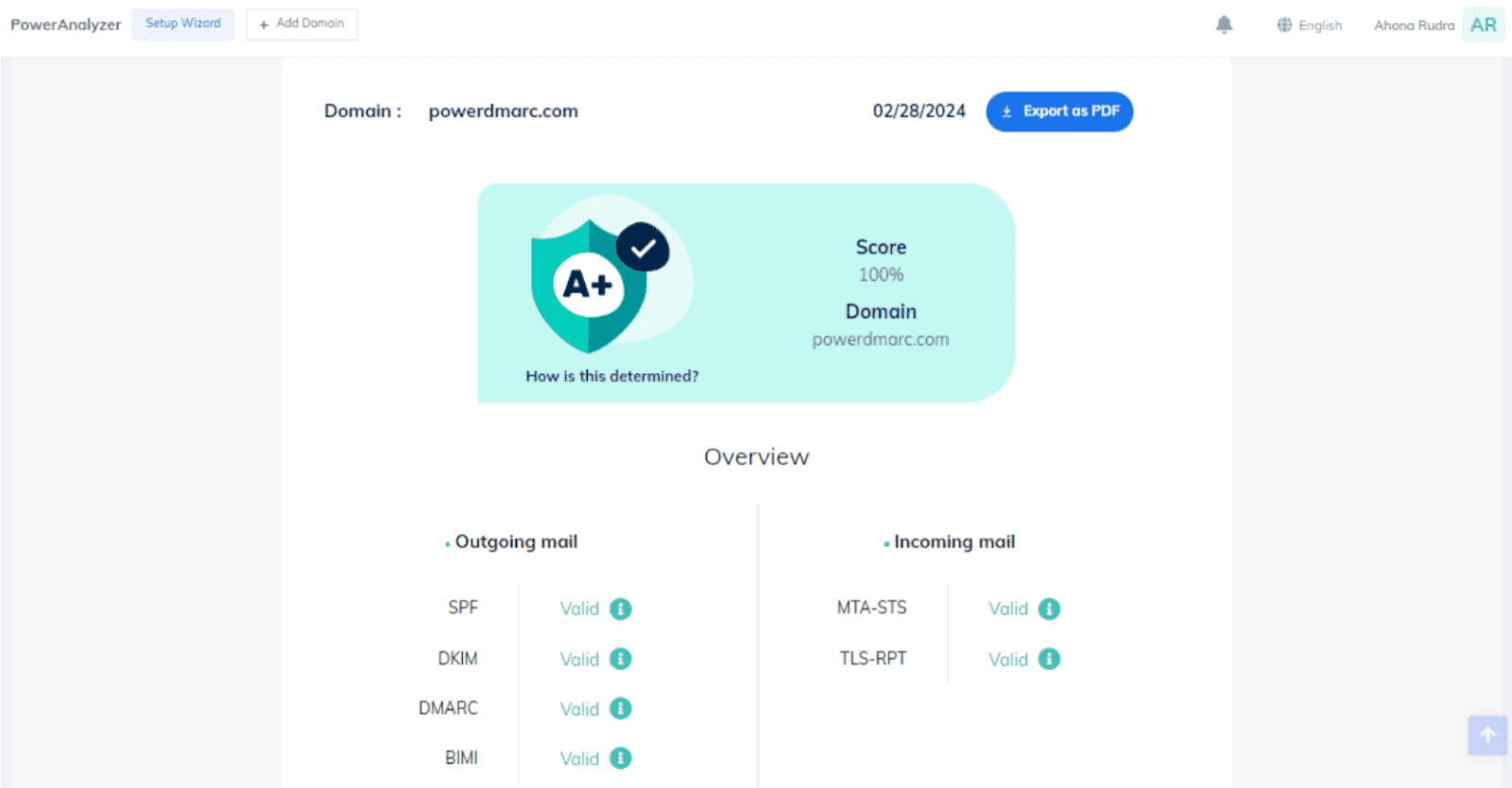
3. Examine your email authentication information with the help of a comprehensive report, generated specifically for your domain.
4. Scroll down for additional information on your email authentication protocols and configurations.
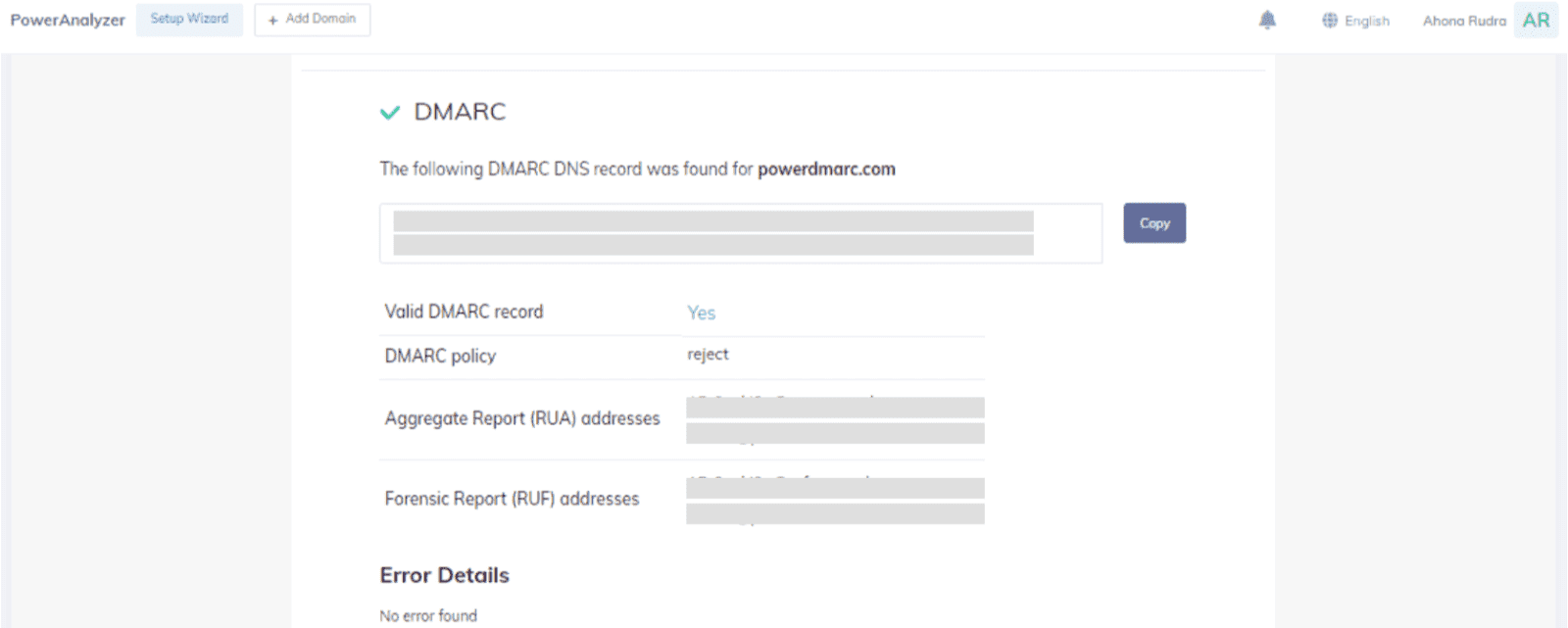
This method is easier as compared to the manual method. The generated report contains a score based on your email security posture, and provides much more visibility into your authentication setups.
Getting your DNS records published is just the first step. To maintain strong email security and deliverability over time, follow these best practices.
When you first set up DMARC, begin with a policy of p=none to collect data on your email traffic without affecting delivery.
Analyze the reports to identify all legitimate sending sources, fix misconfigurations, and then gradually move to p=quarantine and p=reject as you gain confidence.
Every time you add or remove a sending service (a new marketing platform, CRM, helpdesk, or other third party services), update your SPF record.
An outdated record can cause legitimate emails to fail authentication checks. Also be mindful of the 10 DNS lookup limit for SPF. Exceeding it causes the entire SPF check to fail.
Rotating your DKIM keys reduces the risk of key compromise. Best practice is to rotate keys every 6-12 months. If you suspect your private key has been exposed, rotate immediately.
Regularly checking SPF or DKIM checks through your DMARC reports is a best practice to ensure ongoing email deliverability.
Reports reveal misconfigured sending sources, unauthorized senders, and spoofing attempts before they cause real damage. Setting up multiple email authentication methods and regularly monitoring their performance is crucial for effective email delivery.
Many organizations forget to authenticate email sent through third party services like marketing platforms, helpdesk software, or billing systems.
Every service that sends email on behalf of your domain needs to be included in your SPF record and configured with DKIM signing. Missing even one source can lead to authentication failures and deliverability issues.
Email authentication protects your domain, your deliverability, and your recipients.
As inbox providers continue to raise the bar on what it takes for email messages to reach the customer’s inbox, organizations that invest in proper authentication now will avoid disruptions, protect their brand from impersonation, and maintain the trust they have built with their audience.
For teams managing multiple domains, third party services, and evolving sending infrastructure, PowerDMARC offers a centralized platform that simplifies the entire process.
From initial setup and hosted DNS management to AI-powered DMARC analytics and guided policy enforcement, it gives you the tools to move from monitoring to full protection with confidence.
Start your free 15-day trial to see how PowerDMARC can help you authenticate every email your domain sends.
To authenticate your email, you need to implement SPF, DKIM, and DMARC protocols. Start by creating an SPF record that lists authorized IP addresses, then configure DKIM with cryptographic signatures, and finally set up DMARC to define policies for failed authentication. Use DNS records to publish these configurations and monitor results through DMARC reports.
Email authentication failure occurs when an email doesn’t pass SPF, DKIM, or DMARC checks. This can happen due to incorrect DNS records, unauthorized sending sources, or configuration errors. Failed authentication may result in emails being marked as spam, quarantined, or rejected entirely, depending on the recipient’s email server policies.
To verify email legitimacy, check the email headers for authentication results (SPF, DKIM, DMARC pass/fail status), examine the sender’s domain for suspicious variations, look for BIMI logos from trusted brands, and be cautious of urgent requests or unexpected attachments. Use email security tools and always verify sensitive requests through alternative communication channels.
The three main email authentication protocols are SPF (Sender Policy Framework) which authorizes IP addresses to send emails, DKIM (DomainKeys Identified Mail) which uses cryptographic signatures to verify message integrity, and DMARC (Domain-based Message Authentication, Reporting & Conformance), which provides policy enforcement and reporting. Additional protocols include BIMI for brand logo display and MTA-STS for transport security.
Mobile email authentication failures often occur due to incorrect server settings, outdated email client configurations, or issues with app-specific passwords. On iPhones, ensure you’re using the correct IMAP/SMTP settings, and enable OAuth 2.0 authentication when available. We also advise using app-specific passwords for older email clients that don’t support modern authentication methods.
DNS changes for email authentication typically take 24-48 hours to propagate globally, though some changes may be visible within a few hours. The actual time depends on DNS TTL (Time To Live) settings and your DNS provider. It’s recommended to wait at least 24 hours before testing authentication after making DNS changes, and monitor DMARC reports for several days to ensure proper implementation.








 How Entrepreneurs Can Protect Their Businesses from Cyber Attacks